

I have built a project and deployed on server, when try to
open a page which is using asp.net routing I get this error message “Server Error 404 - File or directory not
found. The resource you are looking for might have been removed, had its name
changed or is temporarily unavailable.”
There are three steps you have to follow:
1. You need to install HTTP Redirection in World
Wide Web Services.
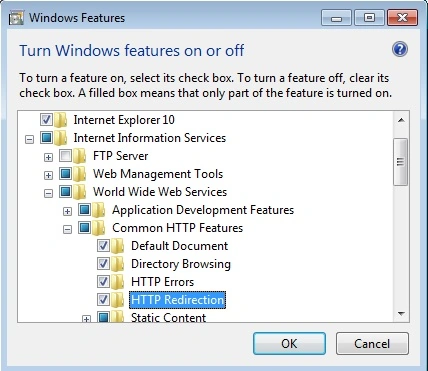
2. Change Web.Config
System.WebServer keys:
<system.webServer>
<modules runAllManagedModulesForAllRequests="true">
<remove
name="UrlRoutingModule"/>
<add
name="UrlRoutingModule"
type="System.Web.Routing.UrlRoutingModule, System.Web, Version=4.0.0.0,
Culture=neutral, PublicKeyToken=b03f5f7f11d50a3a" />
</modules>
<handlers>
<add name="UrlRoutingHandler" preCondition="integratedMode" verb="*" path="UrlRouting.axd" type="System.Web.HttpForbiddenHandler,
System.Web, Version=2.0.0.0,
Culture=neutral, PublicKeyToken=b03f5f7f11d50a3a"/>
</handlers>
</system.webServer>
3. Generate Your
Routes:
RouteTable.Routes.Add( new ServiceRoute("Northwnd", new DataServiceHostFactory(), typeof(Northwnd)))
Chandru DuraiveluPosted Oct 24, 2014, 9:07 AM
I have same issue .On the server IIS it works fine but not in my local IIS. Please help.
Purushottam RathorePosted Nov 8, 2013, 4:18 AM
Thanks for posting blog. with the help of this blog I have save my time. Thanks a lot...