server side validation

Add a Class to the Model Folder named “ClsSample”.
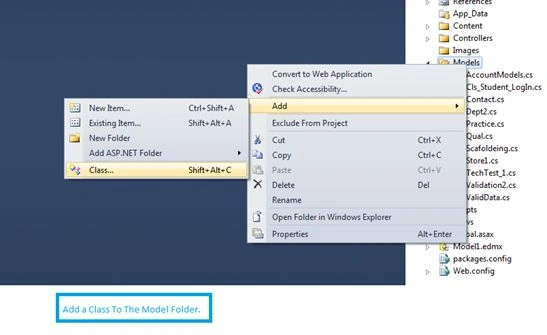
add new class

Class for Validation Attributes

  1. using System;
  2. using System.Collections.Generic;
  3. using System.Linq;
  4. using System.Web;
  5. using System.ComponentModel.DataAnnotations;
  6. namespace TelerikMvcApp1.Models
  7. {
  8. public class ClsSample
  9. {
  10. public int RowId
  11. {
  12. set;
  13. get;
  14. }
  15. [Required(ErrorMessage="* Name")]
  16. [Display(Name="Name")]
  17. [DataType(DataType.Text)]
  18. public string Name
  19. {
  20. set;
  21. get;
  22. }
  23. [Required(ErrorMessage="* Age")]
  24. [Display(Name="Age")]
  25. [DataType(DataType.PhoneNumber)]
  26. [StringLength(3)]
  27. public int? Age
  28. {
  29. set;
  30. get;
  31. }
  32. [Required(ErrorMessage="* Mobile")]
  33. [Display(Name="Mobile")]
  34. [DataType(DataType.PhoneNumber)]
  35. [StringLength(10)]
  36. public long? Mobile
  37. {
  38. set;
  39. get;
  40. }
  41. [Required(ErrorMessage="* EmailID")]
  42. [Display(Name="EmailID")]
  43. [DataType(DataType.EmailAddress)]
  44. [RegularExpression(".+@.+\\..+", ErrorMessage = "Please Enter Correct Email Address")]
  45. public string EmailId
  46. {
  47. set;
  48. get;
  49. }
  50. [Required(ErrorMessage="* Select Gender")]
  51. [Display(Name="Gender")]
  52. public string Gender
  53. {
  54. set;
  55. get;
  56. }
  57. public string MaritalStatus
  58. {
  59. set;
  60. get;
  61. }
  62. [Required(ErrorMessage="* Father Name")]
  63. [Display(Name="FatherName")]
  64. [DataType(DataType.Text)]
  65. public string FatherName
  66. {
  67. set;
  68. get;
  69. }
  70. [Required(ErrorMessage = "* Mother Name")]
  71. [Display(Name="Mother Name")]
  72. [DataType(DataType.Text)]
  73. public string MotherName
  74. {
  75. set;
  76. get;
  77. }
  78. [Required(ErrorMessage = "* Address")]
  79. [Display(Name="Address")]
  80. [DataType(DataType.Text)]
  81. public string Address
  82. {
  83. set;
  84. get;
  85. }
  86. [Required(ErrorMessage = "* PinCode")]
  87. [Display(Name="Pin Code")]
  88. [DataType(DataType.PostalCode)]
  89. [Range(0,6)]
  90. public long? PinCode
  91. {
  92. set;
  93. get;
  94. }
  95. public string NearByLegend
  96. {
  97. set;
  98. get;
  99. }
  100. [Required(ErrorMessage="Select Country")]
  101. public int CountryId
  102. {
  103. set;
  104. get;
  105. }
  106. public string CountryName
  107. {
  108. set;
  109. get;
  110. }
  111. public int? StateId
  112. {
  113. set;
  114. get;
  115. }
  116. public string StateName
  117. {
  118. set;
  119. get;
  120. }
  121. public int? CityId
  122. {
  123. set;
  124. get;
  125. }
  126. public string CityName
  127. {
  128. set;
  129. get;
  130. }
  131. }
  132. }
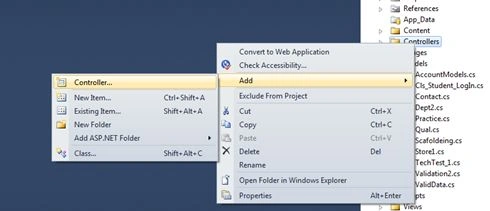
Add Controller and Action Name to The Application.

add new controller

Create an ActionResult and Add View...

Add view

type view name

At the View Bind the Model Class To The View.

View Bind the Model Class

Add your other code to populate The View With Data(Optional).
  1. public ActionResult Validate()
  2. {
  3. #region -- Creating a Form For Server side Data Validation --
  4. var CountryTemp = (from x in objContext.TblCountries
  5. select new ClsSample
  6. {
  7. CountryId = x.CountryId,
  8. CountryName = x.CountryName
  9. }).ToList();
  10. ViewData["customers"] = CountryTemp;
  11. ViewBag.CName2 = new SelectList(CountryTemp, "CountryId", "CountryName");
  12. return View();
  13. #endregion
  14. }
  15. [HttpPost]
  16. public ActionResult Validate(ClsSample obj)
  17. {
  18. return View();
  19. }
At the View write the following:
  1. @Html.Kendo().TextBoxFor(model=>model.Name).Name (Bind The Model Property To The TextBox)
  2. @Html.ValidationMessageFor(X=>X.Name) (Bind the Model Property to the Validation Message For)
View Part
  1. @model TelerikMvcApp1.Models.ClsSample
  2. @{
  3. ViewBag.Title = "Server Side Validate";
  4. }
  5. @section featured {
  6. <div class="featured">
  7. <div class="content-wrapper">
  8. <hgroup class="title">
  9. <h1>@ViewBag.Title.</h1>
  10. <h2>@ViewBag.Message</h2>
  11. </hgroup>
  12. <p>
  13. This Is Form To Register New Employee
  14. </p>
  15. </div>
  16. </div>
  17. }
  18. @using (@Html.BeginForm())
  19. {
  20. <table>
  21. <tr>
  22. <td>Enter Name</td>
  23. <td>:</td>
  24. <td>@Html.Kendo().TextBoxFor(model=>model.Name).Name("txtName")</td>
  25. <td>@Html.ValidationMessageFor(X=>X.Name)</td>
  26. </tr>
  27. <tr>
  28. <td>Enter Age</td>
  29. <td>:</td>
  30. <td>@Html.Kendo().TextBoxFor(model=>model.Age).Name("txtAge")</td>
  31. <td>@Html.ValidationMessageFor(X=>X.Age)</td>
  32. </tr>
  33. <tr>
  34. <td>Enter Mobile</td>
  35. <td>:</td>
  36. <td>@Html.Kendo().TextBoxFor(model=>model.Mobile).Name("txtMobile")</td>
  37. <td>@Html.ValidationMessageFor(model=>model.Mobile)</td>
  38. </tr>
  39. <tr>
  40. <td>Enter EmailID</td>
  41. <td>:</td>
  42. <td>@Html.Kendo().TextBoxFor(model=>model.EmailId).Name("txtEmailID")</td>
  43. <td>@Html.ValidationMessageFor(model=>model.EmailId)</td>
  44. </tr>
  45. <tr>
  46. <td>Select Gender</td>
  47. <td>:</td>
  48. <td>@Html.Kendo().RadioButton().Name("Male").Label("Male").HtmlAttributes(new { name = "a", value = "M" })</td>
  49. <td>@Html.Kendo().RadioButton().Name("FeMale").Label("FeMale").HtmlAttributes(new { name = "a", value = "F" })</td>
  50. <td></td>
  51. </tr>
  52. <tr>
  53. <td>Check Marital Status</td>
  54. <td>:</td>
  55. <td>@Html.Kendo().CheckBox().Name("chkMarried").Label("Married").HtmlAttributes(new { name = "A", value = "Yes" })</td>
  56. <td></td>
  57. </tr>
  58. <tr>
  59. <td>Select Country</td>
  60. <td>:</td>
  61. <td>@Html.Kendo().DropDownList().Name("ddlCountry").BindTo(ViewBag.CName2)</td>
  62. <td></td>
  63. </tr>
  64. <tr>
  65. <td>Enter Pin Code</td>
  66. <td>:</td>
  67. <td>@Html.Kendo().TextBoxFor(X=>X.PinCode).Name("txtPinCode")</td>
  68. <td></td>
  69. </tr>
  70. <tr>
  71. <td>Test Data</td>
  72. <td>:</td>
  73. <td><input type="submit" value="Save" class="k-primary" width="200" /></td>
  74. </tr>
  75. </table>
  76. }
  1. <script>
  2. $(function () {
  3. $("form").kendoValidator();
  4. });
  5. </script>
And finally write this script at the View Page:
  1. <script>
  2. $(function () {
  3. $("form").kendoValidator();
  4. });
  5. </script>
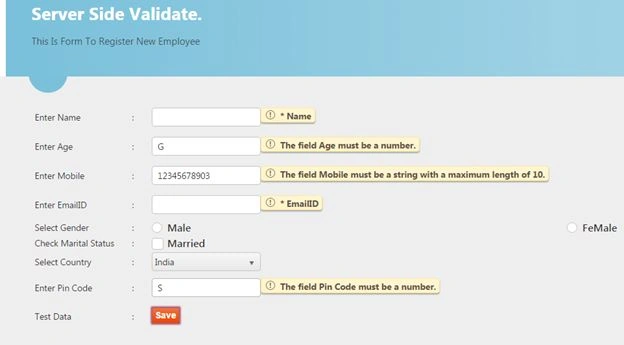
Run and see the output.