

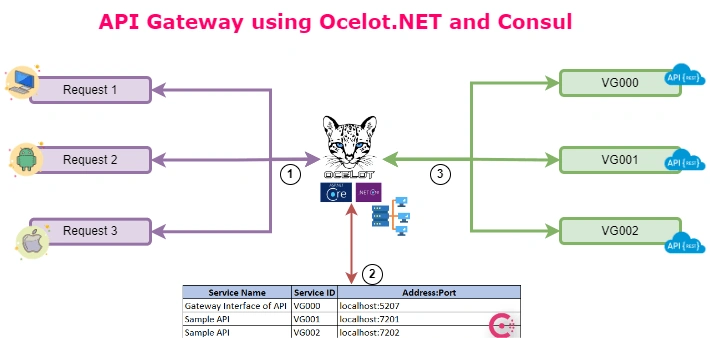
This article will show how to setup API Gateway using Ocelot.Net and Consul.
Step 1
- Set up the Consul Service in Windows, From the below link "https://developer.hashicorp.com/consul/downloads" (Click Here for Download).
- Place in a Directory, open the command prompt, and type the below command to start the development server agent "consul agent -dev".
- Open the Browser and type the following URL "http://127.0.0.1:8500/". If the console UI opens, we set up the Consul properly.
Step 2
In C# Rest Services (Each service needs to be configured like below).
Install Nuget Packages,
- Consul
- Ocelot.Provider.Consul (Gateway Service)
Inject like this in all services (we need to configure service discovery)
services.AddSingleton<IConsulClient, ConsulClient>(p => new ConsulClient(consulConfig =>
{
    consulConfig.Address = new Uri("http://127.0.0.1:8500");
}));
Using the Consul,
public static IApplicationBuilder UseConsul(this IApplicationBuilder app)
{

    var consulClient = app.ApplicationServices.GetRequiredService<IConsulClient>();
    var lifetime = app.ApplicationServices.GetRequiredService<IApplicationLifetime>();
    var settings = app.ApplicationServices.GetRequiredService<ConfigurationMaster>();


    if (!(app.Properties["server.Features"] is FeatureCollection features))
    {
        return app;
    }

    var serviceName = settings.ServiceDiscoveryConfig.NameOfService;
    var serviceId = settings.ServiceDiscoveryConfig.IdOfService;
    var uri = new Uri($"http://{settings.ServiceDiscoveryConfig.Host}");

    var registration = new AgentServiceRegistration()
    {
        ID = serviceId,
        Name = serviceName,
        Address = $"localhost",
        Port = uri.Port,
        Tags = new[] { $"urlprefix-/{settings.ServiceDiscoveryConfig.IdOfService}" }
    };

   var result= consulClient.Agent.ServiceDeregister(registration.ID).Result;
    result = consulClient.Agent.ServiceRegister(registration).Result;

    lifetime.ApplicationStopping.Register(() =>
    {
        consulClient.Agent.ServiceDeregister(registration.ID).Wait();
    });

    return app;
}
Update App Settings (JSON) File:
"ServiceDiscoveryConfig": {
  "Host": "localhost:7201",
  "Port": {Hosted Service Port},
  "NameOfService": "{Service Name Unique}",
  "IdOfService": "{Service ID Our Wish}"
}
Update the Gateway Settings File as Follow in (GlobalConfiguration):
"ServiceDiscoveryProvider": {
  "Host": "localhost",
  "Port": 8500,
  "Type": "PollConsul",
  "PollingInterval": 100
  //"Type": "Consul" - Each Request it will update information
  /*
    Type
      Consul, means that Ocelot will get service information from consul per request
      PollConsul, means that Ocelot will poll Consul for latest service information
  */
}
Sample Gateway End Point Configuration:
{
  "Routes": [
    {
      "UseServiceDiscovery": true,
      "DownstreamPathTemplate": "/v1/{everything}",
      "DownstreamScheme": "http",
      "ServiceName": "Sample API",
      "UpstreamPathTemplate": "/v1/{everything}",
      "UpstreamHttpMethod": [ "GET" ],
      "Priority": 1,
      "ReRoutesCaseSensitive": false,
      "LoadBalancerOptions": {
        "Type": "LeastConnection"
      }
    },
    {
      "DownstreamPathTemplate": "/v1/{everything}",
      "DownstreamScheme": "http",
      "DownstreamHostAndPorts": [
        {
          "Host": "localhost",
          "Port": 7201
        }
      ],
      "UpstreamPathTemplate": "/api/v2/{everything}",
      "UpstreamHttpMethod": [ "GET", "POST" ],
      "Priority": 1
    }
  ],
  "GlobalConfiguration": {
    "BaseUrl": "https://localhost:7123",
    "ServiceDiscoveryProvider": {
      "Host": "localhost",
      "Port": 8500,
      "Type": "PollConsul",
      "PollingInterval": 100
      //"Type": "Consul" - Each Request it will update information
      /*
        Type
          Consul, means that Ocelot will get service information from consul per request
          PollConsul, means that Ocelot will poll Consul for latest service information
      */
    }
  }
}
Join the conversation! Your thoughts help the community grow.