
Please follow the below steps:
- Create a list in the main site (host web) as below:

- Open Visual Studio -> Create a new SharePoint App Project.

- Select the host for the app as “SharePoint-Hosted”.
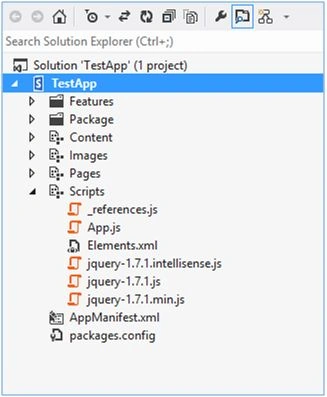
- Once the project is created, you will find the below structure.
- In the default.aspx add reference to knockout.js file [the file has been downloaded and added to the project under Scripts folder].
Add the below code as well in the default.aspx,- <scripttype="text/javascript"src="../Scripts/knockout-2.2.1.js"></script>
- <tableborder="1" cellspacing="0" cellpadding="10">
- <theadstyle='background-color:gray;color:white'>
- <tr>
- <td>Name</td>
- <td>Roll No</td>
- </tr>
- </thead>
- <tbodydata-bind="foreach: assignments">
- <tr>
- <tddata-bind="text: personName">
- </td>
- <tddata-bind="text: rollNo">
- </td>
- </tr>
- </tbody>
- </table>
- Add the below code to the App.js file.
- 'use strict';
- var appWebContext;
- var hostweburl;
- $(document).ready(function ()
- {
- ViewGrid();
- });
- function ViewGrid()
- {
- ko.applyBindings(new TestListViewModel());
- }
- function TestListViewModel()
- {
- var self = this;
- appWebContext = new SP.ClientContext.get_current();
- hostweburl = decodeURIComponent($.getUrlVar("SPHostUrl"));
- var hostwebContext = new SP.AppContextSite(appWebContext, hostweburl);
- self.assignments = ko.observableArray();
- self._loadList = function ()
- {
- var clientContext = SP.ClientContext.get_current();
- var list = hostwebContext.get_web().get_lists().getByTitle('TestList');
- var query = new SP.CamlQuery();
- query.set_viewXml("<View>" + " <Query>" + " <OrderBy>" + " <FieldRef Name='Modified' Ascending='True' />" + " </OrderBy>" + " </Query>" + " <ViewFields>" + " <FieldRef Name='Modified' />" + " <FieldRef Name='Name' />" + " <FieldRef Name='RollNo' />" + " </ViewFields>" + "</View>");
- self._pendingItems = list.getItems(query);
- clientContext.load(self._pendingItems);
- clientContext.executeQueryAsync(Function.createDelegate(self, self._onLoadListSucceeded), Function.createDelegate(self, self._onLoadListFailed));
- }
- self._onLoadListSucceeded = function (sender, args)
- {
- var listEnumerator = self._pendingItems.getEnumerator();
- while (listEnumerator.moveNext())
- {
- var item = listEnumerator.get_current().get_fieldValues();
- self.assignments.push(
- {
- rollNo: item.RollNo.toString(),
- personName: item.Name.toString(),
- });
- }
- }
- self._onLoadListFailed = function (sender, args)
- {
- alert('Unable to load file list: ' + args.get_message() + '\n' + args.get_stackTrace());
- }
- self._loadList();
- }
- // jQuery plugin for fetching querystring parameters
- jQuery.extend(
- {
- getUrlVars: function ()
- {
- var vars = [],
- hash;
- var hashes = window.location.href.slice(window.location.href.indexOf('?') + 1).split('&');
- for (var i = 0; i < hashes.length; i++)
- {
- hash = hashes[i].split('=');
- vars.push(hash[0]);
- vars[hash[0]] = hash[1];
- }
- return vars;
- },
- getUrlVar: function (name)
- {
- return jQuery.getUrlVars()[name];
- }
- });
- Go to AppManifest.xml -> Permissions tab. We need to give permission to the app to access the host web. Select “SiteCollection”-> Permission Level ”Manage” (I have given manage, since I am planning to edit the data as well, which I will do late.) Read permission can also be given.
- Deploy the solution, trust the app.
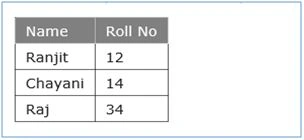
- The Host-web list data will show up as below.
Shriram PophaliPosted Feb 23, 2016, 5:31 AM
Nice article