

Since SharePoint 2013 the sign in as a different user option is not available, but still we have an option to show the sign in as a different user option in SP sites
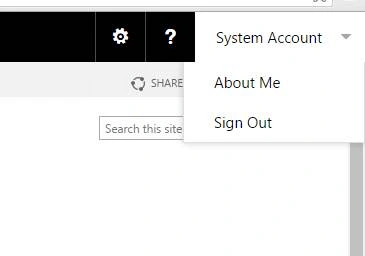
Follow the below listed steps to show the sign in as a different user option,
Step 1
Go to the SharePoint server, where the SP site is hosted
Step 2
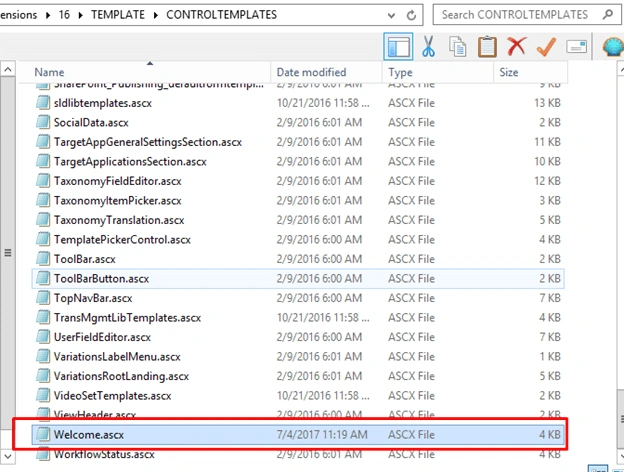
Then open the below windows explorer path in SP server
C:\Program Files\Common Files\microsoft shared\Web Server Extensions\16\TEMPLATE\CONTROLTEMPLATES
Step 3
On the control templates open the welcome.ascx page as shown in below,
Step 4
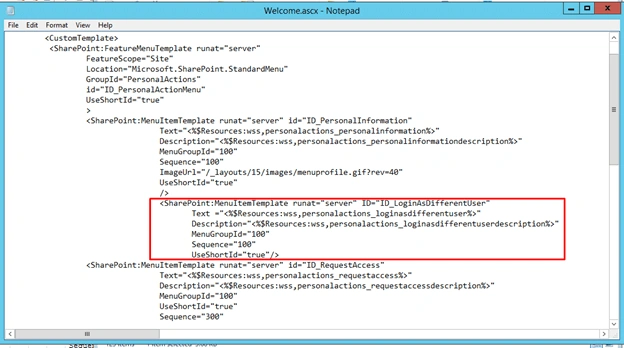
Add the below code in Welcome.ascx page,
- <SharePoint:MenuItemTemplate runat="server" ID="ID_LoginAsDifferentUser" Text="<%$Resources:wss,personalactions_loginasdifferentuser%>" Description="<%$Resources:wss,personalactions_loginasdifferentuserdescription%>" MenuGroupId="100" Sequence="100" UseShortId="true" />
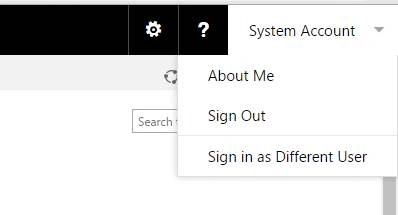
Save the file, finally you will get sign in as a different user option in SharePoint Site,
Summary
In this blog we have explored how to add sign in as a different user option in SharePoint 2016
Former memberPosted May 8, 2020, 6:29 AM
Is there also a way to add the "Select Display Language" option in SharePoint 2016?
Sumit DeshmukhPosted Jul 5, 2017, 7:38 AM
Good Share.Thanks Kaviya:-)