

I have Taken a Model named Student.cs.
This Student class contain all the properties that is required to display Student Details.
This Student class contain all the properties that is required to display Student Details.
- public class Student {
- public int StudentID {
- get;
- set;
- }
- public string Name {
- get;
- set;
- }
- public string RollNo {
- get;
- set;
- }
- public string DOB {
- get;
- set;
- }
- public Student() {
- this.Name = string.Empty;
- this.RollNo = string.Empty;
- this.DOB = string.Empty;
- }
- }
After that i have added a controller that will have a controller Method name "Details".
Inside that we will add a view named "Details" and by default the view and Controller Method will have same Name. while adding View it is advisable to use Strong Naming Convention.
Inside that we will add a view named "Details" and by default the view and Controller Method will have same Name. while adding View it is advisable to use Strong Naming Convention.
- public class EmployeeController: Controller {
- public ActionResult Details() {
- Student std = new Student() {
- StudentID = 101,
- Name = "Harsh",
- RollNo = "10800038",
- DOB = "10/06/1990"
- };
- return View(std);
- }
- }
The Code inside view will Look like this. the Extension of a view is ".cshtml"
The code inside view will look like this.
- @model MVCStudentDemo.Models.Student
- @{
- ViewBag.Title = "Student Details";
- }
- <h2>Student Details</h2>
- <table style=>
- <tr>
- <td>
- Student ID :
- </td>
- <td>
- @Model.StudentID
- </td>
- </tr>
- <tr>
- <td>
- Student Name :
- </td>
- <td>
- @Model.Name
- </td>
- </tr>
- <tr>
- <td>
- Student Roll# :
- </td>
- <td>
- @Model.RollNo
- </td>
- <tr>
- <td>
- Student DOB :
- </td>
- <td>
- @Model.DOB
- </td>
- </tr>
- </tr>
- </table>
The controller responds to the URL requests, gets data from Model and hands it over to VIew. the view then renders the Data. Models can be entities or data Object
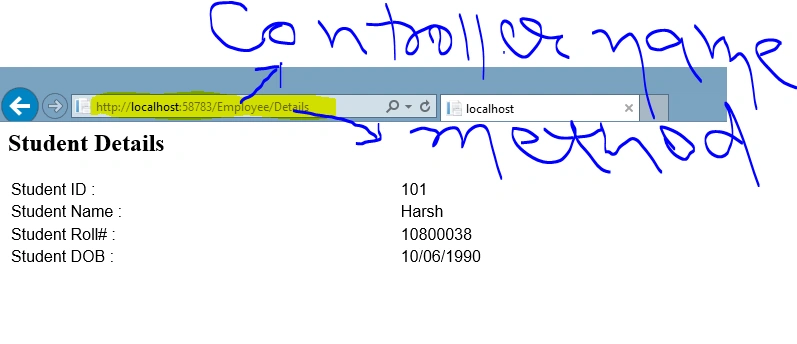
When we will type the following URL.
"http://localhost:58783/Employee/Details".
You just have to append the Controller and Controller method name into your URL.
"http://localhost:58783/Employee/Details".
You just have to append the Controller and Controller method name into your URL.
After rendering the Output will look like this.
If you need the Solution please drop me a message.
If you need the Solution please drop me a message.
Join the conversation! Your thoughts help the community grow.