

Step 1: Firstly we're going to create a new Win Form Application project(I'll call it Cioban Mini Text Editor).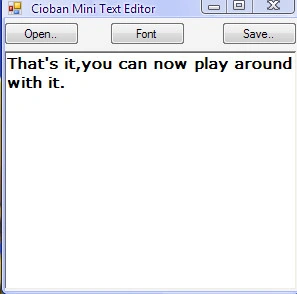
Step 2: To our form we will add three buttons(one for saving the file,one for reading the file,and the other for font),an openfile dialog,a savefile dialog,a font dialog, and rich textbox.Also,we'll ad a new namespace(System.IO).
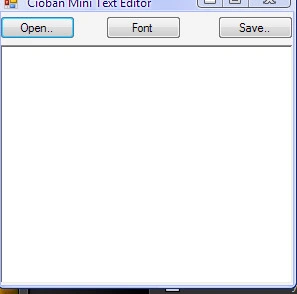
Step 3: The design it's done.Let's start coding.
In my case:
button1 = open button;
button2 = save button;
button3 = the font button
This is the code
- using System;
- using System.Collections.Generic;
- using System.ComponentModel;
- using System.Data;
- using System.Drawing;
- using System.Linq;
- using System.Text;
- using System.Windows.Forms;
- using System.IO;
- namespace Cioban_Mini_Text_Editor
- {
- public partial class Form1: Form
- {
- public Form1()
- {
- InitializeComponent();
- }
- private void button1_Click(object sender, EventArgs e)
- {
- openFileDialog1.ShowDialog(); //Shows the dialog
- if (openFileDialog1.ShowDialog() == System.Windows.Forms.DialogResult.OK && openFileDialog1.FileName.Contains(".txt")) //Checks if it's all ok and if the file name contains .txt
- {
- string open = File.ReadAllText(openFileDialog1.FileName); //Reads the text from file
- richTextBox1.Text = open; //Shows the reded text in the textbox
- }
- else //If something goes wrong...
- {
- MessageBox.Show("The file you've chosen is not a text file");
- }
- }
- private void button2_Click(object sender, EventArgs e)
- {
- saveFileDialog1.ShowDialog(); //Opens the Show File Dialog
- if (saveFileDialog1.ShowDialog() == System.Windows.Forms.DialogResult.OK) //Check if it's all ok
- {
- string name = saveFileDialog1.FileName + ".txt"; //Just to make sure the extension is .txt
- File.WriteAllText(name, richTextBox1.Text); //Writes the text to the file and saves it
- }
- }
- private void button3_Click(object sender, EventArgs e)
- {
- fontDialog1.ShowDialog(); //Shows the font dialog
- if (fontDialog1.ShowDialog() == System.Windows.Forms.DialogResult.OK) {
- richTextBox1.Font = fontDialog1.Font; //Sets the font to the one selected in the dialog
- }
- }
- }
- }
Thanks guys.
Join the conversation! Your thoughts help the community grow.