

Welcome to a blog on to Site Collection Storage Management at the SharePoint Admin Center on Office 365. Here in this blog we will see how to customize the site collection storage as in Manual or Automatic.
To customize you need to be a tenant admin. If you are, let’s see how we can do it,
- Click on the left corner of your SharePoint site to view the apps.
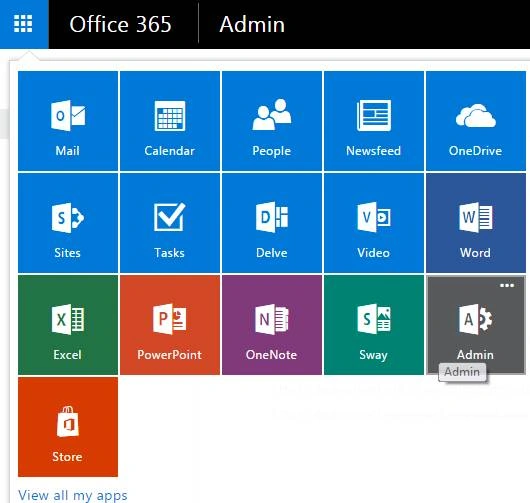
- Click on Admin.
- You will come to the “SharePoint admin center”.
- Click on Settings on the left of the Admin Center.
- Click on settings on the left navigation.
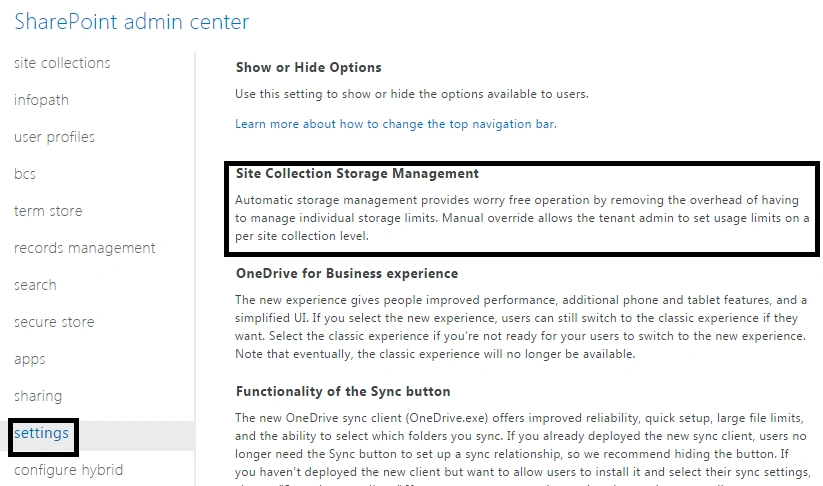
- You will see an option “Site Collection Storage Management”.
- Here as we can see we have two options as apps which we can choose to configure.

It is advised to choose Automatic and not manual as if you choose automatic as an admin it will not ask you to set usage limits on a particular site collection instead it will divide it in ease within all the site collections in the tenant.
Once you complete the configuration click on OK and the option will be available accordingly on all the site collections through this tenant.
Keep reading and keep learning.
Pradeep SahooPosted May 22, 2016, 12:15 AM
Nice share ... Thanks for sharing.....