
A zip file for download is attached for this project.
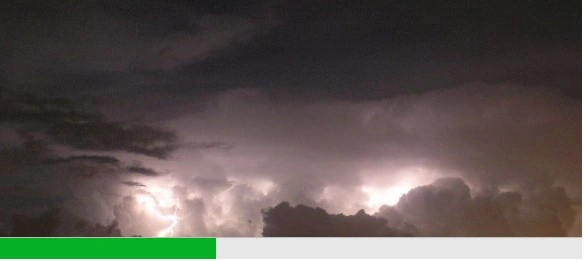
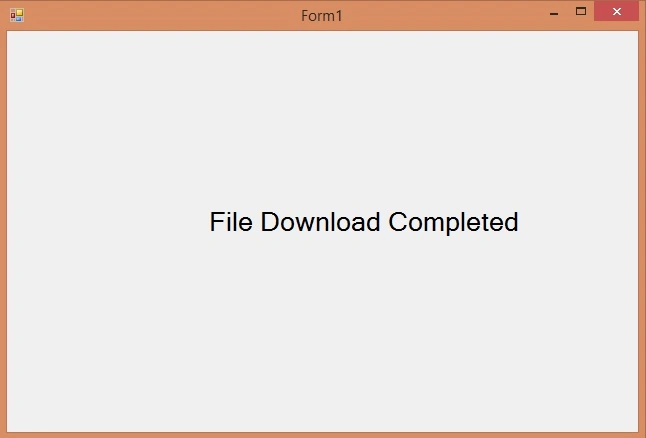
Preview screenshots:
This is the form1 code:
- using System;
- using System.Collections.Generic;
- using System.ComponentModel;
- using System.Data;
- using System.Drawing;
- using System.Linq;
- using System.Text;
- using System.Threading.Tasks;
- using System.Windows.Forms;
- using System.IO;
- using System.Net;
- using System.Threading;
- namespace Splash_Screen_With_Progress_Bar
- {
- public partial class Form1 : Form
- {
- private FileDownload fd;
- public static Splash_Screen splash_s;
- private string Link = "http://www.ims.gov.il/Ims/Pages/RadarImage.aspx?Row=9&TotalImages=10&LangID=1&Location=";
- private string FileName;
- public Form1()
- {
- InitializeComponent();
- splash_s = new Splash_Screen();
- fd = new FileDownload(this);
- FileName = @"c:\temp\test.jpg";
- fd.File_Download(Link, FileName);
- splash_s.Show();
- for (int i = 1; i < 100; i++)
- {
- Thread.Sleep(30);
- Application.DoEvents();
- }
- splash_s.SyncedClose();
- splash_s = null;
- FileDownloadCompleted();
- }
- public void FileDownloadCompleted()
- {
- label1.Text = "File Download Completed";
- }
- private void Form1_Load(object sender, EventArgs e)
- {
- }
- }
- }
The Splash screen form i called it Splash_Screen_With_Progress_Bar
I added to the Splash form in the designer a background image then set the form size to 589,260 and the properties Start Position = center screen , Show in taskbar = false , Form Border Style = none , AutoScale Mod = font
Then I added a progressBar control to the form and set it's property Dock to Bottom.
The progressBar size is: 589,23
- using System;
- using System.Collections.Generic;
- using System.ComponentModel;
- using System.Data;
- using System.Drawing;
- using System.Linq;
- using System.Text;
- using System.Threading.Tasks;
- using System.Windows.Forms;
- using System.Threading;
- using System.IO;
- namespace Splash_Screen_With_Progress_Bar
- {
- public partial class Splash_Screen : Form
- {
- public Splash_Screen()
- {
- InitializeComponent();
- }
- private Mutex mutex = new Mutex();
- public void SyncedClose()
- {
- mutex.WaitOne();
- this.Close();
- mutex.ReleaseMutex();
- }
- public void UpdateProgressBar(int percentage)
- {
- if (this.InvokeRequired)
- {
- mutex.WaitOne();
- if (!IsDisposed)
- this.BeginInvoke(new Action<int>(UpdateProgresPRV), percentage);
- mutex.ReleaseMutex();
- }
- else
- {
- UpdateProgresPRV(percentage);
- }
- }
- private void UpdateProgresPRV(int per)
- {
- if (progressBar1.IsDisposed) return;
- progressBar1.Value = per;
- }
- private void Splash_Screen_Load(object sender, EventArgs e)
- {
- }
- }
- }
This is the FileDownload class:
- using System;
- using System.Collections.Generic;
- using System.Linq;
- using System.Text;
- using System.Threading.Tasks;
- using System.Net;
- using System.IO;
- namespace Splash_Screen_With_Progress_Bar
- {
- class FileDownload
- {
- Form1 f1;
- public FileDownload(Form1 form1)
- {
- f1 = form1;
- }
- HttpWebRequest request;
- int currentIndex = 0;
- public void File_Download(string uri, string fileName)
- {
- if (Form1.splash_s != null)
- {
- if (!Form1.splash_s.IsDisposed)
- Form1.splash_s.UpdateProgressBar(0);
- }
- request = (System.Net.HttpWebRequest)System.Net.WebRequest.Create(uri);
- request.CookieContainer = new CookieContainer();
- request.AllowAutoRedirect = true;
- HttpWebResponse response = (HttpWebResponse)request.GetResponse();
- long contentLength = response.ContentLength;
- if ((response.StatusCode == HttpStatusCode.OK ||
- response.StatusCode == HttpStatusCode.Moved ||
- response.StatusCode == HttpStatusCode.Redirect) &&
- response.ContentType.StartsWith("image", StringComparison.OrdinalIgnoreCase))
- {
- using (Stream inputStream = response.GetResponseStream())
- using (Stream outputStream = File.OpenWrite(fileName))
- {
- byte[] buffer = new byte[4096];
- int bytesRead;
- do
- {
- bytesRead = inputStream.Read(buffer, 0, buffer.Length);
- currentIndex += bytesRead;
- double percentage = (double)currentIndex / contentLength;
- if (Form1.splash_s != null)
- {
- if (!Form1.splash_s.IsDisposed)
- Form1.splash_s.UpdateProgressBar((int)(percentage * 100));
- }
- outputStream.Write(buffer, 0, bytesRead);
- } while (bytesRead != 0);
- if (Form1.splash_s != null)
- {
- if (!Form1.splash_s.IsDisposed)
- {
- Form1.splash_s.UpdateProgressBar(100);
- }
- }
- }
- }
- else
- {
- }
- if (Form1.splash_s == null)
- f1.FileDownloadCompleted();
- }
- }
- }
Join the conversation! Your thoughts help the community grow.