

This example shows how to start/stop remote Windows Service from client machine using C# application.
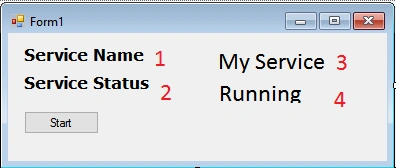
First, create a Windows application and put 4 label controls for displaying service name and status of the service.
On the button click event, we need to write the following lines of code.
- private void btnStartStop_Click(object sender, EventArgs e) {
- try {
- string serviceName = "ServiceName";
- string IP = "xxx.xxx.x.xx"; // remote IP
- string username = "username"; // remote username
- string password = "password"; // remote password
- ConnectionOptions connectoptions = new ConnectionOptions();
- connectoptions.Username = username;
- connectoptions.Password = password;
- ManagementScope scope = new ManagementScope("\\\\xxx.xxx.x.xx\\root\\Machine Name");
- scope.Options = connectoptions;
- //WMI query to be executed on the remote machine
- SelectQuery query = new SelectQuery("select * from Win32_Service where name = '" + serviceName + "'");
- using(ManagementObjectSearcher searcher = new ManagementObjectSearcher(scope, query)) {
- ManagementObjectCollection collection = searcher.Get();
- foreach(ManagementObject service in collection.OfType < ManagementObject > ()) {
- if (service["started"].Equals(true)) {
- //Start the service
- service.InvokeMethod("StopService", null);
- btnStartStop.Text = "Start";
- lblServiceName.Text = serviceName;
- lblServiceStatus.Text = "Stopped";
- } else {
- //Stop the service
- service.InvokeMethod("StartService", null);
- btnStartStop.Text = "Stop";
- lblServiceName.Text = serviceName;
- lblServiceStatus.Text = "Running";
- }
- }
- }
- } catch (NullReferenceException) {
- throw;
- }
- } // This is just a sample script. Paste your real code (javascript or HTML) here.
- if ('this_is' == /an_example/) {
- of_beautifier();
- } else {
- var a = b ? (c % d) : e[f];
- }
Mohamed GaderPosted Sep 11, 2021, 7:11 AM
What do ypu meen by "ManagementScope scope = new ManagementScope("\\\\xxx.xxx.x.xx\\root\\Machine Name"); "
Arslan SdsolPosted Aug 2, 2021, 3:50 PM
I am getting and error "The RPC server is unavailable".
Par DhuPosted Oct 29, 2020, 6:32 AM
Hi, I am encountered with runtime exception "System.Management.ManagementException: Invalid namespace" at ManagementObjectCollection collection = searcher.Get(); .Please let me know how to resolve this issue.Thanks
Pavithra VPosted Jan 27, 2020, 12:48 PM
Its working. Thanks. I need to do it for multiple machines. How can i achieve that? Please help with this
mmm mmmmPosted Jul 12, 2019, 11:04 PM
It possible for asp .net app?
Ajay SharmaPosted May 1, 2017, 4:18 AM
Nicely explained thank you sir..