

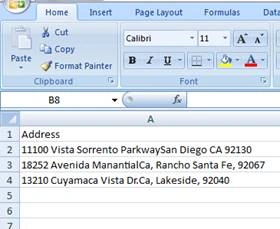
My work is to create an Excel file, which will contain three fields: Address, Latitude and Longitude. The user will upload an Address in an Excel file and after reading the addresses from an Excel file, I have to retrieve Latitude and Longitude, using Bing MAP API and create another Excel file, which will contain Addresses along with the Latitude and Longitude of that address and download the new Excel file to the user's end.
Step 1
Create a MVC Application and add EPPLUS from NuGet package manager to your solution.
Step 2
Add the code to your .cshtml page.
- <h2>Upload File</h2>
- sing (Html.BeginForm("Upload", "Home", null, FormMethod.Post, new { enctype = "multipart/form-data" }))
- {
- @Html.AntiForgeryToken()
- @Html.ValidationSummary()
- <div class="form-group">
- <input type="file" id="dataFile" name="upload" />
- </div>
- <div class="form-group">
- <input type="submit" value="Upload" class="btn btn-default" />
- </div>
- }
Now, add the code, mentioned below to your controller.
- [HttpPost]
- public ActionResult Upload(HttpPostedFileBase upload)
- {
- if (ModelState.IsValid)
- {
- if (Path.GetExtension(upload.FileName) == ".xlsx")
- {
- ExcelPackage package = new ExcelPackage(upload.InputStream);
- //From This part we will read excel file
- DataTable dt = ExcelPackageExtensions.ToDataTable(package);
- DataTable dtExcel = new DataTable();
- dtExcel.Columns.Add("Address", typeof(String));
- dtExcel.Columns.Add("LAT", typeof(Double));
- dtExcel.Columns.Add("LONG", typeof(Double));
- List<Coordinates> lstCor = new List<Coordinates>();
- for (int i = 0; i < dt.Rows.Count; i++)
- {
- //Fill the new data Table to generate new excel file
- }
- //This method will generate new excel and download the same
- generateExcel(dtExcel);
- }
- }
- return View();
- }

Former memberPosted Nov 16, 2016, 4:14 AM
Why some one will use EPPlus ? you should tell me what is the advantage of EPPlus because there are so many ways to read and write excel file.
Reema NandiPosted Nov 13, 2016, 1:21 PM
Too helpful blog it is!!!!