

Hi all, This is my first time writing a blog. So please don’t mind small mistakes (if any).
Today we are going to discuss how we can store data locally using $localstorage in AngularJS.
For that you need to follow some pretty easy steps:
Step 1 : Add an HTML file and add following references and code to it,
- <script src="https://cdn.jsdelivr.net/ngstorage/0.3.6/ngStorage.min.js"></script>
As shown below,
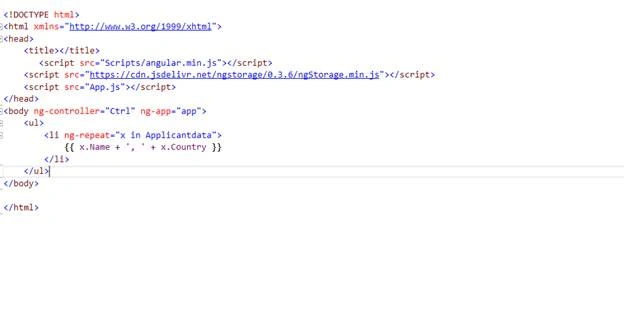
Step 2: Add javascript file and provide its reference in index.html.
Step 3: Add the following code to your javascript file,
- angular.module('app', ['ngStorage']).
- controller('Ctrl', function ($scope, $localStorage, $http) {
- if ($localStorage.datastorage) {
- $scope.Applicantdata = $localStorage.datastorage;
- alert("Second Time Call");
- }
- else{
- $http.get("http://www.w3schools.com/angular/customers.php").then(function (response) {
- $scope.Applicantdata = response.data.records;
- $localStorage.datastorage = response.data.records;
- alert("First Time Call");
- });
- }
- });
Thank You for reading the article – Happy Coding.
Nikhil KapoorPosted Apr 26, 2016, 8:13 AM
thank you all
Shshi Bhooshan SharmaPosted Apr 24, 2016, 9:06 AM
Good Nikhil
Pradeep SahooPosted Apr 24, 2016, 12:21 AM
Nice Information .Thanks for sharing
Atul GuptaPosted Apr 23, 2016, 9:08 AM
informative, Nice start Akhil !!
Debasis SahaPosted Apr 23, 2016, 6:24 AM
Good one.. keep writing