
Introduction
The table is used to display some data in a tabular, rows and columns format.
Syntax for creating the table is given below
- <table>
- <tr>
- <th>Table_Header1</th>
- <th>Table_Header2</th>
- </tr>
- <tr>
- <td>Cell_One</td>
- <td>Cell_Two</td>
- </tr>
- </table>
Here, <table> tag defines the Table, <tr>
tag defines Table Row, <th> tag defines Table Header(Column Header) and <td> tag
defines Table Column.
Now, we use these code to create a table by
writing the following code
- <!DOCTYPE HTML>
- <html>
- <head>
- <table>
- <tr>
- <th>Name</th>
- <th>Subject</th>
- </tr>
- <tr>
- <td>A. Kumar</td>
- <td>HTML</td>
- </tr>
- <tr>
- <td>B. Kumar</td>
- <td>.NET</td>
- </tr>
- </table>
- </body>
- </html>
When we run this code, the output will look like below:
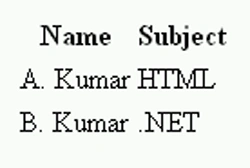
We can change the width of the table by assigning
value to it. As below code
- <table width=100%>
We can also set border thickness and height by
assigning value to it. Like below code
- <table width=100% height=70px border=4>
We make some changes in the above code by assigning
value to width, height, and border attributes. Now, the code is as below
- <!DOCTYPE HTML>
- <html>
- <head>
- <table width=100% height=70px border=4>
- <tr>
- <th>Name</th>
- <th>Subject</th>
- </tr>
- <tr>
- <td>A. Kumar</td>
- <td>HTML</td>
- </tr>
- <tr>
- <td>B. Kumar</td>
- <td>.NET</td>
- </tr>
- </table>
- </body>
- </html>
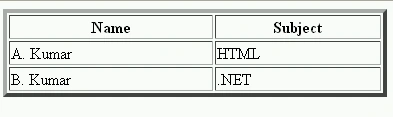
When we run the code with these changes, the
output will look like the below figure:
Join the conversation! Your thoughts help the community grow.