

Introduction
Today, in this blog let's play around with one of the interesting and most useful concept in C#.
Question: What are tuples?
In simple terms "It provides flexibility to define individual tuple items with significant type."
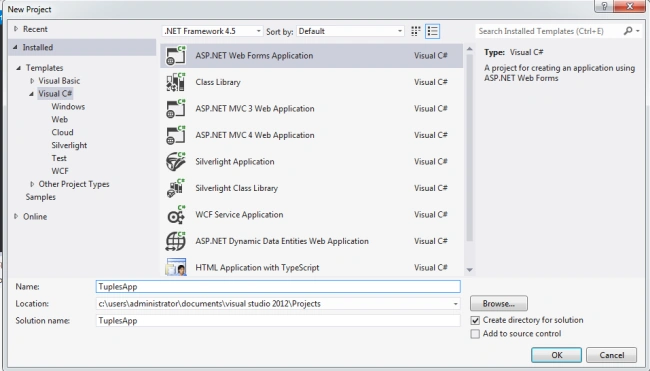
Step 1: Create a new webform project
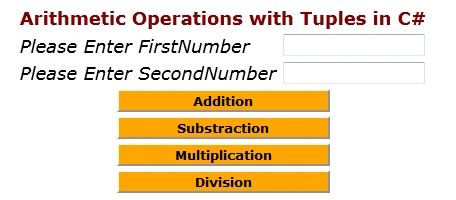
Step 2: The complete code of webform1.aspx looks like this
<%@ Page Language="C#" AutoEventWireup="true" CodeBehind="WebForm1.aspx.cs" Inherits="TuplesApp.WebForm1" %>
<!DOCTYPE html>
<html xmlns="http://www.w3.org/1999/xhtml">
<head id="Head1" runat="server">
<title></title>
</head>
<body>
<form id="form1" runat="server">
<center>
<div>
<table>
<tr>
<td colspan="2" align="center">
<asp:Label ID="Label1" runat="server" Text="Arithmetic Operations with Tuples in C#"
Font-Bold="true" Font-Size="Large" Font-Names="Verdana" ForeColor="Maroon"></asp:Label>
</td>
</tr>
<tr>
<td>
<asp:Label ID="Label6" runat="server" Text="Please Enter FirstNumber" Font-Size="Large"
Font-Names="Verdana" Font-Italic="true"></asp:Label>
</td>
<td>
<asp:TextBox ID="TextBox4" runat="server"></asp:TextBox>
</td>
</tr>
<tr>
<td>
<asp:Label ID="Label2" runat="server" Text="Please Enter SecondNumber" Font-Size="Large"
Font-Names="Verdana" Font-Italic="true"></asp:Label>
</td>
<td>
<asp:TextBox ID="TextBox1" runat="server"></asp:TextBox>
</td>
</tr>
<tr>
<td colspan="2" align="center">
<asp:Button ID="Button1" runat="server" Text="Addition" Font-Names="Verdana" Width="213px"
BackColor="Orange" Font-Bold="True" OnClick="Button1_Click" />
</td>
</tr>
<tr>
<td colspan="2" align="center">
<asp:Button ID="Button2" runat="server" Text="Substraction" Font-Names="Verdana"
Width="213px" BackColor="Orange" Font-Bold="True" OnClick="Button2_Click" />
</td>
</tr>
<tr>
<td colspan="2" align="center">
<asp:Button ID="Button3" runat="server" Text="Multiplication" Font-Names="Verdana"
Join the conversation! Your thoughts help the community grow.