Introduction
IOC and DI helps us to get rid of dependency from your code. Why should I use dependency injection?
Let’s say we have a Smartphone class that contains various objects, such as Processor, Ram, OS, Storage, etc. In this situation, the Smartphone class is responsible for creating all dependency objects. Now, what if we decide to get rid of Snapdragon Processor in the future, and rather want to use a MediaTek Processor? We will need to recreate the Smartphone object with a new MediaTek dependency. However, when using dependency injection (DI), we can change the Processor at runtime because dependencies can be injected at runtime rather than at the compile time. We can think of DI as the intermediary in our code who does all the work of creating the preferred Processor object and providing it to the Smartphone class. It makes our Smartphone class independent from creating the objects of as Processor, Ram, OS, Storage, etc.
Let’s first understand the basic terminology.
How do we achieve loosely coupled classes? With tightly coupled classes, implementation of inversion of control, DIP using abstraction, and implementation of DI using an IOC Container (UnityContainer)
What do we need to take care of?
There are 3 entities involved.
- The Dependent class is a class which depends on the dependency class
- The Dependency class is a class that provides service/data to the dependent class.
- The interface injects the Dependency class object into the dependent class.
For our examples we will have:
- The Dependent class: ProductDataAccess class: Waiting for business logic to apply on data provided by entity class.
- The Dependency class: ProductDetails class: Entity of Product table, which holds data.
- The Injector interface: IProductDetails interface
There are 3 types of Dependency Injection.
- Constructor Injection
- Property Injection
- Method Injection
Let's create a project in Visual Studio and follow a proper structure. We will create 3 layered architecture:
(Presentation -> BusinessLogic -> DataAccess)
Add Console application Project named Presentation (This is our entry point into the project). Then add one more DLL named DataAccess. (For now, we’re not going to create database, as our main focus in this blog is to understand DI). We will create an Entity class with default values as data. Add one more DLL named BusinessLogic. As per the 3 layered architectural pattern, UI communicates with BusinessLogic and BusinessLogic gets data from DataAccess layer. To achieve this, first add BusinessLogic’s reference in Presentation module, then add DataAccess’ reference in BusinessLogic.
Refer to the below image for clarification
Once this is done, let’s get back to our main goal. We will start by adding Unity in all of the modules through NuGet.
Refer to the image below.
Let's get into the code. Add Interface into DataAccess module and name it IProductDetails (our injector interface).
- using DataAccProductDetailsess;
- namespace DataAccess.Interfaces
- {
- public interface IProductDetails
- {
- }
- }
Let’s have that entity class assume we’re getting data from the product table. We’re setting up values of properties into the constructor, as there is no database. Make sure you have the same name for class as the interface(without the prefix I) for ease of understanding, so we name our class ProductDetails (our dependency class).
- using DataAccess.Interfaces;
- namespace DataAccProductDetailsess
- {
- public class ProductDetails : IProductDetails
- {
- public string ProductName { get; set; }
- public double ProductPrice { get; set; }
- public int ProductQuantity { get; set; }
- public ProductDetails()
- {
- ProductName = "IPhone 11";
- ProductPrice = 100000;
- ProductQuantity = 1;
- }
- /// <summary>
- /// Get properties values assigned in constructor
- /// </summary>
- /// <returns>Returns this object</returns>
- public ProductDetails GetProductDetails()
- {
- return this;
- }
- }
- }
Let’s have one abstract method in IProductDetails Interface, which will return Product Details.
Update your interface as follow. (Refer to the bold part.)
- public interface IProductDetails
- {
- ProductDetails GetProductDetails();
- }
- namespace DataAccess
- {
- public class ProductDataAccess
- {
- }
- }
Now we want to fetch data from entity class, so what do we so? Generally, we create “Has-A” relationship with 2 classes. If class ProductDetails’s implementation changes, so does the source code. This is the Problem with Snapdragon and MediaTek implementation.
The following code show implementation without DI:
- public class ProductDataAccess {
- #region Properties
- //Has-ARelationship
- public ProductDetails ProductData;
- #endregion
- #region Constructor
- public ProductDataAccess(IProductDetails _productDetails)
- {
- //here we have problem
- ProductData = new ProductDetails();
- }
- #endregion
- }
Solution: Update the ProductDataAccess. As you see, in order to get data from Entity class we’re fetching it from Interface, rather than having to create an object of ProductDetail class with New operator.
It may look like this:
1. Constructor Injection
- using DataAccess.Interfaces;
- using DataAccProductDetailsess;
- using System;
- using Unity;
- namespace DataAccess
- {
- public class ProductDataAccess
- {
- #region Dependancy variables
- public IProductDetails ProductDetails;
- #endregion
- #region Constructor
- public ProductDataAccess(IProductDetails _productDetails)
- {
- this.ProductDetails = _productDetails;
- ProductDetails.GetProductDetails();
- }
- #endregion
- #region Method Injection
- public void PrintProductDetails()
- {
- ProductDetails ProdDetails = ProductDetails.GetProductDetails();
- Console.WriteLine("***********************************Receipt***********************************");
- Console.WriteLine(" Product :"+ ProdDetails.ProductName);
- Console.WriteLine(" Price :" + ProdDetails.ProductPrice);
- Console.WriteLine(" Quantity:" + ProdDetails.ProductQuantity);
- Console.WriteLine("******************Thank you for shopping with Us !!!!!***********************");
- }
- #endregion
- }
- }
Let’s move to our beloved presentation module.
Rename the program class ProductPresentation and add the following code. Create a UnityContainer object coming from namespace using Unity. Use RegisterType method as follows, you can see it takes “Generics”. First is the interface and second is your Class. By doing this UnityContainer would know where to look for dependencies. Use Resolve method which takes generics as parameter. And we’re solving dependency rather than creating an object.
- using DataAccess;
- using DataAccess.Interfaces;
- using DataAccProductDetailsess;
- using System;
- using Unity;
- namespace Presentation
- {
- class ProductPresentation
- {
- static void Main(string[] args)
- {
- Console.WriteLine("3 layered architecture");
- UnityContainer container = new UnityContainer();
- container.RegisterType<IProductDetails, ProductDetails>();
- ProductDataAccess prodDetails = container.Resolve<ProductDataAccess>();
- prodDetails.PrintProductDetails();
- Console.ReadLine();
- }
- }
- }

There you go, now the classes are loosely coupled and more scalable.
2. Property – Setter Dependency Injection.
Until now, we were passing a dependency using the constructor. What if we don’t even want that? No worries, Property DI to the rescue.
Add a property with Dependency attribute in the ProductDataAccess class
- #region Dependant Properties
- [Dependency]
- public IProductDetails productData { get; set; }
- #endregion
- /// <summary>
- /// This method prints product details using Property DI
- /// </summary>
- public void PrintProductDetailsWithPropDI()
- {
- ProductDetails ProdDetails = productData.GetProductDetails();
- Console.WriteLine("***********************************Receipt From Property/Setter DI***********************************");
- Console.WriteLine(" Product :" + ProdDetails.ProductName);
- Console.WriteLine(" Price :" + ProdDetails.ProductPrice);
- Console.WriteLine(" Quantity:" + ProdDetails.ProductQuantity);
- Console.WriteLine("******************Thank you for shopping with Us !!!!!***********************");
- }
In order to call this method, make changes in the ProductPresentation class.
First, comment Constructor DI call and add the following line:
- //prodDetails.PrintProductDetails();
- prodDetails.PrintProductDetailsWithPropDI();

3. Method Injection: Injecting dependency using method.
Add these properties in ProductDataAccess class
- #region Method DI Properties
- /// <summary>
- /// This property is for Method DI
- /// </summary>
- private IProductDetails productDataUsingMethodDI = null;
- /// <summary>
- /// Variable to assign product details
- /// </summary>
- public ProductDetails ProdDetails { get; set; }
- #endregion
Add these 2 methods. One is for injection and another is for printing details of the product As you can see, we are using the InjectionMethod attribute to tell container which method to look for. We're not going to call the method AssignProductDetailsWithMethodDI() explicitly, rather the attribute tells the complier where to look.
- /// <summary>
- /// This method injects product details using Method DI
- /// </summary>
- [InjectionMethod]
- public void AssignProductDetailsWithMethodDI(IProductDetails _productDetails)
- {
- productDataUsingMethodDI = _productDetails;
- ProdDetails = productDataUsingMethodDI.GetProductDetails();
- }
- /// <summary>
- /// This method prints product details using Method DI
- /// </summary>
- public void PrintProductDetailsWithMethodDI()
- {
- Console.WriteLine("***********************************Receipt From Methos DI***********************************");
- Console.WriteLine(" Product :" + ProdDetails.ProductName);
- Console.WriteLine(" Price :" + ProdDetails.ProductPrice);
- Console.WriteLine(" Quantity:" + ProdDetails.ProductQuantity);
- Console.WriteLine("******************Thank you for shopping with Us !!!!!***********************");
- }
Let’s call this method as well from our main(). Open ProductPresentation class, and comment the first 2 method calls, then and add third one.
- //prodDetails.PrintProductDetails();
- //prodDetails.PrintProductDetailsWithPropDI();
- prodDetails.PrintProductDetailsWithMethodDI();

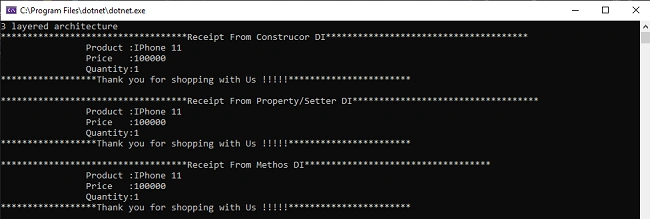
4. Let us uncomment everything and run project with all types of dependencies.
The Final ProductDataAccess class will look like this with all types of dependencies designed.
- using DataAccess.Interfaces;
- using DataAccProductDetailsess;
- using System;
- using Unity;
- namespace DataAccess
- {
- public class ProductDataAccess
- {
- #region Constructor DIProperties
- /// <summary>
- /// This property is for Constructor DI
- /// </summary>
- public IProductDetails ProductDetails;
- #endregion
- #region Dependant DISetter Properties
- /// <summary>
- /// This property is for Setter DI
- /// </summary>
- [Dependency]
- public IProductDetails productData { get; set; }
- #endregion
- #region Method DI Properties
- /// <summary>
- /// This property is for Method DI
- /// </summary>
- private IProductDetails productDataUsingMethodDI = null;
- /// <summary>
- /// Variable to assign product details
- /// </summary>
- public ProductDetails ProdDetails { get; set; }
- #endregion
- #region Constructor
- /// <summary>
- /// Injects dependancy using constructor
- /// </summary>
- /// <param name="_productDetails"></param>
- public ProductDataAccess(IProductDetails _productDetails)
- {
- this.ProductDetails = _productDetails;
- ProductDetails.GetProductDetails();
- }
- #endregion
- #region Method Injection
- /// <summary>
- /// This method prints product details using Constructor DI
- /// </summary>
- public void PrintProductDetails()
- {
- ProductDetails ProdDetails = ProductDetails.GetProductDetails();
- Console.WriteLine("***********************************Receipt From Construcor DI**************************************");
- Console.WriteLine(" Product :"+ ProdDetails.ProductName);
- Console.WriteLine(" Price :" + ProdDetails.ProductPrice);
- Console.WriteLine(" Quantity:" + ProdDetails.ProductQuantity);
- Console.WriteLine("******************Thank you for shopping with Us !!!!!***********************");
- }
- /// <summary>
- /// This method prints product details using Property DI
- /// </summary>
- public void PrintProductDetailsWithPropDI()
- {
- ProductDetails ProdDetails = productData.GetProductDetails();
- Console.WriteLine("***********************************Receipt From Property/Setter DI***********************************");
- Console.WriteLine(" Product :" + ProdDetails.ProductName);
- Console.WriteLine(" Price :" + ProdDetails.ProductPrice);
- Console.WriteLine(" Quantity:" + ProdDetails.ProductQuantity);
- Console.WriteLine("******************Thank you for shopping with Us !!!!!***********************");
- }
- /// <summary>
- /// This method injects product details using Method DI
- /// </summary>
- [InjectionMethod]
- public void AssignProductDetailsWithMethodDI(IProductDetails _productDetails)
- {
- productDataUsingMethodDI = _productDetails;
- ProdDetails = productDataUsingMethodDI.GetProductDetails();
- }
- /// <summary>
- /// This method prints product details using Method DI
- /// </summary>
- public void PrintProductDetailsWithMethodDI()
- {
- Console.WriteLine("***********************************Receipt From Methos DI***********************************");
- Console.WriteLine(" Product :" + ProdDetails.ProductName);
- Console.WriteLine(" Price :" + ProdDetails.ProductPrice);
- Console.WriteLine(" Quantity:" + ProdDetails.ProductQuantity);
- Console.WriteLine("******************Thank you for shopping with Us !!!!!***********************");
- }
- #endregion
- }
- }

The ProductPresentation class would look like this with all types of dependencies designed.
- using DataAccess;
- using DataAccess.Interfaces;
- using DataAccProductDetailsess;
- using System;
- using Unity;
- namespace Presentation
- {
- class ProductPresentation
- {
- static void Main(string[] args)
- {
- Console.WriteLine("3 layered architecture");
- UnityContainer container = new UnityContainer();
- container.RegisterType<IProductDetails, ProductDetails>();
- ProductDataAccess prodDetails = container.Resolve<ProductDataAccess>();
- prodDetails.PrintProductDetails();
- Console.WriteLine();
- prodDetails.PrintProductDetailsWithPropDI();
- Console.WriteLine();
- prodDetails.PrintProductDetailsWithMethodDI();
- Console.ReadLine();
- }
- }
- }
Note: We haven’t made much of use of the BusinessLogic layer. The point of keeping that module is so we can have Higher level modules communicating with the lower-level modules by having a loosely coupled relationship.
Download the project to get source code for a better understanding.
Thank you so much for visiting this blog, I hope you were helped by this. If you have any queries, please connect with me.
Happy Coding. Have a good day :)

ganesh venketaramananPosted Dec 5, 2021, 2:32 AM
The data access and business logic projects are not there in the zip, it says that its missing while i tried to download it. Can you pls share it.
Sourav Kumar DasPosted Dec 26, 2019, 12:40 AM
Nice and useful article.
Rushi MehtaPosted Dec 25, 2019, 4:20 AM
Very Well explained
Bikesh SrivastavaPosted Dec 25, 2019, 3:37 AM
Well explained about DI and IOC
Rikam PalkarPosted Dec 25, 2019, 3:14 AM
much appreciated @pritesh
Pritesh MaturkarPosted Dec 25, 2019, 3:01 AM
Nice Explanation.