

In this blog we will know if data is present in the database then update the data, or if the data does not exits in database then insert it to the database.
Create a table employee as below.
Create table employee (eid varchar(50)primary key,ename varchar(50))

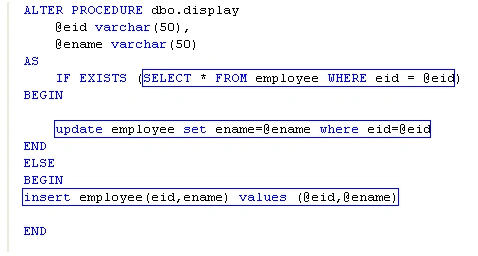
Create a stored procedure display as below.
ALTER
PROCEDURE dbo.display
@eid varchar(50),
@ename varchar(50)
AS
IF EXISTS (SELECT * FROM employee WHERE eid = @eid)
BEGIN
update employee set ename=@ename where eid=@eid
END
ELSE
BEGIN
insert employee(eid,ename) values (@eid,@ename)
END
Default.aspx code
<%@
Page Language="VB"
AutoEventWireup="false"
CodeFile="Default.aspx.vb"
Inherits="_Default"
%>
<!DOCTYPE
html PUBLIC
"-//W3C//DTD XHTML 1.0 Transitional//EN"
"http://www.w3.org/TR/xhtml
/DTD/xhtml1-transitional.dtd">
<html
xmlns="http://www.w3.org/1999/xhtml">
<head
runat="server">
<title>Untitled
Page</title>
</head>
<body>
<form
id="form1"
runat="server">
<div>
<asp:Label
ID="Label1"
runat="server"
Text="Eid"
Width="50px"></asp:Label>
<asp:TextBox
ID="txtUserId"
runat="server"
Width="197px"></asp:TextBox><br
/>
<asp:Label
ID="Label2"
runat="server"
Text="Ename"
Width="50px"></asp:Label>
<asp:TextBox
ID="txtUserName"
runat="server"
Width="197px"></asp:TextBox>
<asp:GridView
ID="GridView1"
runat="server">
</asp:GridView>
<br
/>
<asp:Button
ID="btn1"
runat="server"
Text="Insert"
onclick="btn1_Click"
/>
</div>
</form>
</body>
</html>
Default.aspx.vb code
Imports
System.Data
Imports
System.Data.SqlClient
Partial
Class _Default
Inherits System.Web.UI.Page
Dim strConnString As
String =
System.Configuration.ConfigurationManager.ConnectionStrings.Item("ConnectionString").ToString()
Dim
sqlda As SqlDataAdapter
Dim com As
SqlCommand
Dim str As
String
Dim ds As
DataSet
Dim con As
New SqlConnection(strConnString)
Protected Sub
Page_Load(ByVal sender
As Object, ByVal
e As System.EventArgs)
Handles Me.Load
If Not
IsPostBack Then
bindgrid()
End If
End Sub
Sub bindgrid()
con.Open()
str =
"select * from employee"
com =
New SqlCommand(str, con)
ds =
New DataSet()
sqlda =
New SqlDataAdapter(com)
sqlda.Fill(ds,
"employee")
GridView1.DataSource = ds
GridView1.DataMember = "employee"
GridView1.DataBind()
con.Close()
End Sub
Protected Sub
btn1_Click(ByVal sender
As Object, ByVal
e As System.EventArgs)
Handles
btn1.Click
con.Open()
com =
New SqlCommand("display",
con)
com.Parameters.Add("@eid",
SqlDbType.VarChar).Value = txtUserId.Text
com.Parameters.Add("@ename",
SqlDbType.VarChar).Value = txtUserName.Text
com.CommandType =
CommandType.StoredProcedure
com.ExecuteNonQuery()
con.Close()
bindgrid()
End Sub
End
Class
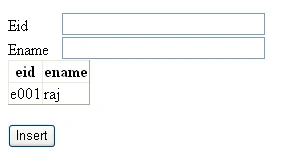
Output

Thanks for reading
Join the conversation! Your thoughts help the community grow.