
Hello All,
I was doing some testing for my application and there is need for changing with different user who has different permission than the current logged in user. I clicked on current user in right top corner; pop appears but no “Sign in as Different User” option. So in SharePoint 2013 there is no “Sign in as Different User” option available as shown in following diagram:
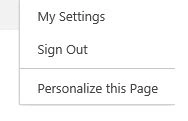
One possible solution is open new browser and log in with different user.
But if we want to log in as different user in the same browser then other workaround is using direct URL in address browser, I opened my SP 2010 site and check the URL – “_layouts/closeConnection.aspx?loginasanotheruser=true” , I copied this URL and appended to my 2013 site url and it worked well.
Only thing SP 2013 added automatically 15 hive in URL so URL became “_layouts/15/closeConnection.aspx?loginasanotheruser=true”.
Thanks!

Workaround for Sign in as Different User in SharePoint
Join the conversation! Your thoughts help the community grow.
Sign in to leave a comment
It is the same account you read, post and publish with — and you will come straight back to this page.
Gowtham RajamanickamPosted Mar 12, 2015, 4:03 AM
good one...
Prasham SabadraPosted Feb 16, 2015, 4:52 AM
Thanks for Sharing. But then need to update OOB control which is not suggested.
Melissa RosenkranzPosted Feb 16, 2015, 4:30 AM
Hi! There is a possibility to activate the Action in SharePoint 2013 Go to C:\Program Files\Common Files\Microsoft Shared\Web Server Extensions\15\TEMPLATE\CONTROLTEMPLATES and open the „Welcome.ascx” with editor. Add there the following section before Part „ID_RequestAccess“: <SharePoint:MenuItemTemplate runat="server" ID="ID_LoginAsDifferentUser" Text="<%$Resources:wss,personalactions_loginasdifferentuser%>" Description="<%$Resources:wss,personalactions_loginasdifferentuserdescription%>" MenuGroupId="100" Sequence="100" UseShortId="true" Click save and close. After Refresh of SharePoint 2013 Website, Action should be there.