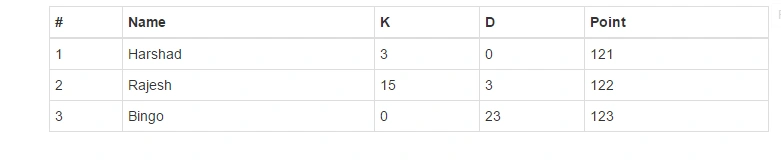
First Of All to Create the HTML table using Json there are easy task to do it.
Let's Start
Let's Start
You can add below code in your html file:
<div class="container">
    <p>
        <table id="placar" class="table table-condensed  table-bordered">
            <thead>
                <tr>
                    <th>#</th>
                    <th>Name</th>
                    <th>K</th>
                    <th>D</th>
                    <th>Point</th>
                </tr>
            </thead>
            <tbody></tbody>
        </table>
</div>
Now as JSON for that Add below code in the JavaScript file:
var data = [{
    'order': '1',
        'name': 'Harshad',
        'k': '3',
        'd': '0',
        'score': '121',
        'id': '540'
}, {
    'order': '2',
        'name': 'Rajesh',
        'k': '15',
        'd': '3',
        'score': '122',
        'id': '541'
}, {
    'order': '3',
        'name': 'Bingo',
        'k': '0',
        'd': '23',
        'score': '123',
        'id': '542'
}];

var currentID = 541;

var transform = {
    tag: 'tr',
    children: [{
        "tag": "td",
            "html": "${order}"
    }, {
        "tag": "td",
            "html": "${name}"
    }, {
        "tag": "td",
            "html": "${k}"
    }, {
        "tag": "td",
            "html": "${d}"
    }, {
        "tag": "td",
            "html": "${score}"
    }]
};

$('#placar > tbody ').json2html(data, transform);
If you do the upar thing ur output is below: