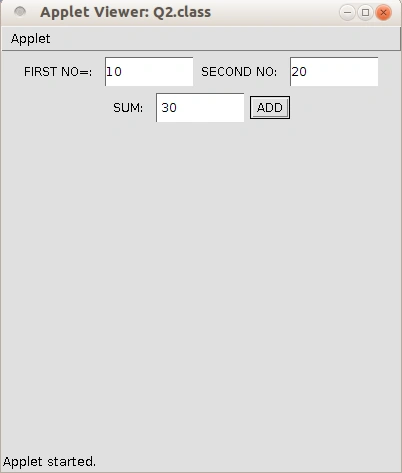
At the time creation of a data base, we must embed the applet into the HTML page then only it works
Step 1: Create the java program with " filename.java ".
Step 2: Create the html program with "filename.html".
Step 3: Compile the java program "javac filename.java".
Step 4: View applet using "appletviewer filename.html".
Note: Both program must have the same name and Both program must be in same folder.
Java Program
import java.awt.*;
import java.awt.event.*;
import java.applet.*;
public class Q2 extends Applet implements ActionListener
{
    TextField t1 = new TextField(10);
    TextField t2 = new TextField(10);
    TextField t3 = new TextField(10);
    Label l1 = new Label("FIRST NO=:");
    Label l2 = new Label("SECOND NO:");
    Label l3 = new Label("SUM:");
    Button b = new Button("ADD");
    public void init()
    {
        t1.setForeground(Color = Red);
        add(l1);
        add(t1);
        add(l2);
        add(t2);
        add(l3);
        add(t3);
        add(b);
        b.addActionListener(this);
    }
    public void actionPerformed(ActionEvent e)
    {
        if (e.getSource() == b)
        {
            int n1 = Integer.parseInt(t1.getText());
            int n2 = Integer.parseInt(t2.getText());
            t3.setText(" " + (n1 + n2));
        }
    }
}<HTML>
<HEAD>
<TITLE>WELCOME TO JAVA APPLET</TITLE>
</HEAD>
<BODY>
<CENTER>
<H1>WELCOME TO THE APPLET</H1> </CENTER>
<BR>
<APPLET CODE=Q2.class WIDTH=400 HEIGHT=400> </APPLET>
</BODY>
</HTML>OUTPUT