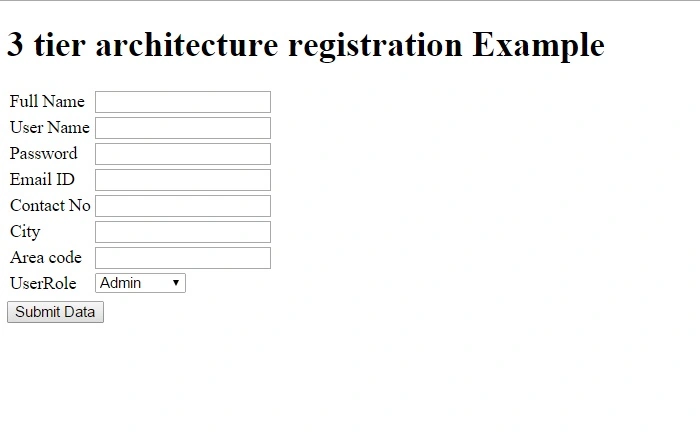
Step 1 : Create User registration form using Master page,
<asp:Content ID="Content1" ContentPlaceHolderID="head" runat="server"></asp:Content>
<asp:Content ID="Content2" ContentPlaceHolderID="ContentPlaceHolder1" runat="server">
    <div>
        <asp:Table ID="Table1" runat="server" >
            <asp:TableRow>
                <asp:TableCell>Full Name</asp:TableCell>
                <asp:TableCell>
                    <asp:TextBox ID="txtName" runat="server" ></asp:TextBox>
                </asp:TableCell>
            </asp:TableRow>
            <asp:TableRow>
                <asp:TableCell>User Name</asp:TableCell>
                <asp:TableCell>
                    <asp:TextBox ID="txtUserName" runat="server" ></asp:TextBox>
                </asp:TableCell>
            </asp:TableRow>
            <asp:TableRow>
                <asp:TableCell>Password</asp:TableCell>
                <asp:TableCell>
                    <asp:TextBox ID="txtpassword" runat="server" TextMode="Password" ></asp:TextBox>
                </asp:TableCell>
            </asp:TableRow>
            <asp:TableRow>
                <asp:TableCell> Email ID </asp:TableCell>
                <asp:TableCell>
                    <asp:TextBox ID="txtEmailid" runat="server" ></asp:TextBox>
                </asp:TableCell>
            </asp:TableRow>
            <asp:TableRow>
                <asp:TableCell>Contact No</asp:TableCell>
                <asp:TableCell>
                    <asp:TextBox ID="txtContact" runat="server" ></asp:TextBox>
                </asp:TableCell>
            </asp:TableRow>
            <asp:TableRow>
                <asp:TableCell>City</asp:TableCell>
                <asp:TableCell>
                    <asp:TextBox ID="txtcity" runat="server" ></asp:TextBox>
                </asp:TableCell>
            </asp:TableRow>
            <asp:TableRow>
                <asp:TableCell>Area code</asp:TableCell>
                <asp:TableCell>
                    <asp:TextBox ID="txtAreaCode" runat="server" ></asp:TextBox>
                </asp:TableCell>
            </asp:TableRow>
            <asp:TableRow>
                <asp:TableCell>UserRole</asp:TableCell>
                <asp:TableCell>
                    <asp:DropDownList runat="server" ID="ddlUserRole"></asp:DropDownList>
                </asp:TableCell>
            </asp:TableRow>
            <asp:TableRow>
                <asp:TableCell></asp:TableCell>
                <asp:TableCell>
                    <asp:Button ID="btnSave" runat="server" onclick="btnSave_Click" Text="Submit Data" />
                </asp:TableCell>
            </asp:TableRow>
        </asp:Table>
    </div>
</asp:Content>
Step 2 : Now Create User registration form DAL Class File.
using System;
using System.Collections.Generic;
using System.Linq;
using System.Web;
using System.Data;
using System.Data.Sql;
using System.Data.SqlClient;
using System.Text;
using System.Configuration;

namespace Real_Estate.DAL
{
    public class DAL_NewUserEntrys
    {
        string connString = ConfigurationManager.ConnectionStrings["connstr"].ConnectionString;
        public int InsertNewUser(string U_FullName, string U_Name, string U_Email, string U_Contact, string U_Password, string U_City, string U_Area_Code, int UR_id, DateTime U_CreateDate)
        {
            var returnData = 0;
            using(SqlConnection con = new SqlConnection(connString))
            {
                using(SqlCommand cmd = new SqlCommand("sp_NewUser", con))
                {
                    cmd.CommandType = CommandType.StoredProcedure;
                    SqlParameter[] perm = new SqlParameter[9];
                    perm[0] = new SqlParameter("@U_FullName", SqlDbType.NVarChar, 50);
                    perm[0].Value = U_FullName;
                    perm[1] = new SqlParameter("@U_Name", SqlDbType.NVarChar, 30);
                    perm[1].Value = U_Name;
                    perm[2] = new SqlParameter("@U_Email", SqlDbType.NVarChar, 50);
                    perm[2].Value = U_Email;
                    perm[3] = new SqlParameter("@U_Contact", SqlDbType.NVarChar, 15);
                    perm[3].Value = U_Contact;
                    perm[4] = new SqlParameter("@U_Password", SqlDbType.NVarChar, 20);
                    perm[4].Value = U_Password;
                    perm[5] = new SqlParameter("@U_City", SqlDbType.NVarChar, 25);
                    perm[5].Value = U_City;
                    perm[6] = new SqlParameter("@U_Area_P_Code", SqlDbType.NVarChar, 10);
                    perm[6].Value = U_Area_Code;
                    perm[7] = new SqlParameter("@UR_id", SqlDbType.Int);
                    perm[7].Value = UR_id;
                    perm[8] = new SqlParameter("@U_CreateDate", SqlDbType.DateTime.ToString());
                    perm[8].Value = U_CreateDate;
                    cmd.Parameters.AddRange(perm);
                    con.Open();
                    returnData = cmd.ExecuteNonQuery();
                    con.Close();
                    con.Dispose();
                }
            }
            return returnData;
        }
    }
}
Step 3 : Now Create User registration form BAL Class File.
using System;
using System.Collections.Generic;
using System.Linq;
using System.Web;
using System.Text;
using Real_Estate.DAL;

namespace Real_Estate.BAL
{
    public class BAL_NewUserEntry
    {
        public int InsertNewUser(string U_FullName, string U_Name, string U_Email, string U_Contact, string U_Password, string U_City, string U_Area_Code, int UR_id, DateTime U_CreateDate) {
            return new DAL_NewUserEntrys().InsertNewUser(U_FullName, U_Name, U_Email, U_Contact, U_Password, U_City, U_Area_Code, UR_id, U_CreateDate);
        }
    }
}
Step 4 : Finally write submit button code on aspx.cs page.
using System;
using System.Collections.Generic;
using System.Linq;
using System.Web;
using System.Web.UI;
using System.Web.UI.WebControls;
using System.Data;
using System.Data.SqlClient;
using System.Configuration;
using Real_Estate.BAL;

namespace Real_Estate.Form
{
    public partial class UserRegistration: System.Web.UI.Page
    {
        string connection = ConfigurationManager.ConnectionStrings["connstr"].ConnectionString;
        protected void Page_Load(object sender, EventArgs e)
        {
            if (!IsPostBack)
            {
                BindUserRole();
            }
        }
        protected void BindUserRole() // Bind Dropdownlist form database
        {
            using(SqlConnection conn = new SqlConnection(connection))
            {
                conn.Open();
                SqlCommand cmd = new SqlCommand("sp_UserRole", conn);
                cmd.CommandType = System.Data.CommandType.StoredProcedure;
                SqlDataAdapter da = new SqlDataAdapter(cmd);
                DataSet dt = new DataSet();
                da.Fill(dt);
                ddlUserRole.DataSource = dt;
                ddlUserRole.DataTextField = "UR_Role";
                ddlUserRole.DataValueField = "UR_id";
                ddlUserRole.DataBind();
                conn.Close();
            }
        }
        protected void btnSave_Click(object sender, EventArgs e) {
            var result = 0;
            int UR_id = 0;
            int.TryParse(ddlUserRole.SelectedValue, out UR_id);
            DateTime U_CeateDate = DateTime.Now;
            result = new BAL_NewUserEntry().InsertNewUser(txtName.Text.Trim(), txtUserName.Text.Trim(), txtEmailid.Text.Trim(), txtContact.Text.Trim(), txtpassword.Text.Trim(), txtcity.Text.Trim(), txtAreaCode.Text.Trim(), UR_id, U_CeateDate);
        }
    }
}
Note: Here set connection string in web.config
<configuration>
    <connectionStrings>
        <add name="connstr"
connectionString="Data Source=RAKESH-PC;Initial Catalog=Real_Estate;User ID=sa;Password=****" providerName="System.Data.SqlClient" />
    </connectionStrings>
Also Create stored procedure in your database
Screen Shoot :