Hello Team,
In my ajax post request is able to bind the textbox data and the table content except the Item and the date, though I can see the item in the table.
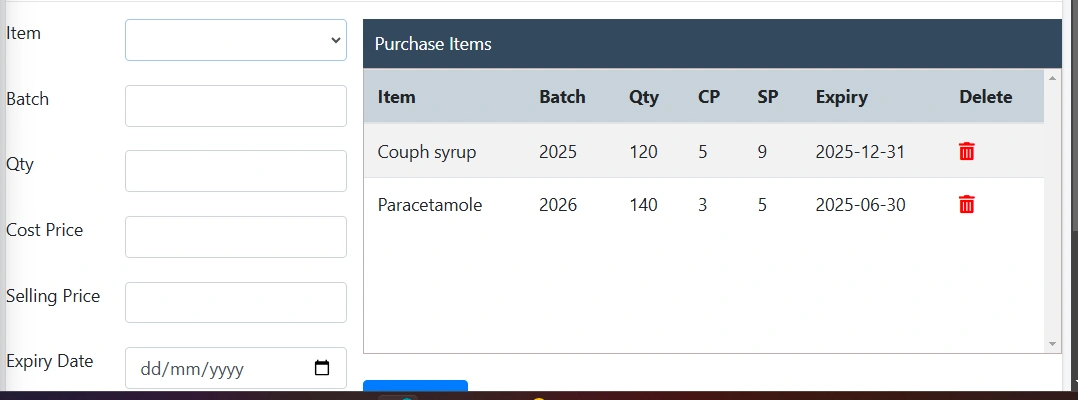
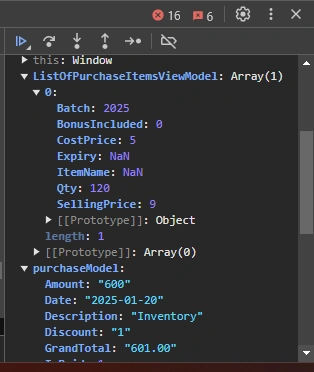
function SavePurchases()
{
debugger;
var purchaseModel = {};
var ListOfPurchaseItemsViewModel = new Array();
purchaseModel.PurchaseID = $.trim($('#PurchaseID').val() + '--' + $('#SelectSupplier').val()),
purchaseModel.Date = $('#InvocingDate').val().trim(),
purchaseModel.SupplierID = $('#SelectSupplier').val(),
purchaseModel.Amount = $('#Amount').val(),
purchaseModel.Discount = $('#Discount').val(),
purchaseModel.Tax = $('#Tax').val(),
purchaseModel.GrandTotal = $('#GrandTotal').val(),
purchaseModel.IsPaid = $('#Payment').is(":checked") ? 1 : 0,
purchaseModel.Description = $('#Description').val(),
$("#orderItems").find("tr:gt(0)").each(function () {
var PurchaseItemModel = {};
//PurchaseItemModel.ItemID = parseFloat($(this).find("td:eq(0)").text());
PurchaseItemModel.ItemName = parseFloat($(this).find("td:eq(0)").text());
PurchaseItemModel.Batch = parseFloat($(this).find("td:eq(5)").text());
PurchaseItemModel.Qty = parseFloat($(this).find("td:eq(2)").text());
PurchaseItemModel.CostPrice = parseFloat($(this).find("td:eq(3)").text());
PurchaseItemModel.SellingPrice = parseFloat($(this).find("td:eq(4)").text());
PurchaseItemModel.Expiry = parseFloat($(this).find("td:eq(6)").text());
PurchaseItemModel.BonusIncluded = 0
ListOfPurchaseItemsViewModel.push(PurchaseItemModel);
});
purchaseModel.ListOfPurchaseItemsViewModel = ListOfPurchaseItemsViewModel;
//post data to server
$.ajax({
contentType: "application/json; charset=utf-8",
type: "POST",
dataType: "JSON",
url: "/PurchaseEntry/SavePurchase",
data: JSON.stringify(purchaseModel),
success: function (d) {
//check is successfully save to database
if (d.status == true) {
//will send status from server side
alert('Successfully done.');
location.reload(true);
//clear form
purchaseItems = [];
$('#PurchaseID').val('');
$('#InvocingDate').val('');
$('#SelectSupplier').val('0');
}
else {
alert('Failed');
}
$('#submit').val('Save');
},
error: function () {
alert('Error. Please try again.');
$('#btnSubmit').val('Save');
}
});
}
function GeneratedItemsTable() {
if (purchaseItems.length > 0) {
var $table = $('
$table.append('
var $tbody = $('');
// var $table = $('.tableList');
// var $tbody = $('
$.each(purchaseItems, function (i, val) {
var $row = $('
//$row.append($('
$row.append($('
$row.append($('
$row.append($('
$row.append($('
$row.append($('
$row.append($('
$row.append($('
$tbody.append($row);
});
$table.append($tbody);
$('#orderItems').html($table);
}
else {
alert("List is empty !");
}
}
Emmmanuel FIADUFEPosted Jan 20, 2025, 8:54 PM
Hello Paul
After trying all the 3 format.
I got this error saying Invalid date
Tuhin PaulPosted Jan 20, 2025, 5:57 PM
1. If the date stored in your table (td:eq(6)) is in a recognized date format (e.g., YYYY-MM-DD), you can directly use new Date() or Date.parse()
2. If the date format is not directly supported by JavaScript (e.g.,
DD/MM/YYYY), you might need to manually split and rearrange the date components.3. If you're working with various date formats and want a more robust solution, you can use Moment.js, which provides powerful date parsing and formatting capabilities. (optional approach)
Tuhin PaulPosted Jan 20, 2025, 5:51 PM
Just outlining the steps for resolving the issue of missing "Item" and "Date" fields in the Ajax POST request.
Emmmanuel FIADUFEPosted Jan 20, 2025, 3:48 PM
Thank you Sangeetha S,
Please how do I format the date, because the below code is not working
Sangeetha SPosted Jan 20, 2025, 1:25 PM
Issue with an Ajax POST request. Here are a few common troubleshooting steps you can take:
Check the URL: Ensure that the URL you are sending the request to is correct.
Inspect the Payload: Confirm that the data you're sending in the request is correctly formatted and matches what the server expects.
Use Console Logging: Add
console.log()statements before the Ajax call to check the data being sent. This can help identify any issues with the data format.Check Network Tab: Open your browser's developer tools (usually F12) and check the "Network" tab. Look for the POST request and examine the response and status code. This can provide clues about what might be going wrong.
Server-Side Logs: If you have access to the server, check the server logs for any errors that may indicate what's wrong with the request.
CORS Issues: If your request is going to a different domain, ensure that CORS (Cross-Origin Resource Sharing) is properly configured on the server.
Error Handling: Implement error handling in your Ajax call to catch any errors and display them, which can provide more insight.