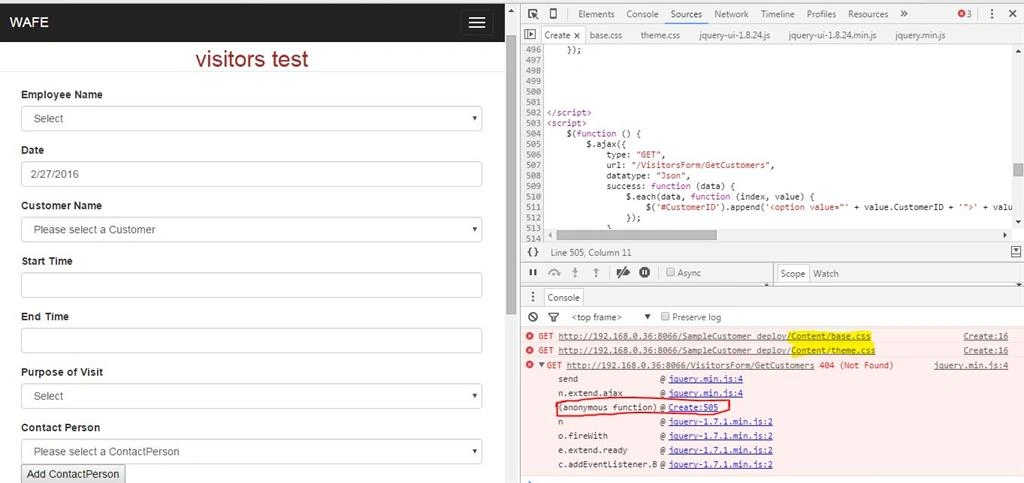
Hi i have one view called visitors view in my project. In that view it contain two drop downsCustomerName and ContactPerson if i select the CustomerName the CustomerName related ContactPerson name will be automatically load in contact person drop down.its like Cascading DropDown. This process is working fine in normal mode that is when i run my application this cascading dropdown is working fine. But when i publish my project in LocalHost and run the application both the dropdown are not loading the values from db. These cascading is not working. so i inspect the issue in browser at that time i got these issue. The issue are below. please any one tell me what are the issue is this? Give me solution for this problem
My ViewModel
   public Nullable<System.Guid> CustomerID { get; set; }
   public string CustomerName { get; set; }
   public Nullable<System.Guid> CustomerContactID { get; set; }
   public string ContactPerson { get; set; }
My Controller
public ActionResult Create()
{
public JsonResult GetCustomers()
{
return Json(db.Customers.ToList(), JsonRequestBehavior.AllowGet);
}
public JsonResult GetContactPersobByCustomerId(string customerId)
{
Guid Id = Guid.Parse(customerId);
var customercontacts = from a in db.CustomerContacts where a.CustomerID == Id select a;
return Json(customercontacts);
}
return View();
}
My View
@Html.Label("Customer Name", new { @class = "control-label" })
@Html.DropDownListFor(model => model.CustomerID, new SelectList(string.Empty, "Value", "Text"), "Please select a Customer", new { @class = "form-control required", type = "text" })
@Html.Label("Contact Person", new { @class = "control-label" })
@Html.DropDownListFor(model => model.CustomerContactID, new SelectList(string.Empty, "Value", "Text"), "Please select a ContactPerson", new { @class = "form-control", type = "text", id = "CustomerContactID" })
My Jquery
My Viewmodel
public Nullable CustomerID { get; set; }
public string CustomerName { get; set; }
public Nullable CustomerContactID { get; set; }
public Nullable ContactID { get; set; }
public string ContactPerson { get; set; }
public string PhoneNo { get; set; }
public string MobileNo { get; set; }
public string Email { get; set; }
public string AlternateEmail { get; set; }
public string CustomerName { get; set; }
public Nullable
public Nullable
public string ContactPerson { get; set; }
public string PhoneNo { get; set; }
public string MobileNo { get; set; }
public string Email { get; set; }
public string AlternateEmail { get; set; }
My Controller
public PartialViewResult ContactPersonPartialView() //Insert PartialView
{
ViewBag.CustomerID = new SelectList(db.Customers, "CustomerID", "DisplayName");
return PartialView ();
}
[HttpPost]
public JsonResult ContactPersonCreate(VisitorsViewModel VVviewmodel)
{
ViewBag.CustomerID = new SelectList(db.Customers, "CustomerID", "DisplayName", VVviewmodel.CustomerID);
var ContactIDObj = Guid.NewGuid();
var CustomerContactIDObj = Guid.NewGuid();
var CustomerContactObj = new CustomerContact()
{
CustomerContactID = CustomerContactIDObj,
CustomerID = VVviewmodel.CustomerID,
ContactReference = VVviewmodel.ContactPerson,
ContactID = ContactIDObj,
IsActive = true,
IsDeleted = false,
CreatedDate = DateTime.Now,
EditedDate = DateTime.Now,
LastActiveOn = DateTime.Now,
RowID = Guid.NewGuid(),
CreatedSessionID = Guid.NewGuid(),
EditedSessionID = Guid.NewGuid(),
OfflineMode = false,
OfflineID = Guid.NewGuid()
};
var ContactObj = new Contact()
{
ContactID = ContactIDObj,
DisplayName = VVviewmodel.CustomerID.ToString(),
PrintName = VVviewmodel.CustomerID.ToString(),
Phone1 = VVviewmodel.PhoneNo,
Mobile1 = VVviewmodel.MobileNo,
Email1 = VVviewmodel.Email,
Email2 = VVviewmodel.AlternateEmail
};
db.Contacts.Add(ContactObj);
db.CustomerContacts.Add(CustomerContactObj);
db.SaveChanges();
ModelState.Clear();
//return Json(new
//{
// redirectUrl = Url.Action("create", "VisitorsForm"),
// isRedirect = true
//});
return Json( "VisitorsForm" ,JsonRequestBehavior.AllowGet);
}
{
ViewBag.CustomerID = new SelectList(db.Customers, "CustomerID", "DisplayName");
return PartialView ();
}
[HttpPost]
public JsonResult ContactPersonCreate(VisitorsViewModel VVviewmodel)
{
ViewBag.CustomerID = new SelectList(db.Customers, "CustomerID", "DisplayName", VVviewmodel.CustomerID);
var ContactIDObj = Guid.NewGuid();
var CustomerContactIDObj = Guid.NewGuid();
var CustomerContactObj = new CustomerContact()
{
CustomerContactID = CustomerContactIDObj,
CustomerID = VVviewmodel.CustomerID,
ContactReference = VVviewmodel.ContactPerson,
ContactID = ContactIDObj,
IsActive = true,
IsDeleted = false,
CreatedDate = DateTime.Now,
EditedDate = DateTime.Now,
LastActiveOn = DateTime.Now,
RowID = Guid.NewGuid(),
CreatedSessionID = Guid.NewGuid(),
EditedSessionID = Guid.NewGuid(),
OfflineMode = false,
OfflineID = Guid.NewGuid()
};
var ContactObj = new Contact()
{
ContactID = ContactIDObj,
DisplayName = VVviewmodel.CustomerID.ToString(),
PrintName = VVviewmodel.CustomerID.ToString(),
Phone1 = VVviewmodel.PhoneNo,
Mobile1 = VVviewmodel.MobileNo,
Email1 = VVviewmodel.Email,
Email2 = VVviewmodel.AlternateEmail
};
db.Contacts.Add(ContactObj);
db.CustomerContacts.Add(CustomerContactObj);
db.SaveChanges();
ModelState.Clear();
//return Json(new
//{
// redirectUrl = Url.Action("create", "VisitorsForm"),
// isRedirect = true
//});
return Json( "VisitorsForm" ,JsonRequestBehavior.AllowGet);
}
All are working fine it open the partial view as popup window when i click the button and if i enter the details it save the value in Db when i click create button in partial view but it not redirect the page correctly. please correct my http post return json code . i tried many ways but its not working. please give me suggession.
Advance Thanks

Sneha,
If you have any query/doubt then you can ask. No need to add comment for that. Just ask the question.
manas i have one doubt..
Use HttpGet in function header:
[HttpGet]
public ActionResult Create()
{
public JsonResult GetCustomers()
{
return Json(db.Customers.ToList(), JsonRequestBehavior.AllowGet);
}
}