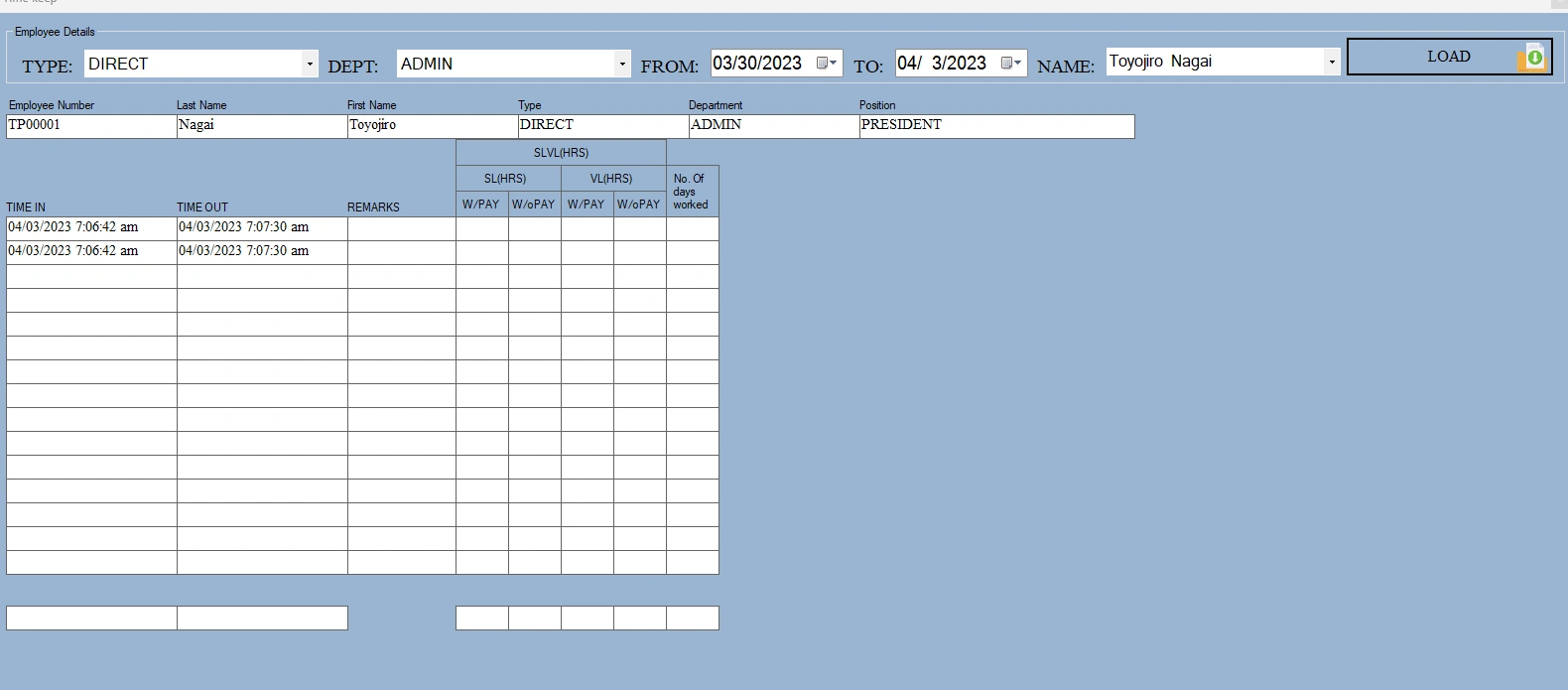
Hello guys please help me, I'm creating a time keeping I want the daterange from/to into textbox here is my code:
using (SqlConnection sqlConnection = new SqlConnection(Connect.pcnTEIPI))
{
SqlCommand command = new SqlCommand("select * from [AttendanceView] where Fullname ='" + cboName.Text + "' and TimeIn >= '"+ dtpDateFrom.Text +"' and TimeOut <= '"+ dtpDateto.Text +"'", sqlConnection);
sqlConnection.Open();
SqlDataReader read = command.ExecuteReader();
while (read.Read())
{
txtEmpNumber.Text = (read["Employeenumber"].ToString());
txtLastname.Text = (read["Lastname"].ToString());
txtFirstname.Text = (read["Firstname"].ToString());
txtType.Text = (read["Type"].ToString());
txtDepartment.Text = (read["Department"].ToString());
txtPosition.Text = (read["Position"].ToString());
TimeIN1.Text = (read["TimeIn"].ToString());
TimeOUT1.Text = (read["TimeOut"].ToString());
TimeIN2.Text = (read["TimeIn"].ToString());
TimeOUT2.Text = (read["TimeOut"].ToString());
}
}
Amit MohantyPosted Apr 3, 2023, 9:52 AM
Try this
Stored Procedure:
JC BalloPosted Apr 3, 2023, 11:41 PM
Thank you Sir Amit it works, I appreciate your kindness.
Mr. Vishal Thank you too for helping me. I also appreciate your kindness.
Vishal JoshiPosted Apr 3, 2023, 9:27 AM
Please try above code. as there index in readline we need to assign values by index.
JC BalloPosted Apr 3, 2023, 9:12 AM
private void btnLoadData_Click(object sender, EventArgs e)
{
using (SqlConnection sqlConnection = new SqlConnection(Connect.pcnTEIPI))
{
SqlCommand command = new SqlCommand("select * from [AttendanceView] where Fullname ='" + cboName.Text + "' and CAST(TimeIn AS DATE) >= '" + dtpDateFrom.Text + "' and CAST(TimeOut AS DATE) <= '" + dtpDateto.Text + "' ", sqlConnection);
sqlConnection.Open();
SqlDataReader read = command.ExecuteReader();
while (read.Read())
{
txtEmpNumber.Text = (read["Employeenumber"].ToString());
txtLastname.Text = (read["Lastname"].ToString());
txtFirstname.Text = (read["Firstname"].ToString());
txtType.Text = (read["Type"].ToString());
txtDepartment.Text = (read["Department"].ToString());
txtPosition.Text = (read["Position"].ToString());
TimeIN1.Text = (read["TimeIn"].ToString());
TimeOUT1.Text = (read["TimeOut"].ToString());
TimeIN2.Text = (read["TimeIn"].ToString());
TimeOUT2.Text = (read["TimeOut"].ToString());
TimeIN3.Text = (read["TimeIn"].ToString());
TimeOUT3.Text = (read["TimeOut"].ToString());
}
}
}
Hello Sir Vishal Joshi,
This is my source code also the image is also there. I tried your but still the same. I also used the DATETIME in CAST but not also working.
I want the data in sql server to fill in those textboxes by using daterange in 2 datetime picker I tried everything but I am out of knowledge I sorry for troubling you.
Vishal JoshiPosted Apr 3, 2023, 8:51 AM
Can you please confirm data response from query is correct or not?
Also, please share html and bind data code so i can review.
Thanks
JC BalloPosted Apr 3, 2023, 8:49 AM
Hello Mr. Vishal, I tried every possible way on the command you gave me but it's not working. I'm So sorry.
Vishal JoshiPosted Apr 3, 2023, 7:31 AM
Hello Ballo
As i undarstand it's issue of time comparison. in search box from date is 03/30/2023 but it response it's returnig only after 04/03/2023.
In this case you can use CAST sql function to compare only date.
Please try below query to get expected result.
Thanks
JC BalloPosted Apr 3, 2023, 7:07 AM
I have this data of timein and timeout, I want this 3 data or so on to put it into those textboxes of time int time out by clicking it in load data. I thought those simple codes will work by ranging it but its not.
Amit MohantyPosted Apr 3, 2023, 7:01 AM
Can you please provide more details or clarification on your requirement so that we can better understand what you need and provide you with a more accurate solution?