Hello Team,
Please in my window form application, am trying to load both Supplier and product on the sales page and my issues is Supplier and product are not loading.
private void frmPurchaseAdd_Load(object sender, EventArgs e)
{
string qry = "Select ProID 'id', pName 'name' from tblProduct";
string qry2 = "Select SupID 'id', SupName 'name' from tblSupplier";
MainClass.CBFill(qry, cbProduct, "name", "id");
MainClass.CBFill(qry2, cmbSupplier, "name", "id");
if(supID>0)
{
cmbSupplier.SelectedValue = supID;
}
}
private void GetDetails()
{
string qry = "Select * from tblProduct where ProID =" +Convert.ToInt32(cbProduct.SelectedValue)+ "";
SqlCommand cmd = new SqlCommand(qry, MainClass.con);
SqlDataAdapter da = new SqlDataAdapter(cmd);
DataTable dt = new DataTable();
da.Fill(dt);
if(dt.Rows.Count>0)
{
txtCost.Text = dt.Rows[0]["pCost"].ToString();
Calculate();
}
}
Muhammad Imran AnsariPosted Oct 18, 2023, 10:25 PM
It seems you are missing a bracket in your code and the missing the selectedProductId variable. Try the following code for your issue.
Emmmanuel FIADUFEPosted Oct 19, 2023, 7:55 AM
Please the selected value is not null, it is working but the Sr # is comming as zeros in the DataGridView as shown in the picture
Emmmanuel FIADUFEPosted Oct 18, 2023, 9:54 PM
Hello Muhammed,
After applying the chamges more errors occure, kindly check to see how well you can remodified it for me. thank you.
Muhammad Imran AnsariPosted Oct 18, 2023, 5:38 PM
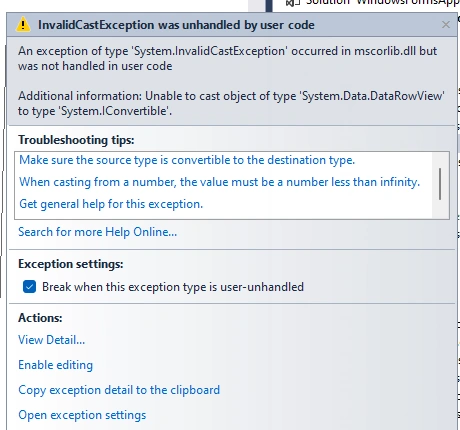
The InvalidCastException is likely occurring because the
SelectedValueproperty might not be an integer or convertible to an integer. To avoid this, you should first check if theSelectedValueis not null and then parse it to an integer.Here's the updated version of your
GetDetailsmethod to handle this:This modification ensures that the
SelectedValueis a valid integer before using it in the SQL query. If the parsing fails, it will show an error message to the user. Make sure to handle the error gracefully for a better user experience.