Selenium CheckBox Click When working on the computer, the same codes error on the website. What is the solution of this error?
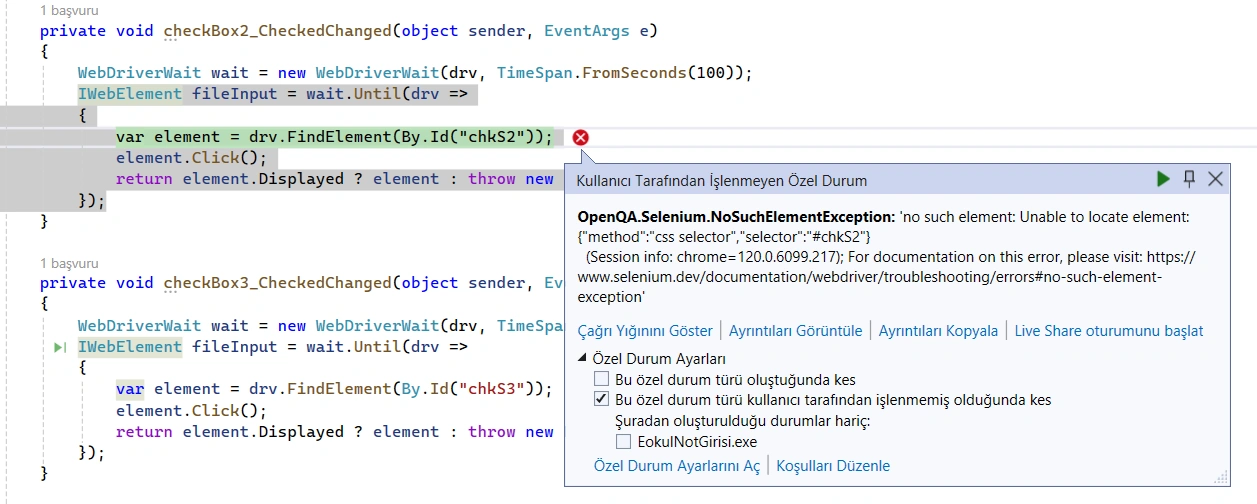
 private void checkBox2_CheckedChanged(object sender, EventArgs e)
 {
     WebDriverWait wait = new WebDriverWait(drv, TimeSpan.FromSeconds(100));
     IWebElement fileInput = wait.Until(drv =>
     {
         var element = drv.FindElement(By.Id("chkS2"));
         element.Click();
         return element.Displayed ? element : throw new NoSuchElementException();
     });
 }
Naimish MakwanaPosted Jan 17, 2024, 9:45 AM
The
NoSuchElementExceptiontypically occurs when Selenium WebDriver is unable to locate an element on the webpage. Here are a few strategies to handle this exception:WebDriverWaitwhich is a type of explicit wait. However, you might want to wait until the element is visible or clickable, not just present in the DOM12. Here’s how you can modify your code:Try-Catch Block: You can wrap your code inside a try-catch block to catch the
NoSuchElementExceptionif it occurs and let the code continue without stopping abruptly3.JavaScript Executor: If the element is not being found by the usual method, you can try finding the element with JavaScript2.
Scroll Into View: If the element is out of view and scrolling will reveal it, you can use JavaScript to scroll the element into view4.
Remember, the element might not be found due to reasons like the page is still rendering, AJAX has not returned yet, or the element is really not on the page1. So, it’s important to understand the root cause of the issue. If the element is dynamically loaded, waiting for the element to be ready before interacting with it is usually a good strategy. If the element is really not there, you might need to check your locator or the state of your application.
Thanks
Mehmet FatihPosted Jan 17, 2024, 8:24 AM
I am sorry to say that the result is the same.
Prasad RaveendranPosted Jan 17, 2024, 3:38 AM
It looks like you are using C# with Selenium to handle a checkbox change event. However, there seems to be a confusion in your code. The
checkBox2_CheckedChangedmethod is typically used for handling events when a checkbox state changes, and it seems like you are trying to find an element with the ID "chkS2" and click it within this method.If your intention is to click the checkbox with the ID "chkS2" when
checkBox2is checked or unchecked, you should refactor your code to handle the checkbox state change event appropriately. Here's an example of how you might modify your code:This modification ensures that the checkbox with the ID "chkS2" is clicked only when
checkBox2is checked. If you also want to handle the case whencheckBox2is unchecked, you can add an else block.Make sure that the element with ID "chkS2" is present on the page and that the ID is correct. If the error persists, you may want to check for other factors such as the visibility or interactability of the element. Additionally, make sure you have appropriate error handling in place to deal with any unexpected situations.