I have 2 datagridview(same). I want to transform 2.datagridview to ipnumber from ipadress with this code piece;
long result = 0;
if (!string.IsNullOrWhiteSpace(ip))
{
string[] temp = ip.Trim().Split('.');
if (temp != null && temp.Count() > 3)
{
string[] lastPart = temp[3].Split(':', ',', ' ');//Port verisinin gelmesi durumunda portu ayirmak için kullaniyoruz
result = long.Parse(temp[0]) * 256 * 256 * 256 +
long.Parse(temp[1]) * 256 * 256 +
long.Parse(temp[2]) * 256 +
//long.Parse(temp[3]);
long.Parse(lastPart[0]);
}
}
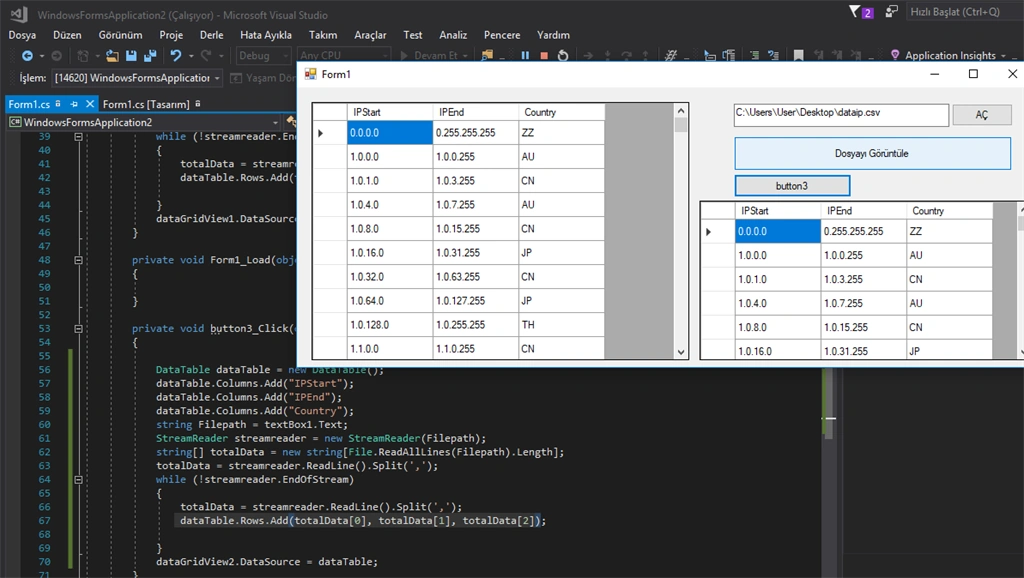
and my both 2 datagirdview is now:
0.0.0.0 / 0.0.255.255 / usa ......(600.000 row) 3columnthis my project s code
sing System;
using System.Collections.Generic;
using System.ComponentModel;
using System.Data;
using System.Drawing;
using System.IO;
using System.Linq;
using System.Text;
using System.Threading.Tasks;
using System.Windows.Forms;
namespace WindowsFormsApplication2
{
public partial class Form1 : Form
{
public Form1()
{
InitializeComponent();
}
private void button1_Click(object sender, EventArgs e)
{
OpenFileDialog op = new OpenFileDialog();
op.ShowDialog();
textBox1.Text = op.FileName;
}
private void button2_Click(object sender, EventArgs e)
{
DataTable dataTable = new DataTable();
dataTable.Columns.Add("IPStart");
dataTable.Columns.Add("IPEnd");
dataTable.Columns.Add("Country");
string Filepath = textBox1.Text;
StreamReader streamreader = new StreamReader(Filepath);
string[] totalData = new string[File.ReadAllLines(Filepath).Length];
totalData = streamreader.ReadLine().Split(',');
while (!streamreader.EndOfStream)
{
totalData = streamreader.ReadLine().Split(',');
dataTable.Rows.Add(totalData[0],totalData[1],totalData[2]);
}
dataGridView1.DataSource = dataTable;
}
private void button3_Click(object sender, EventArgs e)
{
DataTable dataTable = new DataTable();
dataTable.Columns.Add("IPStart");
dataTable.Columns.Add("IPEnd");
dataTable.Columns.Add("Country");
string Filepath = textBox1.Text;
StreamReader streamreader = new StreamReader(Filepath);
string[] totalData = new string[File.ReadAllLines(Filepath).Length];
totalData = streamreader.ReadLine().Split(',');
while (!streamreader.EndOfStream)
{
totalData = streamreader.ReadLine().Split(',');
dataTable.Rows.Add(totalData[0], totalData[1], totalData[2]);
}
dataGridView2.DataSource = dataTable;
}
}
}
using System.Collections.Generic;
using System.ComponentModel;
using System.Data;
using System.Drawing;
using System.IO;
using System.Linq;
using System.Text;
using System.Threading.Tasks;
using System.Windows.Forms;
namespace WindowsFormsApplication2
{
public partial class Form1 : Form
{
public Form1()
{
InitializeComponent();
}
private void button1_Click(object sender, EventArgs e)
{
OpenFileDialog op = new OpenFileDialog();
op.ShowDialog();
textBox1.Text = op.FileName;
}
private void button2_Click(object sender, EventArgs e)
{
DataTable dataTable = new DataTable();
dataTable.Columns.Add("IPStart");
dataTable.Columns.Add("IPEnd");
dataTable.Columns.Add("Country");
string Filepath = textBox1.Text;
StreamReader streamreader = new StreamReader(Filepath);
string[] totalData = new string[File.ReadAllLines(Filepath).Length];
totalData = streamreader.ReadLine().Split(',');
while (!streamreader.EndOfStream)
{
totalData = streamreader.ReadLine().Split(',');
dataTable.Rows.Add(totalData[0],totalData[1],totalData[2]);
}
dataGridView1.DataSource = dataTable;
}
private void button3_Click(object sender, EventArgs e)
{
DataTable dataTable = new DataTable();
dataTable.Columns.Add("IPStart");
dataTable.Columns.Add("IPEnd");
dataTable.Columns.Add("Country");
string Filepath = textBox1.Text;
StreamReader streamreader = new StreamReader(Filepath);
string[] totalData = new string[File.ReadAllLines(Filepath).Length];
totalData = streamreader.ReadLine().Split(',');
while (!streamreader.EndOfStream)
{
totalData = streamreader.ReadLine().Split(',');
dataTable.Rows.Add(totalData[0], totalData[1], totalData[2]);
}
dataGridView2.DataSource = dataTable;
}
}
}
James AxsomPosted Jun 30, 2018, 10:57 AM
Hi Fatih,
You want to transform an ip address to an ip number in your second datagridview using the code you presented to us. Correct?
If that’s correct, what is stopping you from using your code to transform the data?
If you already have the answer (your code) to your question (transform an ip number to ip address), then what is the problem to be solved?
I have a question: What is the difference between an ip address and an ip number?
If I google ip number nothing comes up stating “ip number”. Instead google shows me everything ip address. What is the difference?