You can improve the accpeted answer by doing the following:
Use type annotations to make your code more readable and maintainable. You can specify the types of the function arguments and the return value.
onFormSubmit(value: {EmpName: string}): void {
  // sample to get value of form
  const empName = value.EmpName;
}
Another improvement is use destructuring to extract values from objects and arrays and assign them to variables. You can use destructuring to extract the EmpName property from the value object.
onFormSubmit({EmpName}: {EmpName: string}): void {
  // sample to get value of form
  const empName = EmpName;
}
Vishal JoshiPosted Mar 14, 2023, 1:09 PM
You can get value like the below code
Tuhin PaulPosted Mar 18, 2023, 6:33 PM
You can improve the accpeted answer by doing the following:
Use type annotations to make your code more readable and maintainable. You can specify the types of the function arguments and the return value.
Another improvement is use destructuring to extract values from objects and arrays and assign them to variables. You can use destructuring to extract the EmpName property from the value object.
Sruthi DesaiPosted Mar 14, 2023, 1:13 PM
'EmpName' is declared but its value is never read.ts(6133)
Sruthi DesaiPosted Mar 14, 2023, 1:10 PM
Showing like this sir
Sruthi DesaiPosted Mar 14, 2023, 1:05 PM
I have shared both ts and html code plzz help sir.
Vishal JoshiPosted Mar 14, 2023, 1:05 PM
Please try the below defination for onFormSubmit in .ts file.
In HTML you can use the below code
Thanks
Sruthi DesaiPosted Mar 14, 2023, 1:04 PM
Sruthi DesaiPosted Mar 14, 2023, 1:03 PM
Sruthi DesaiPosted Mar 14, 2023, 1:02 PM
version 18.12.1
Vishal JoshiPosted Mar 14, 2023, 12:58 PM
Please share the version of angular.
Sruthi DesaiPosted Mar 14, 2023, 12:51 PM
But after removing parameter the details or not getting submitted.
Sruthi DesaiPosted Mar 14, 2023, 12:48 PM
Thank You Soo much it worked.
Vishal JoshiPosted Mar 14, 2023, 12:41 PM
Hello Sruthi
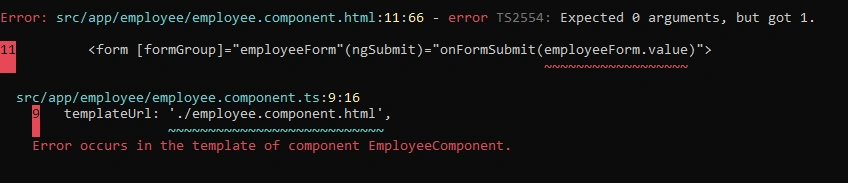
Your onSubmit() method does not expect any arguments. But from your html you call it with one argument: onSubmit(serviceForm.value)
I would remove the parameter from html just simply use onSubmit()
Thanks