Hello Team,
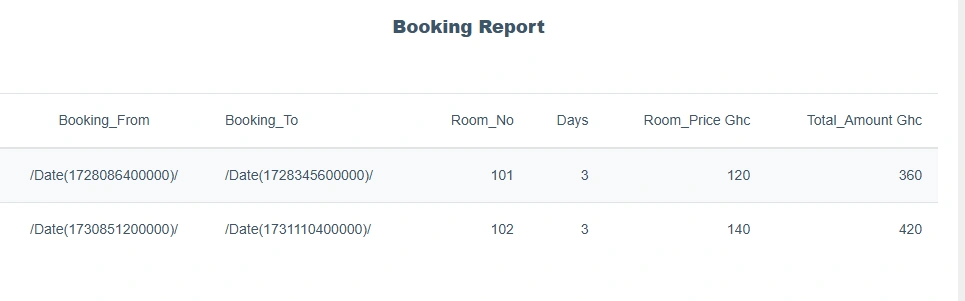
In my mvc controller and Js function my date formart became like this /Date(1728086400000)/ mean while in other part of project this same date format work fine as I expected.
public ActionResult GetAllBookingHistory(string RoomNumber, string sDate=null, string eDate=null)
{
    DateTime? startDate = null;
    if (!string.IsNullOrEmpty(sDate))
        startDate = Convert.ToDateTime(sDate);
    DateTime? endDate = null;
    if (!string.IsNullOrEmpty(eDate))
        endDate = Convert.ToDateTime(eDate);
    var bookingList = objHotelDbEntities.RoomBookings.Join(objHotelDbEntities.Rooms,
                      booking => booking.AssignRoomId,
                      room => room.RoomId,
                      (booking, room) => new { booking = booking, room = room });
    var modifiedData = bookingList.GroupBy(x => new { x.booking.BookingFrom, x.booking.BookingTo, x.booking.BookingId}).Select(x => new RoomBookingViewModel
    {
        CustomerName = x.FirstOrDefault().booking.CustomerName,
        Address = x.FirstOrDefault().booking.Address,
        PhoneNo = x.FirstOrDefault().booking.PhoneNo,
        BookingFrom = x.Key.BookingFrom,
        BookingTo = x.Key.BookingTo,
        BookingId = x.FirstOrDefault().booking.BookingId,
        RoomNumber = x.FirstOrDefault().room.RoomNumber,
        NoOfMembers = x.FirstOrDefault().booking.NoOfMembers,
        numberOfDays = System.Data.Entity.DbFunctions.DiffDays(x.Key.BookingFrom, x.Key.BookingTo).Value,
        RoomPrice = x.FirstOrDefault().room.RoomPrice,
        TotalAmount = x.FirstOrDefault().booking.TotalAmount,

    }).ToList();
    modifiedData.ForEach(a => { a.BookingFrom = Convert.ToDateTime(a.BookingFrom); });
    if(startDate !=null)
    {
        modifiedData = modifiedData.Where(a => a.BookingFrom >= startDate).ToList();
    }
    if(endDate !=null)
    {
        modifiedData = modifiedData.Where(a => a.BookingFrom <= endDate).ToList();
    }
    var responseData = modifiedData.OrderBy(a => a.BookingFrom).ToList();
    var TotalSales = responseData.Sum(a => a.TotalAmount);
    return Json(modifiedData, JsonRequestBehavior.AllowGet);
}
Jignesh KumarPosted Nov 26, 2024, 2:41 AM
Hello Emmmanuel ,
You haven't incorporated my latest updated code into your function. I have updated the
parseJsonDate()method for you; please apply the following change, as it should resolve your issue.Emmmanuel FIADUFEPosted Nov 26, 2024, 7:14 AM
Thank you team,
verything is working perfectly now as per Kumar's code
Emmmanuel FIADUFEPosted Nov 25, 2024, 2:33 PM
Hello Jignesh Kumar,
This is the current update.
function dateParser(input) {
input = input.replace('/Date(', '');
return new Date(parseInt(input, 10));
}
function GetAllBookingPDFReport() {
$http.get('/Booking/GetAllBookingHistoryPDF')
.then(function (response) {
var data = response.data;
// Parse dates if needed
data.forEach(function (item) {
if (item.BookingFrom) {
item.BookingFrom = dateParser(item.BookingFrom);
}
if (item.BookingTo) {
item.BookingTo = dateParser(item.BookingTo);
}
});
$scope.PrintBookingRecordList = data;
sumOfSalesDetails($scope);
})
}
Jignesh KumarPosted Nov 23, 2024, 6:17 AM
Could you please share your updated code here? This will help us better understand what might be wrong with it.
Emmmanuel FIADUFEPosted Nov 22, 2024, 6:04 PM
Thank you Team for your support so far, but just that nothing is working.
Any further help will be greatly appreciated
Emmmanuel FIADUFEPosted Nov 22, 2024, 3:25 PM
Hello Jignesh Kumar
It is not working please
Ramesh PalanivelPosted Nov 22, 2024, 7:47 AM
Instead doing it your own, we have several date library which makes code easier. Please refer some of open source datatime libraray Moment.js, Datejs
Refer this article for more info
https://phrase.com/blog/posts/best-javascript-date-time-libraries/#:~:text=across%20the%20globe.-,Datejs,formatting%2C%20and%20processing%20DateTime%20objects.
Jignesh KumarPosted Nov 22, 2024, 3:39 AM
Hello Emmmanuel ,
To convert the
/Date(1728086400000)/format into the'dd-MM-yyyy'format in your JavaScript function, you can modify theparseJsonDatefunction to include formatting logic. Here’s the updated function:Emmmanuel FIADUFEPosted Nov 21, 2024, 8:35 PM
Hello Jignesh Kumar
The date format is isn't wroking
Jignesh KumarPosted Nov 21, 2024, 1:57 AM
Hello Emmmanuel ,
Please use this updated version. It may be / not removed in that so it's giving null.
Emmmanuel FIADUFEPosted Nov 21, 2024, 12:50 AM
Hello Jayraj Chhaya,
Please this is the error, message that came.
Emmmanuel FIADUFEPosted Nov 21, 2024, 12:44 AM
Hello Amit Mohanty
Please this is the date format that came which isn't what I'm looking for.
I want something like dd-MM-yyyy
Emmmanuel FIADUFEPosted Nov 21, 2024, 12:40 AM
Hello Jignesh Kumar
Please when I use your code, this is the result that I got
Emmmanuel FIADUFEPosted Nov 19, 2024, 10:28 AM
Thank you team,
Please I will check it out and revert as soon as possible.
Jignesh KumarPosted Nov 19, 2024, 5:48 AM
Hello Emmmanual,
If you are encountering issues with the date format, you can apply the following code in your application's front-end JavaScript., It should resolve your issue,
Amit MohantyPosted Nov 19, 2024, 5:39 AM
Format the dates into a standard format before returning them as JSON. For example
On client side, ff you prefer keeping the
/Date(timestamp)/format on the server, parse it in JavaScript using a function. For example:Jayraj ChhayaPosted Nov 18, 2024, 1:01 PM
Hi @Emmmanuel FIADUFE,
The date format issue you are encountering, where dates are represented as
/Date(1728086400000)/, is typically related to how dates are serialized in JSON. This format is a JSON representation of a .NET DateTime object, which can be confusing when consumed in JavaScript.To resolve this, ensure that the dates are properly formatted before being sent to the client. You can modify your
GetAllBookingHistoryaction to convert the DateTime objects to a more JavaScript-friendly format, such as ISO 8601.In your JavaScript function, you can then parse these dates easily:
Emmmanuel FIADUFEPosted Nov 18, 2024, 11:13 AM
JS Function