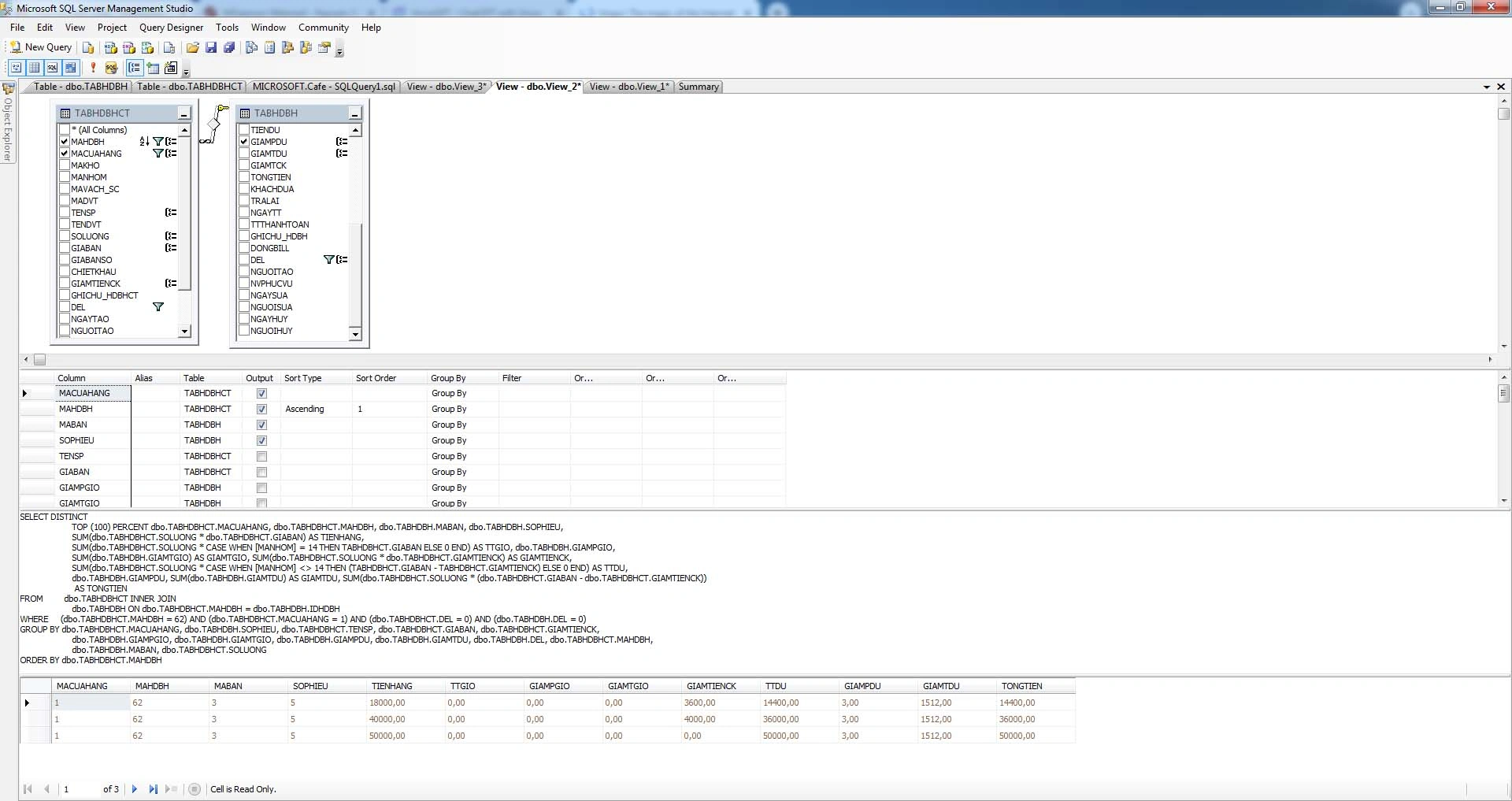
you see my image and sql file why not sum and group into one line ?
SELECT DISTINCT
    TOP (100) PERCENT dbo.TABHDBHCT.MACUAHANG, dbo.TABHDBHCT.MAHDBH, dbo.TABHDBH.MABAN, dbo.TABHDBH.SOPHIEU,
    SUM(dbo.TABHDBHCT.SOLUONG * dbo.TABHDBHCT.GIABAN) AS TIENHANG,
    SUM(dbo.TABHDBHCT.SOLUONG * CASE WHEN [MANHOM] = 14 THEN TABHDBHCT.GIABAN ELSE 0 END) AS TTGIO, dbo.TABHDBH.GIAMPGIO,
    SUM(dbo.TABHDBH.GIAMTGIO) AS TGIAMTGIO, SUM(dbo.TABHDBHCT.SOLUONG * dbo.TABHDBHCT.GIAMTIENCK) AS TGIAMTIENCK,
    SUM(dbo.TABHDBHCT.SOLUONG * CASE WHEN [MANHOM] <> 14 THEN (TABHDBHCT.GIABAN - TABHDBHCT.GIAMTIENCK) ELSE 0 END) AS TTDU,
    dbo.TABHDBH.GIAMPDU, SUM(dbo.TABHDBH.GIAMTDU) AS TGIAMTDU,
    SUM(dbo.TABHDBHCT.SOLUONG * (dbo.TABHDBHCT.GIABAN - dbo.TABHDBHCT.GIAMTIENCK)) AS TONGTIEN
FROM         dbo.TABHDBHCT INNER JOIN
    dbo.TABHDBH ON dbo.TABHDBHCT.MAHDBH = dbo.TABHDBH.IDHDBH
WHERE     (dbo.TABHDBHCT.MAHDBH = 62) AND (dbo.TABHDBHCT.MACUAHANG = 1) AND (dbo.TABHDBHCT.DEL = 0) AND (dbo.TABHDBH.DEL = 0)
GROUP BY dbo.TABHDBHCT.MACUAHANG, dbo.TABHDBHCT.MAHDBH, dbo.TABHDBH.MABAN, dbo.TABHDBH.SOPHIEU, dbo.TABHDBHCT.SOLUONG,
    dbo.TABHDBHCT.GIABAN, dbo.TABHDBHCT.GIAMTIENCK, dbo.TABHDBHCT.MANHOM, dbo.TABHDBH.GIAMPGIO, dbo.TABHDBH.GIAMTGIO, dbo.TABHDBH.GIAMPDU,
    dbo.TABHDBH.GIAMTDU
ORDER BY dbo.TABHDBHCT.MAHDBH
Prasad RaveendranPosted Jul 1, 2023, 4:00 PM
You can combine the SUM and GROUP BY clauses into a single line by using the OVER clause with the PARTITION BY statement. Here's the refactored query with the SUM and GROUP BY combined into one line:
In this refactored query, the SUM function is used with the OVER clause, which partitions the data based on the specified columns (TABHDBHCT.MACUAHANG, TABHDBHCT.MAHDBH, TABHDBH.MABAN, TABHDBH.SOPHIEU). The OVER clause allows you to calculate the aggregate functions within each partition. This eliminates the need for a separate GROUP BY clause.
Deepak RawatPosted Jun 28, 2023, 5:29 AM
Based on the provided SQL query, it seems that the intention is to sum and group the data into one line. However, there might be some factors preventing the desired result. Here are a few things to consider:
DISTINCT: The query starts with a DISTINCT keyword, which ensures that the result set only contains distinct rows. If there are multiple rows with the same values for all selected columns, only one of them will be returned. This can affect the grouping and summing of data.
Grouping Columns: The GROUP BY clause specifies the grouping columns. Make sure that all the necessary columns for grouping are included. It seems that the query already includes the relevant columns for grouping, such as
TABHDBHCT.MACUAHANG,TABHDBHCT.MAHDBH,TABHDBH.MABAN,TABHDBH.SOPHIEU, etc.Aggregation Functions: The query uses aggregate functions like SUM to calculate the desired totals. These functions should be applied to the appropriate columns that need to be summed.
Additional Columns: Check if there are any additional columns in the SELECT statement that might affect the grouping. It's important to only select the necessary columns for grouping and aggregation.
WHERE Clause: Ensure that the conditions specified in the WHERE clause filter the data correctly and do not exclude any necessary rows for grouping.
By reviewing these factors and making appropriate adjustments to the query, you should be able to achieve the desired result of summing and grouping the data into one line.
Amit MohantyPosted Jun 27, 2023, 5:34 AM
To group the results and calculate the sum in a single line, you need to remove the individual quantities from the GROUP BY clause and include them in the aggregate functions.
Rajkiran SwainPosted Jun 27, 2023, 5:03 AM