Can anyone tell me how to extract only required text from Word document using C#.
About Word document:
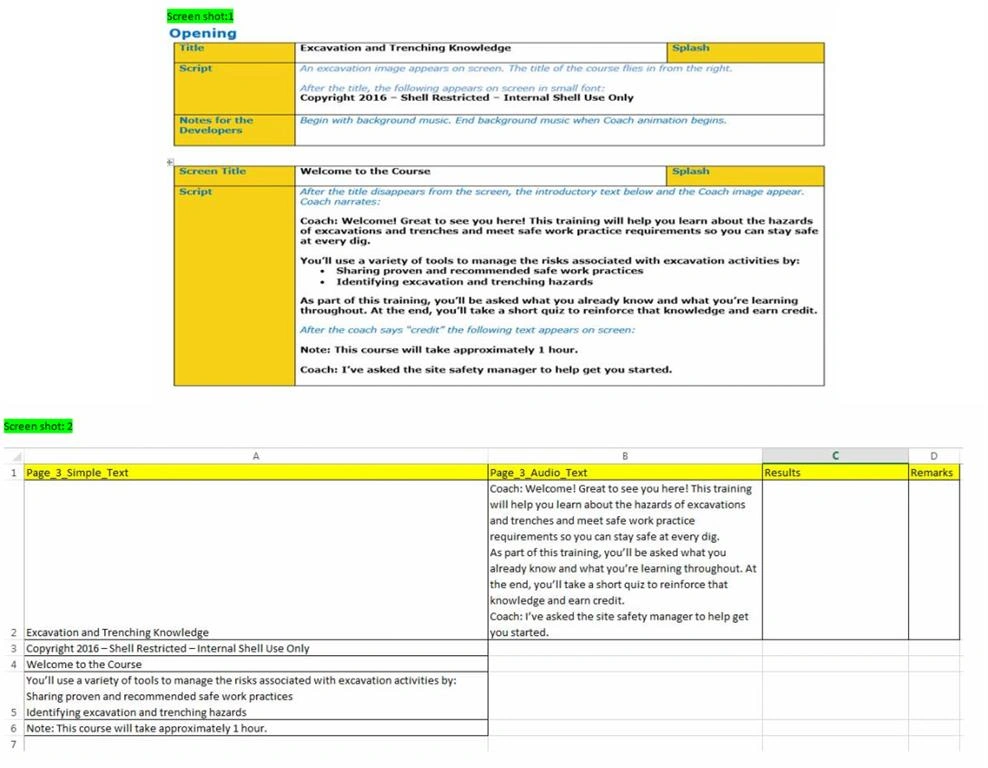
It contains some Simple text and Audio text and I want to Extract that text from word file and generate the Excel file.
Below storyboard Screen Shot-1 contains Simple text and Audio text and where you can see 2 Text color Blue and Black. Problem is to identify the Black color Text because it has some Simple Text and Audio Text and I want that Text into Excel in separate columns as displayed in Screen shot-2.
and i'm able to extract the text from Word document into Excel but problem is how can I identify Simple text and Audio text without changing the font style and color to generate Excel file.
Any help in this will be highly appreciated.
Thanks in advance.
Ankur BharataPosted Jul 28, 2016, 12:25 PM
Since you want to extract text from the word (DOC) file based on color, I think you might need to load the file as an image first.
So first thing to do is to load or convert the word doc file to image. I found the following threads that might help:
http://stackoverflow.com/questions/20326478/convert-word-file-pages-to-jpg-images-using-c-sharp
http://stackoverflow.com/questions/24830027/issue-with-converting-doc-to-png
After this, you need to find the non-black colored text in the image and hide it. You need to create a region that contains only non-black colored pixels. I think this is applicable using Microsoft .NET graphics object.
Also, there might be some sdks (like leadtools) that can do all the above (loading DOC file, find non-black colored text and then save the result as Excell, etc.). I found the following link that might help:
https://www.leadtools.com/help/leadtools/v19/dh/to/leadtools.topics.documents.converters~doxc.topics.documentconverters_using.html
Rohit MehtaPosted Jun 30, 2016, 12:33 AM
Akshay PhadkePosted Jun 24, 2016, 7:14 AM