In my financial application I have a DataGrid with a DataTable as ItemSource. I'm using the DataTable because of the flexibility to view queries with different number of columns. So, the viewmodel creates the DataTable. The AutoGenerateColumns="True" to support the flexibility. I added some logic in the UI to highlight negative values. The XAML code:
It uses a ValueConverter to determine if the cell is not empty and to set the Background color based on the value.
public class ValueToColorConverter : IValueConverter
{
    public object Convert(object value, Type targetType, object parameter, CultureInfo culture)
    {
        if ((value.GetType() == typeof(string)))
        {
            if (decimal.TryParse((string)value, out decimal decimalValue))
            {
                if (decimalValue < 0)
                {
                    return Brushes.Orange as Brush;
                }
                else
                {
                    return Brushes.White as Brush;
                }
            }
            return Brushes.White as Brush;
        }
        throw new NotImplementedException($"No conversion from type {value.GetType()} to a Brush");
    }
}
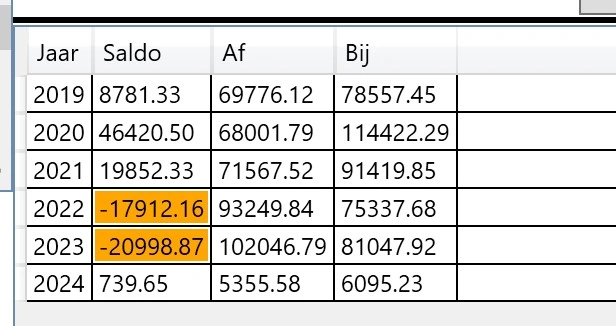
As a first step works fine with the following result:
However I profer to have a more subtile formatting, by just coloring the Foreground color of the textbox and with right alignment:

I could not find a way to format the TextBox of the cell.
How can you achieve it, preferably in XAML
Prasad RaveendranPosted Feb 25, 2024, 4:43 PM
To apply styles like foreground color and right alignment to the content of DataGrid cells, you can extend your existing DataGrid.CellStyle. Here's an example of how you can modify your XAML code to include foreground color and right alignment:
In this example, I added two setters to the DataGridCell style:
Foreground: This sets the foreground color of the cell's content. You can replace "Black" with the color you desire.HorizontalAlignment: This sets the horizontal alignment of the content to "Right". You can change it to "Left" or "Center" based on your requirements.Adjust these values according to your preferences.