
I set up a github repository to match the project I am working on in Visual Studio 2022. I did something wrong and only the project file exists. I followed a tutorial. But the tutorial was disappointing and the instruction was to drag the content of my project and I suppose I only uploaded the project file.
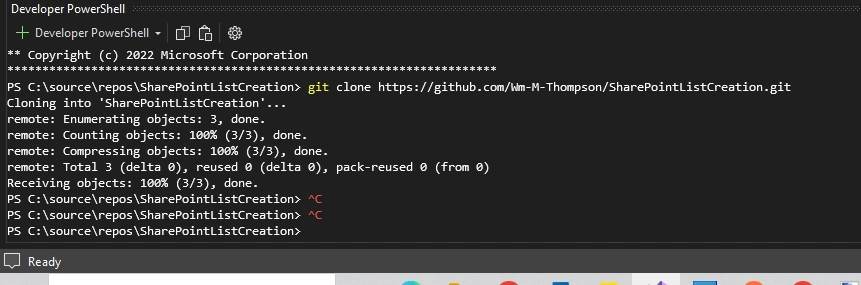
That was then. This is now. So far this is what I have done. In Visual studio I opened a command window by click on CTRL + `. THen using the.git file and its location from my github repository, I typed at the command line:
What are the next steps?
Jignesh KumarPosted Sep 28, 2024, 4:37 AM
Hello,
You can check the file list for the current project using the command below.
ls -> list of files in the current directory.
git status : To see untracked, modified, and staged files.
git ls-files : To see all tracked files in the repository