how to get the exact value of total hours with minutesXZxeo zer9yAsked Jun 21, 2017, 3:32 AM1.2kVisual Basic .NETno negative value of total hours
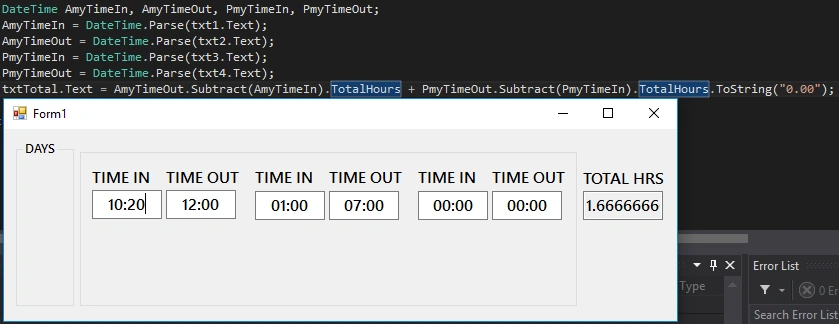
Rafnas T P9y agoPosted Jun 21, 2017, 5:46 AMAccepted answerok you are saying AM is in morning and PM is in evening But you have concanate this AM or PM with time when you do calculation like below AmyTimIn=DateTime.Parse(txt1.Text+" AM");AmyTimOut=DateTime.Parse(txt2.Text+" AM"); PmyTimIn=DateTime.Parse(txt3.Text+" PM");PmyTimOut=DateTime.Parse(txt4.Text+" PM");..... +1
Rafnas T P9y agoPosted Jun 22, 2017, 2:08 AMover time should be with dates becouse, time out may be next day so0
Rafnas T P9y agoPosted Jun 21, 2017, 7:24 AMyou have add am pm for overtime Time in and Time out in drop down or some ware and some code also you have to modifyI am attaching modified one please have a check+1
Rafnas T P9y agoPosted Jun 21, 2017, 6:54 AMcan you post full totalhrs text box value generation code0
XZxeo zer9y agoPosted Jun 21, 2017, 5:05 AM heres the second problem in overtime total must be 10 hrs0
XZxeo zer9y agoPosted Jun 21, 2017, 5:00 AMright but if employee did not take a break it gives me a negative result0
Rafnas T P9y agoPosted Jun 21, 2017, 4:30 AM1. Time should contain AM/PM if it is 12 hrs formate2. if 24 hrs then no need but time in should be Less than time out if you follow these two then you will not get negative values0
Rafnas T PPosted Jun 21, 2017, 5:46 AM
Rafnas T PPosted Jun 22, 2017, 2:08 AM
xeo zerPosted Jun 21, 2017, 10:16 PM
Rafnas T P
xeo zerPosted Jun 21, 2017, 6:44 PM
Rafnas T PPosted Jun 21, 2017, 7:24 AM
Rafnas T PPosted Jun 21, 2017, 6:54 AM
xeo zerPosted Jun 21, 2017, 6:52 AM
Rafnas T PPosted Jun 21, 2017, 6:36 AM
Rafnas T PPosted Jun 21, 2017, 6:32 AM
xeo zerPosted Jun 21, 2017, 6:25 AM
Rafnas T PPosted Jun 21, 2017, 5:51 AM
xeo zerPosted Jun 21, 2017, 5:05 AM
xeo zerPosted Jun 21, 2017, 5:00 AM
Rafnas T PPosted Jun 21, 2017, 4:30 AM
Rafnas T PPosted Jun 21, 2017, 4:27 AM