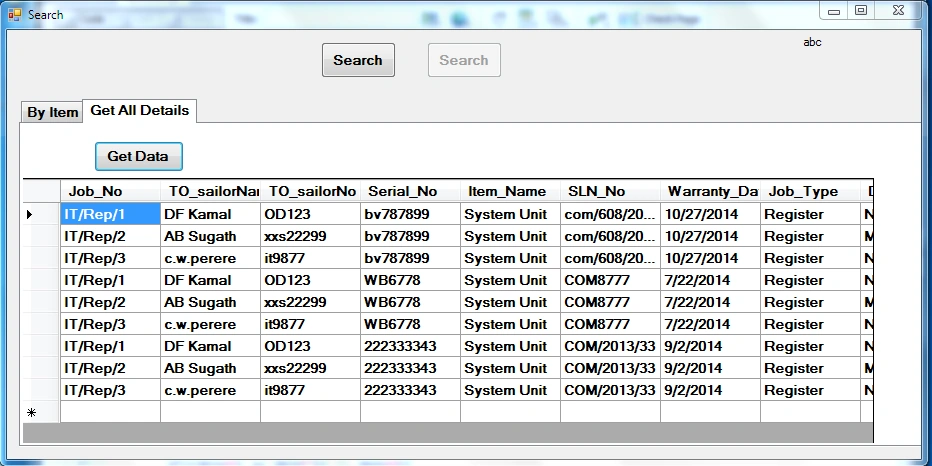
If you see the records carefully, they are not duplicate at all. e.g. Each duplicate(as per your statement) Job_No have different Serial_No entry than previous ones.
So the records you are getting are nothing but distinct only. Please check your data.
try this type WITH cte AS ( SELECT Job_NO,anotherColumnName,anotherColumnName row_number() OVER ( PARTITION BY name ORDER BY Job_NO) AS row_num FROM yourTable ) DELETE FROM cte WHERE row_num > 1


Vishal JadhavPosted Nov 5, 2014, 7:40 AM
If you see the records carefully, they are not duplicate at all.
e.g. Each duplicate(as per your statement) Job_No have different Serial_No entry than previous ones.
So the records you are getting are nothing but distinct only.
Please check your data.
Thanks.
Joginder BangerPosted Nov 5, 2014, 4:28 AM
WITH cte AS ( SELECT Job_NO,anotherColumnName,anotherColumnName
row_number() OVER ( PARTITION BY name ORDER BY Job_NO) AS row_num
FROM yourTable ) DELETE FROM cte WHERE row_num > 1
Riddhi ValechaPosted Nov 5, 2014, 1:28 AM
1 line remaining - Datagridview1.Databind();
Last line after assigning the DataSource.
In database, make Job_No as primary key... If this is not the mapping table.
Chathurika PalliyagurugePosted Nov 5, 2014, 1:08 AM
Joginder BangerPosted Nov 5, 2014, 1:01 AM
Chathurika PalliyagurugePosted Nov 5, 2014, 12:17 AM
Joginder BangerPosted Nov 4, 2014, 11:47 PM
select distinct Job.Job_no,To_SailorName,Solution,Ho_sailorName from yourTableName"
use this distinct keyword , you duplicate data automatic hide.