Hi I have one field called contactperson and i kept one add button near to that field.if i click that add button partial view will appear as popup window
My Parent view and Child View
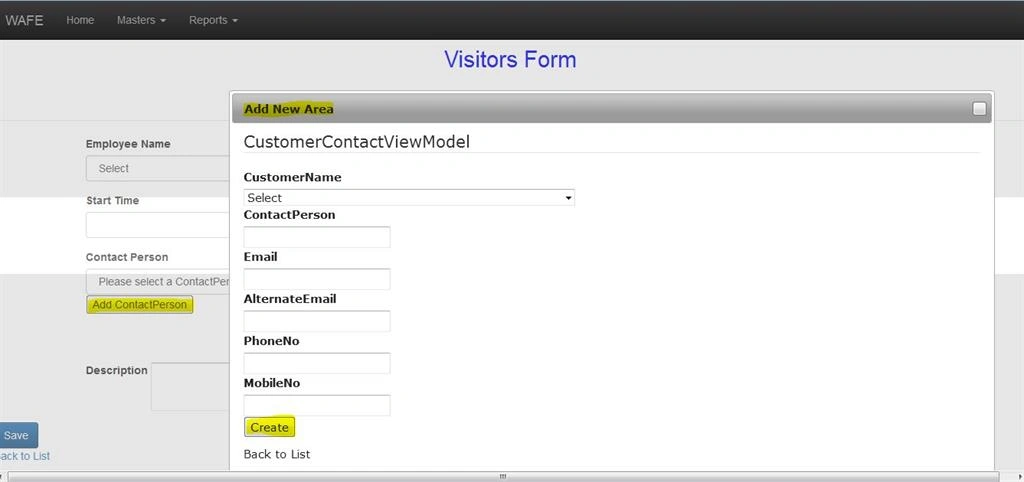
if i click the add button near to contact person it will open the add new area popup window now i enter the details which is in the popup window it saving the data in db but it not redirect to parent view correctly. That is when i click the Create button which is popup window it shows this page but it saving the data in DB.
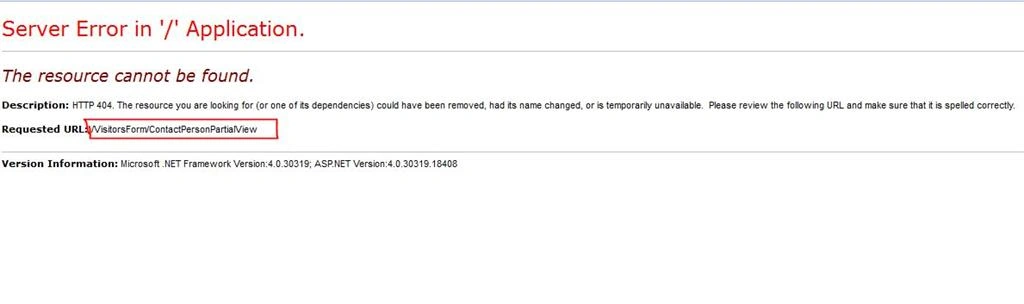
And also i created the properties of partial view in same view model which is used for parent view.
My View
@Html.Label("Contact Person", new { @class = "control-label" })
@Html.DropDownListFor(model => model.CustomerContactID, new SelectList(string.Empty, "Value", "Text"), "Please select a ContactPerson", new { @class = "form-control", type = "text", id = "CustomerContactID" })
J query
This code is to open the partial view as popup window
$('.AddContactPerson').on('click', function () {
$("#AddNewContactPerson").dialog({
autoOpen: true,
position: { my: "center", at: "top+350", of: window },
width: 1000,
resizable: false,
title: 'Add New Area',
modal: true,
open: function () {
$(this).load('@Url.Action("ContactPersonPartialView", "VisitorsForm")');
},
buttons: {
Cancel: function () {
$(this).dialog("close");
}
}
});
return false;
});
$("#AddNewContactPerson").dialog({
autoOpen: true,
position: { my: "center", at: "top+350", of: window },
width: 1000,
resizable: false,
title: 'Add New Area',
modal: true,
open: function () {
$(this).load('@Url.Action("ContactPersonPartialView", "VisitorsForm")');
},
buttons: {
Cancel: function () {
$(this).dialog("close");
}
}
});
return false;
});
My partial View
@Html.LabelFor(model => model.CustomerName)
@Html.DropDownList("CustomerID", "Select")
@Html.LabelFor(model => model.ContactPerson)
@Html.EditorFor(model => model.ContactPerson)
@Html.ValidationMessageFor(model => model.ContactPerson)
@Html.LabelFor(model => model.Email)
@Html.EditorFor(model => model.Email)
@Html.ValidationMessageFor(model => model.Email)
Partialview jquery code
My Viewmodel
public Nullable CustomerID { get; set; }
public string CustomerName { get; set; }
public Nullable CustomerContactID { get; set; }
public Nullable ContactID { get; set; }
public string ContactPerson { get; set; }
public string PhoneNo { get; set; }
public string MobileNo { get; set; }
public string Email { get; set; }
public string AlternateEmail { get; set; }
public string CustomerName { get; set; }
public Nullable
public Nullable
public string ContactPerson { get; set; }
public string PhoneNo { get; set; }
public string MobileNo { get; set; }
public string Email { get; set; }
public string AlternateEmail { get; set; }
My Controller
public PartialViewResult ContactPersonPartialView() //Insert PartialView
{
ViewBag.CustomerID = new SelectList(db.Customers, "CustomerID", "DisplayName");
return PartialView ();
}
[HttpPost]
public JsonResult ContactPersonCreate(VisitorsViewModel VVviewmodel)
{
ViewBag.CustomerID = new SelectList(db.Customers, "CustomerID", "DisplayName", VVviewmodel.CustomerID);
var ContactIDObj = Guid.NewGuid();
var CustomerContactIDObj = Guid.NewGuid();
var CustomerContactObj = new CustomerContact()
{
CustomerContactID = CustomerContactIDObj,
CustomerID = VVviewmodel.CustomerID,
ContactReference = VVviewmodel.ContactPerson,
ContactID = ContactIDObj,
IsActive = true,
IsDeleted = false,
CreatedDate = DateTime.Now,
EditedDate = DateTime.Now,
LastActiveOn = DateTime.Now,
RowID = Guid.NewGuid(),
CreatedSessionID = Guid.NewGuid(),
EditedSessionID = Guid.NewGuid(),
OfflineMode = false,
OfflineID = Guid.NewGuid()
};
var ContactObj = new Contact()
{
ContactID = ContactIDObj,
DisplayName = VVviewmodel.CustomerID.ToString(),
PrintName = VVviewmodel.CustomerID.ToString(),
Phone1 = VVviewmodel.PhoneNo,
Mobile1 = VVviewmodel.MobileNo,
Email1 = VVviewmodel.Email,
Email2 = VVviewmodel.AlternateEmail
};
db.Contacts.Add(ContactObj);
db.CustomerContacts.Add(CustomerContactObj);
db.SaveChanges();
ModelState.Clear();
//return Json(new
//{
// redirectUrl = Url.Action("create", "VisitorsForm"),
// isRedirect = true
//});
return Json( "VisitorsForm" ,JsonRequestBehavior.AllowGet);
}
{
ViewBag.CustomerID = new SelectList(db.Customers, "CustomerID", "DisplayName");
return PartialView ();
}
[HttpPost]
public JsonResult ContactPersonCreate(VisitorsViewModel VVviewmodel)
{
ViewBag.CustomerID = new SelectList(db.Customers, "CustomerID", "DisplayName", VVviewmodel.CustomerID);
var ContactIDObj = Guid.NewGuid();
var CustomerContactIDObj = Guid.NewGuid();
var CustomerContactObj = new CustomerContact()
{
CustomerContactID = CustomerContactIDObj,
CustomerID = VVviewmodel.CustomerID,
ContactReference = VVviewmodel.ContactPerson,
ContactID = ContactIDObj,
IsActive = true,
IsDeleted = false,
CreatedDate = DateTime.Now,
EditedDate = DateTime.Now,
LastActiveOn = DateTime.Now,
RowID = Guid.NewGuid(),
CreatedSessionID = Guid.NewGuid(),
EditedSessionID = Guid.NewGuid(),
OfflineMode = false,
OfflineID = Guid.NewGuid()
};
var ContactObj = new Contact()
{
ContactID = ContactIDObj,
DisplayName = VVviewmodel.CustomerID.ToString(),
PrintName = VVviewmodel.CustomerID.ToString(),
Phone1 = VVviewmodel.PhoneNo,
Mobile1 = VVviewmodel.MobileNo,
Email1 = VVviewmodel.Email,
Email2 = VVviewmodel.AlternateEmail
};
db.Contacts.Add(ContactObj);
db.CustomerContacts.Add(CustomerContactObj);
db.SaveChanges();
ModelState.Clear();
//return Json(new
//{
// redirectUrl = Url.Action("create", "VisitorsForm"),
// isRedirect = true
//});
return Json( "VisitorsForm" ,JsonRequestBehavior.AllowGet);
}
All are working fine it open the partial view as popup window when i click the button and if i enter the details it save the value in Db when i click create button in partial view but it not redirect the page correctly. please any one correct my http post return json code . i tried many ways but its not working. please give me suggession.
Advance Thanks
Shuvojit HalderPosted Feb 26, 2016, 5:51 AM