
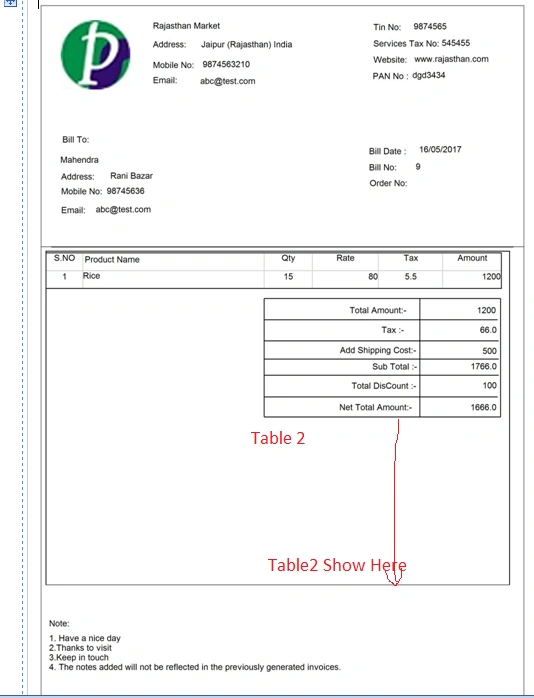
how to table2 show in near footer in Rdlc Report in Windows application c#
Know the answer? Post it — somebody with the same question will find it here.
Sign in to answer this question
It is the same account you read, post and publish with — and you will come straight back to this page.
Rafnas T PPosted May 24, 2017, 7:10 AM
Second- don't use the build-in Footer. Instead, use a sub-report that will contain your footer details.
Now, you need to define the sub-report as thin as possible in the main report (while in the actual sub-report - arrange your data as you want).
now add a page footer(in your sub report) you should right-click on the design surface, point to Insert, and then click Footer (Or it can be enabled through the Report menu –> Add page footer in BIDS ).
You could put the rectangle into a page footer and set its Hidden property to:
Rafnas T PPosted May 24, 2017, 5:50 AM
Jyoti JodhaPosted May 24, 2017, 5:47 AM
Rafnas T PPosted May 24, 2017, 5:44 AM
Jyoti JodhaPosted May 24, 2017, 5:27 AM
Jyoti JodhaPosted May 24, 2017, 5:24 AM
Amit GuptaPosted May 24, 2017, 5:03 AM
Jyoti JodhaPosted May 24, 2017, 4:59 AM
I am Use Rectangle
and set height and weight
but when print 2,3 page then printing format change.....
Amit GuptaPosted May 24, 2017, 3:33 AM