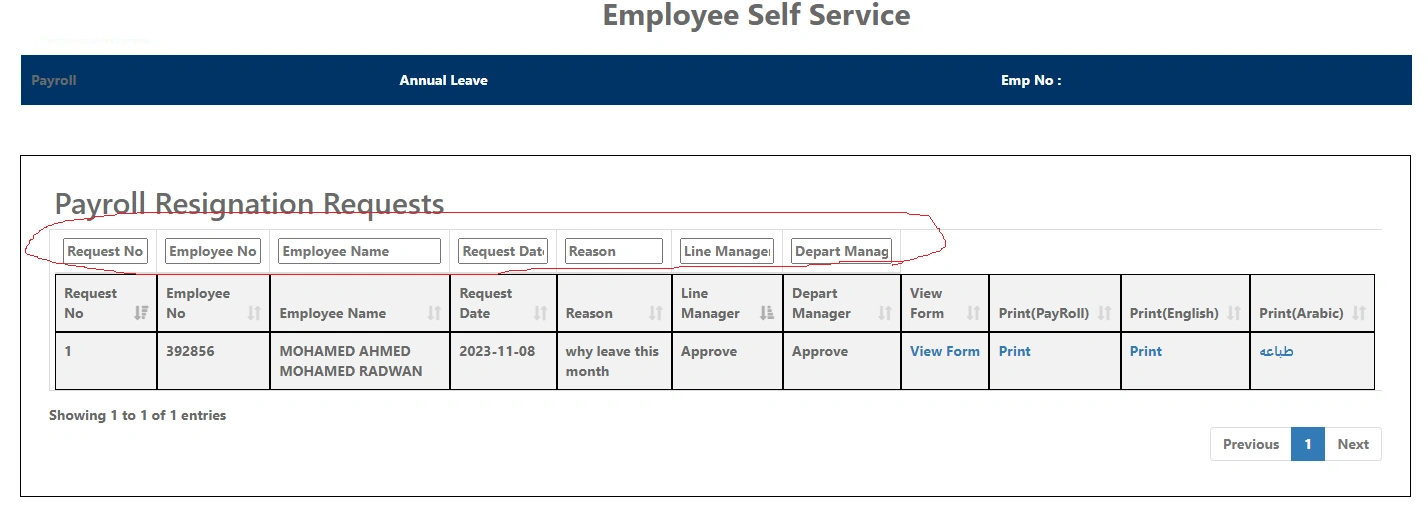
I work on asp.net mvc page view . but i face issue search for every column not fit for column header and have bad design
so How to enhance bad design for input to be suitable and have good design
I using search for every column above header that represent by tfoot
my issue search above header not have same size and have bad design so how to enhance it
so input text with red color surronded have issue on design so how to make it have good design
my code details as below :
@model IEnumerable
@{
ViewBag.Title = "PayrollTeam";
Layout = "~/Views/Shared/_LayoutResignation.cshtml";
var color = "white";
// string userRole = Session[SessionKeys.RoleCode].ToString();
}
Request No
Employee No
Employee Name
Request Date
Reason
Line Manager
@foreach (var item in Model)
{
@Html.DisplayFor(modelItem => item.RequestNo)
@Html.DisplayFor(modelItem => item.EmpID)
@Html.DisplayFor(modelItem => item.EmpName)
@Html.DisplayFor(modelItem => item.ResignationSubmissionDate)
@Html.DisplayFor(modelItem => item.Reason)
@Html.DisplayFor(modelItem => item.LineManagerStatus)
}
Request No
Employee No
Employee Name
Request Date
Reason
Line Manager
Tuhin PaulPosted Nov 11, 2023, 6:54 PM
You mentioned that the input fields in tfoot have varying sizes. To make the input fields have the same width, you can set a fixed width using CSS. In your code, you already have a CSS rule for tfoot input, but you can also add this rule to tfoot input[type="text"]:
This CSS rule will verify that all search input fields in the table footer have the same width.