Hi Team
I need some help, i have installed jdk 8 and when run command on CMD java -version it shows jdk1.8. Then i want to launch an Emulator on Android Studio, got this following error. What are the necessary steps to fix this?
FAILURE: Build failed with an exception.

* What went wrong:
The supplied javaHome seems to be invalid. I cannot find the java executable. Tried location: C:\Program Files\Java\jdk-19\bin\java.exe

* Try:
> Run with --stacktrace option to get the stack trace.
> Run with --info or --debug option to get more log output.
> Run with --scan to get full insights.

Exception: Gradle task assembleDebug failed with exit code 1
Tuhin PaulPosted Mar 10, 2024, 3:23 PM
Your steps for configuring the JDK path in Android Studio and verifying the environment variables are clear and accurate. However, I can provide some additional tips to ensure a smooth configuration process:
Before configuring the JDK path in Android Studio, ensure that you have JDK 8 (or later) installed on your system. You can do this by checking the installation directory and verifying the presence of the necessary files, such as java.exe in the bin directory.
Instead of manually configuring the JDK path in Android Studio, you can utilize system environment variables to set the JDK path. This ensures consistency across projects and simplifies configuration management. Ensure that the JAVA_HOME environment variable points to the JDK installation directory, and add %JAVA_HOME%\bin to the system's PATH variable.
After making changes to the JDK path or environment variables, it's a good practice to restart Android Studio to apply the changes effectively. This ensures that Android Studio picks up the updated JDK configuration.
Check that the JDK version you've configured is compatible with Android Studio and the Android SDK. While JDK 8 is recommended for compatibility with older projects, you can use newer JDK versions for compatibility with the latest features and improvements.
Guest UserPosted Dec 5, 2023, 10:52 AM
Hi Mohammed
I have followed the steps and my jdk configuration is the same as this sdk.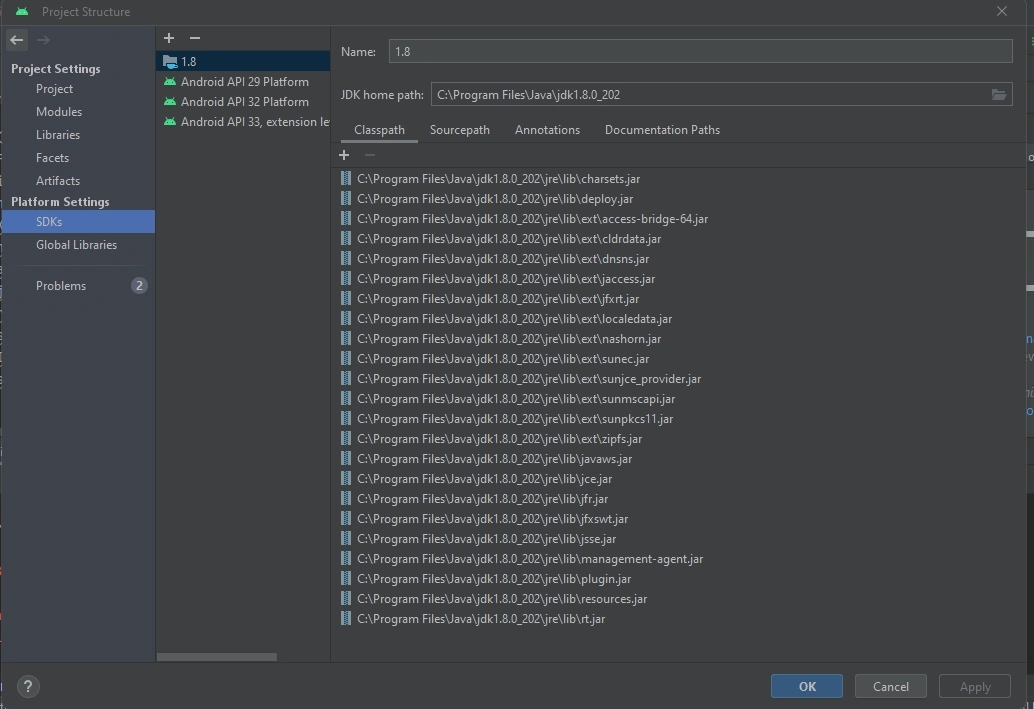 When i ran cmd its the same path, look below;
C:\Users\Zux>java -version
java version "1.8.0_202"
Java(TM) SE Runtime Environment (build 1.8.0_202-b08)
Java HotSpot(TM) 64-Bit Server VM (build 25.202-b08, mixed mode)
Mohamed Azarudeen ZPosted Dec 1, 2023, 5:03 PM
Hi
Configure JDK Path in Android Studio:
Check Environment Variables:
PATHenvironment variable includes the correct path to thebindirectory of your JDK 8 installation. The JDK 8bindirectory should contain thejava.exefile.