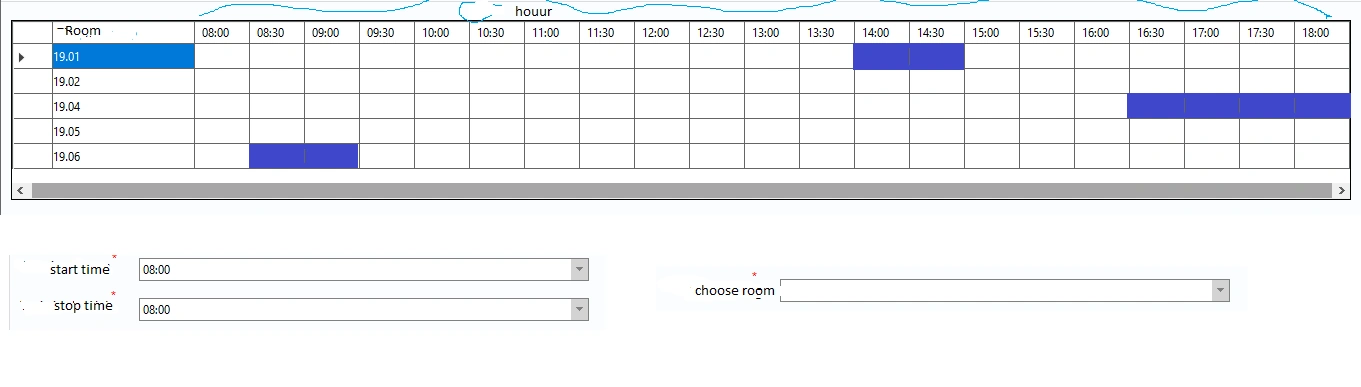
Hello everyone, I have a datagridview like the left column is the meeting room I took from the database and the hour column from 08:00 to 18:00 is that I add a new column in the datagridviewcolumn and I set Name="column1", Headertext="08: 00" to..... end of....Name="column18, Headertext="18:00" after selecting the start time, end time and room, it will be displayed on the grid as shown. but I don't know how to compare the input time and then compare it with the value of that headertext, hope someone can guide me
Tuhin PaulPosted Feb 15, 2023, 10:24 AM
Here's some sample code to give you an idea of how to accomplish this:
// Get the start time and end time inputs and the selected meeting room
DateTime startTime = dateTimePickerStart.Value;
DateTime endTime = dateTimePickerEnd.Value;
string selectedRoom = comboBoxRooms.SelectedItem.ToString();
// Loop through the rows in the DataGridView and find the matching row
foreach (DataGridViewRow row in dataGridView1.Rows)
{
if (row.Cells[0].Value.ToString() == selectedRoom)
{
// Loop through the columns and compare the start and end times with the time slots
for (int i = 1; i < dataGridView1.Columns.Count; i++)
{
DateTime columnTime = DateTime.ParseExact(dataGridView1.Columns[i].HeaderText, "HH:mm", null);
if (startTime <= columnTime && endTime >= columnTime)
{
MessageBox.Show("The selected time slot is already booked.");
return;
}
}
}
}
// If the code reaches this point, the selected time slot is available and can be added to the DataGridView
Keep in mind this code assumes that the DataGridView has been populated with data and that the start and end time inputs are represented as DateTime objects. You may need to modify the code to fit your specific scenario.