I am looking for display a parent child view in boilerplate application. but not able to find solution. Click event not displaying the row below. 404 error is coming in console
here is the parent page looks like
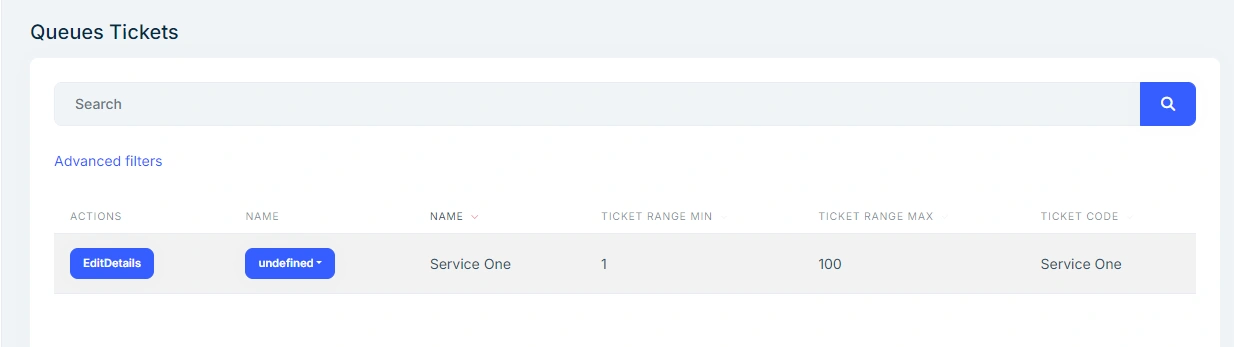
my requirment is to show a row below to the clicked row. I am using javascript code to trigger click and show the page.
var currentOpenedDetailRow;
function openDetailRow(e, url) {
var tr = $(e).closest('tr');
var row = dataTable.row(tr);
if (row.child.isShown()) {
row.child.hide();
tr.removeClass('shown');
currentOpenedDetailRow = null;
} else {
if (currentOpenedDetailRow)
currentOpenedDetailRow.child.hide();
$.get(url).then((data) => {
row.child(data).show();
tr.addClass('shown');
currentOpenedDetailRow = row;
});
}
}
_$queuesTable.on('click', '.View_Invoice', function () {
var tr = $(this).closest('tr');
var row = dataTable.row(tr);
openDetailRow(this, abp.appPath+ "Shared/QueueTicketPartial/_QueueTicketsComponent" + row.data().queue.id);
});
I have created a Partial view page to display row below to the clicked row. And the partial view page cshtml page code is listed below
@page
@using Microsoft.AspNetCore.Authorization
@using QueuingSystem.Pages.Shared.QueueTicketPartial
@using Volo.Abp.AspNetCore.Mvc.UI.Layout
@using QueuingSystem.Permissions
@using QueuingSystem.Web.Pages.Tickets
@using QueuingSystem.Menus
@using Microsoft.AspNetCore.Mvc.Localization
@using QueuingSystem.Localization
@inject IHtmlLocalizer
@inject IAuthorizationService Authorization
@model QueueTicketsViewComponent
@{
Layout = null;
}
| @L["Actions"] | @L["Invoice"] | @L["InvoiceNo"] | @L["ClearanceStatus"] | @L["ProcessTime"] | @L["Edition"] | @L["TotalWithoutTax"] | @L["TaxPerc"] | @L["TaxValue"] | @L["TotalAmount"] | @L["Status"] |
|---|
Bineesh ViswanathPosted Aug 21, 2024, 8:35 AM
Dear Namish,
I have tried as per your suggestion. All code side seems ok. but not working as per requirement
Naimish MakwanaPosted Aug 21, 2024, 4:22 AM
It looks like you’re trying to display a child row below a clicked parent row in a DataTable, but you’re encountering a 404 error when trying to load the partial view. Here are a few steps to troubleshoot and resolve this issue:
Check the URL: Ensure that the URL you’re passing to the
$.getfunction is correct. It should match the route defined in your ASP.NET Core application.Verify the Partial View Path: Make sure the path to your partial view is correct. The URL should point to the correct location of the
_QueueTicketsComponentpartial view.Inspect the Network Request: Use the browser’s developer tools to inspect the network request. Check the exact URL being requested and ensure it matches the expected path. Look for any typos or incorrect segments in the URL.
Check Server-Side Routing: Ensure that your server-side routing is correctly set up to handle the request for the partial view. Verify that the controller action or Razor Page exists and is correctly configured to return the partial view.
Error Handling: Add error handling to your JavaScript code to log any errors that occur during the
$.getrequest. This can help you identify if there are any issues with the request itself.Here’s an updated version of your JavaScript code with added error handling:
By adding the
.failmethod, you can log any errors that occur during the AJAX request, which can help you diagnose the issue.Thanks