I want to export the columns I pulled into the datagridview with Checkbox to Word. However, it also exports the hidden columns to Word that I have not checked with the checkboxes and that do not appear in the datagridview. I want to export only selected columns as shown in the image. What is the solution?
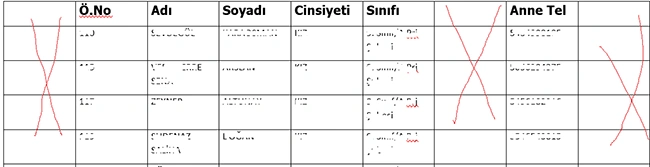
public void Export_Data_To_Word(DataGridView DGV, string filename)
{
if (File.Exists(filename))
{
File.Delete(filename);
}
Object oMissing = System.Reflection.Missing.Value;
Object oTrue = true;
Object oFalse = false;
Word.Application oWord = new Word.Application();
Word.Document oWordDoc = new Word.Document();
oWord.Visible = true;
oWord.WindowState = Word.WdWindowState.wdWindowStateMinimize;
oWord.WindowState = Word.WdWindowState.wdWindowStateMaximize;
if (DGV.Rows.Count != 0)
{
int RowCount = DGV.Rows.Count;
int ColumnCount = DGV.Columns.Count;
Object[,] DataArray = new object[RowCount + 1, ColumnCount + 1];
//add rows
int r = 0;
for (int c = 0; c <= ColumnCount - 1; c++)
{
if (DGV.Columns[c].Visible) // Check if the column is visible
{
for (r = 0; r <= RowCount - 1; r++)
{
DataArray[r, c] = DGV.Rows[r].Cells[c].Value;
} //end row loop
} //end column loop
}
//page orintation
oWordDoc.PageSetup.Orientation = Word.WdOrientation.wdOrientLandscape;
dynamic oRange = oWordDoc.Content.Application.Selection.Range;
string oTemp = "";
for (r = 0; r <= RowCount - 1; r++)
{
for (int c = 0; c <= ColumnCount - 1; c++)
{
oTemp = oTemp + DataArray[r, c] + "\t";
}
}
//table format
oRange.Text = oTemp;
object Separator = Word.WdTableFieldSeparator.wdSeparateByTabs;
object ApplyBorders = true;
object AutoFit = true;
object AutoFitBehavior = Word.WdAutoFitBehavior.wdAutoFitContent;
oRange.ConvertToTable(ref Separator, ref RowCount, ref ColumnCount,
Type.Missing, Type.Missing, ref ApplyBorders,
Type.Missing, Type.Missing, Type.Missing,
Type.Missing, Type.Missing, Type.Missing,
Type.Missing, ref AutoFit, ref AutoFitBehavior, Type.Missing);
oRange.Select();
oWord.Application.Selection.Borders.InsideLineStyle = Word.WdLineStyle.wdLineStyleSingle; //tablo çizgisi
oWord.Application.Selection.Borders.OutsideLineStyle = Word.WdLineStyle.wdLineStyleSingle; // tablo çizgisi
oWord.Application.Selection.Tables[1].Select();
oWord.Application.Selection.Tables[1].Rows.AllowBreakAcrossPages = 0;
oWord.Application.Selection.Tables[1].Rows.Alignment = 0;
oWord.Application.Selection.Tables[1].Rows[1].Select();
oWord.Application.Selection.InsertRowsAbove(1);
oWord.Application.Selection.Tables[1].Rows[1].Select();
//header row style
oWord.Application.Selection.Tables[1].Rows[1].Range.Bold = 1;
oWord.Application.Selection.Tables[1].Rows[1].Range.Font.Name = "Tahoma";
oWord.Application.Selection.Tables[1].Rows[1].Range.Font.Size = 14;
//add header row manually
for (int c = 0; c <= DGV.Columns.Count - 1; c++)
{
if (DGV.Columns[c].Visible) // Check if the column is visible
{
oWord.Application.Selection.Tables[1].Cell(1, c + 1).Range.Text = DGV.Columns[c].HeaderText;
}
}
//table style
oWord.Application.Selection.Tables[1].Rows[1].Select();
oWord.Application.Selection.Cells.VerticalAlignment = Word.WdCellVerticalAlignment.wdCellAlignVerticalCenter;
//header text
foreach (Word.Section section in oWord.Application.ActiveDocument.Sections)
{
Word.Range headerRange = section.Headers[Word.WdHeaderFooterIndex.wdHeaderFooterPrimary].Range;
headerRange.Fields.Add(headerRange, Word.WdFieldType.wdFieldPage);
headerRange.Text = "ÖGRENCI BILGILERI";
headerRange.Font.Size = 16;
headerRange.ParagraphFormat.Alignment = Word.WdParagraphAlignment.wdAlignParagraphCenter;
}
//save the file
oWord.ActiveDocument.SaveAs2(Path.Combine(Environment.GetFolderPath(Environment.SpecialFolder.Desktop), "Ögrenci Bilgileri.docx"));
oWordDoc.Close(ref oFalse, ref oMissing, ref oMissing);
oWord.Quit();
System.Runtime.InteropServices.Marshal.ReleaseComObject(oWordDoc);
System.Runtime.InteropServices.Marshal.ReleaseComObject(oWord);
oWordDoc = null;
oWord = null;
GC.WaitForPendingFinalizers();
GC.Collect();
MessageBox.Show("Your file is saved");
}
}
private void WordeAktar_Load(object sender, EventArgs e)
{
SinifCek();
ComboBox1.SelectedIndex = 0;
DGV.AutoSizeColumnsMode = DataGridViewAutoSizeColumnsMode.AllCells;
DGV.AutoSizeColumnsMode = DataGridViewAutoSizeColumnsMode.Fill;
DGV.Columns["tcno"].Visible = tcnochk.Checked; // ilk açilista hangi sütunlari getirecegiyle ilgili
DGV.Columns["dtarihi"].Visible = dogchk.Checked;
DGV.Columns["atel"].Visible = atelchk.Checked;
DGV.Columns["btel"].Visible = btelchk.Checked;
DGV.TopLeftHeaderCell.Value = "S.No";
DGV.Columns[0].HeaderText = "T.C.No";
DGV.Columns[1].HeaderText = "Ö.No";
DGV.Columns[2].HeaderText = "Adi";
DGV.Columns[3].HeaderText = "Soyadi";
DGV.Columns[4].HeaderText = "Cinsiyeti";
DGV.Columns[5].HeaderText = "Sinifi";
DGV.Columns[7].HeaderText = "Anne Tel";
DGV.Columns[8].HeaderText = "Baba Tel";
}
private void button1_Click(object sender, EventArgs e)
{
SaveFileDialog sfd = new SaveFileDialog();
sfd.Filter = "Word Documents (*.docx)|*.docx";
sfd.FileName = "Ögrenci Bilgileri.docx";
if (sfd.ShowDialog() == DialogResult.OK)
{
Export_Data_To_Word(DGV, sfd.FileName);
}
}
Prasad RaveendranPosted Dec 1, 2023, 12:21 AM
To remove empty columns from the exported Word document, you'll need to adjust the logic that constructs the table in Word based on the DataGridView data. Instead of directly converting the data into a table, you should identify and skip columns that contain only empty cells before creating the Word table.
Here's an updated version of the code that removes empty columns:
This updated code identifies columns that have at least one non-empty cell and constructs the table in Word only using these non-empty columns. It skips empty columns, thereby removing them from the final table in the exported Word document. Adjustments might be needed based on your specific requirements or the structure of your DataGridView.
Prasad RaveendranPosted Nov 29, 2023, 1:22 AM
To prevent empty columns when exporting the DataGridView to Word, you can modify the loop that constructs the data for export (
DataArray). The current implementation checks for column visibility but does not account for empty cells. You can add an additional check within the loop to ensure that only non-empty cells are added tooTemp.Here's an updated version of the code:
This modification checks if the cell value is not null before adding it to
oTemp. If the cell is empty, it adds a tab character to maintain the alignment of the columns. Additionally, a newline character (\n) is added after each row to separate the rows in the Word document.Please replace the existing loop in your
Export_Data_To_Wordmethod with this modified code snippet.This modification ensures that empty cells are represented by a tab character in the exported Word document, preventing the appearance of empty columns. Adjustments can be made based on your specific requirements for handling empty cells or formatting the exported data.
Mehmet FatihPosted Nov 7, 2023, 4:53 PM
Initially I set tcno, dtarihi, atel and btel columns as false. I tried again and again but unfortunately the result is the same.
Prasad RaveendranPosted Nov 7, 2023, 12:29 AM
Did you check whether the columns visibility properly assigned?? When you click "Export_Data_To_Word" , did you check whether visibility enabled columns in grid are able to access?
Mehmet FatihPosted Nov 6, 2023, 10:04 PM
Prasad, I regret to say that the result is the same.
Prasad RaveendranPosted Nov 6, 2023, 8:35 PM
To dynamically control the visibility of columns based on the checkbox selection, you need to update the checkbox events to trigger the visibility changes in the DataGridView columns. This revised approach avoids hardcoding individual columns and instead links the checkbox controls to the DataGridView columns by their associated names.
Here's the updated code:
Explanation:
ToggleColumnVisibilitymethod takes the column name and the checkbox's checked state as parameters.By using this method in the checkbox events, you can dynamically control the visibility of columns based on the checkbox state without explicitly referencing each column in the checkbox event handlers.
Mehmet FatihPosted Nov 6, 2023, 6:22 AM
I only have 4 optional fields to be shown. These are tcno,dtarihi,atel and btel. Other fields are fields that will always be shown. My original full codes are below.
using System;
using System.Data;
using System.Data.OleDb;
using System.Drawing;
using System.IO;
using System.Windows.Forms;
using Word = Microsoft.Office.Interop.Word;
namespace SinifListesi
{
public partial class WordeAktar : Form
{
public WordeAktar()
{
InitializeComponent();
}
OleDbConnection conn = new OleDbConnection("Provider=Microsoft.ACE.OLEDB.12.0;Data Source = siniflisteleri25.accdb; Jet OLEDB:Database Password = Fatih2541; Mode = ReadWrite");
OleDbCommand sorgu;
OleDbDataReader veriler;
private void SinifCek()
{
try
{
if (conn.State == ConnectionState.Closed)
{
conn.Open();
}
sorgu = new OleDbCommand
{
CommandText = "SELECT * from siniflar order by sin_id asc",
Connection = conn
};
veriler = sorgu.ExecuteReader();
while (veriler.Read())
{
ComboBox1.Items.Add(veriler["sinifi"].ToString());
ComboBox1.ValueMember = "sinifi";
ComboBox1.DisplayMember = "sinifi";
}
veriler.Close();
sorgu.Dispose();
}
catch (Exception hata)
{
MessageBox.Show("Islem Sirasinda Hata Olustu." + hata.Message);
}
}
public void Export_Data_To_Word(DataGridView DGV, string filename)
{
if (File.Exists(filename))
{
File.Delete(filename);
}
Word.Document oDoc = new Word.Document();
oDoc.Application.Visible = true;
if (DGV.Rows.Count != 0)
{
int RowCount = DGV.Rows.Count;
int ColumnCount = DGV.Columns.Count;
Object[,] DataArray = new object[RowCount + 1, ColumnCount + 1];
//add rows
int r = 0;
for (int c = 0; c <= ColumnCount - 1; c++)
{
if (DGV.Columns[c].Visible) // Check if the column is visible
{
for (r = 0; r <= RowCount - 1; r++)
{
DataArray[r, c] = DGV.Rows[r].Cells[c].Value;
} //end row loop
} //end column loop
}
//page orintation
oDoc.PageSetup.Orientation = Word.WdOrientation.wdOrientLandscape;
dynamic oRange = oDoc.Content.Application.Selection.Range;
string oTemp = "";
for (r = 0; r <= RowCount - 1; r++)
{
for (int c = 0; c <= ColumnCount - 1; c++)
{
oTemp = oTemp + DataArray[r, c] + "\t";
}
}
//table format
oRange.Text = oTemp;
object Separator = Word.WdTableFieldSeparator.wdSeparateByTabs;
object ApplyBorders = true;
object AutoFit = true;
object AutoFitBehavior = Word.WdAutoFitBehavior.wdAutoFitContent;
oRange.ConvertToTable(ref Separator, ref RowCount,
ref ColumnCount,
Type.Missing, Type.Missing,
ref ApplyBorders,
Type.Missing, Type.Missing, Type.Missing,
Type.Missing, Type.Missing, Type.Missing,
Type.Missing, ref AutoFit,
ref AutoFitBehavior, Type.Missing);
oRange.Select();
oDoc.Application.Selection.Borders.InsideLineStyle = Word.WdLineStyle.wdLineStyleSingle; //tablo çizgisi
oDoc.Application.Selection.Borders.OutsideLineStyle = Word.WdLineStyle.wdLineStyleSingle; // tablo çizgisi
oDoc.Application.Selection.Tables[1].Select();
oDoc.Application.Selection.Tables[1].Rows.AllowBreakAcrossPages = 0;
oDoc.Application.Selection.Tables[1].Rows.Alignment = 0;
oDoc.Application.Selection.Tables[1].Rows[1].Select();
oDoc.Application.Selection.InsertRowsAbove(1);
oDoc.Application.Selection.Tables[1].Rows[1].Select();
//header row style
oDoc.Application.Selection.Tables[1].Rows[1].Range.Bold = 1;
oDoc.Application.Selection.Tables[1].Rows[1].Range.Font.Name =
"Tahoma";
oDoc.Application.Selection.Tables[1].Rows[1].Range.Font.Size = 14;
//add header row manually
for (int c = 0; c <= DGV.Columns.Count - 1; c++)
{
if (DGV.Columns[c].Visible) // Check if the column is visible
{
oDoc.Application.Selection.Tables[1].Cell(1, c + 1).Range.Text = DGV.Columns[c].HeaderText;
}
}
//table style
oDoc.Application.Selection.Tables[1].Rows[1].Select();
oDoc.Application.Selection.Cells.VerticalAlignment =
Word.WdCellVerticalAlignment.wdCellAlignVerticalCenter;
//header text
foreach (Word.Section section in
oDoc.Application.ActiveDocument.Sections)
{
Word.Range headerRange =
section.Headers[Word.WdHeaderFooterIndex.wdHeaderFooterPrimary].Range;
headerRange.Fields.Add(headerRange,
Word.WdFieldType.wdFieldPage);
headerRange.Text = "ÖGRENCI BILGILERI";
headerRange.Font.Size = 16;
headerRange.ParagraphFormat.Alignment =
Word.WdParagraphAlignment.wdAlignParagraphCenter;
}
//save the file
oDoc.SaveAs2(filename);
}
}
private void WordeAktar_Load(object sender, EventArgs e)
{
SinifCek();
ComboBox1.SelectedIndex = 0;
DGV.AutoSizeColumnsMode = DataGridViewAutoSizeColumnsMode.AllCells;
DGV.AutoSizeColumnsMode = DataGridViewAutoSizeColumnsMode.Fill;
DGV.Columns["tcno"].Visible = tcnochk.Checked; // ilk açilista hangi sütunlari getirecegiyle ilgili
DGV.Columns["dtarihi"].Visible = dogchk.Checked;
DGV.Columns["atel"].Visible = atelchk.Checked;
DGV.Columns["btel"].Visible = btelchk.Checked;
DGV.TopLeftHeaderCell.Value = "S.No";
DGV.Columns[0].HeaderText = "T.C.No";
DGV.Columns[1].HeaderText = "Ö.No";
DGV.Columns[2].HeaderText = "Adi";
DGV.Columns[3].HeaderText = "Soyadi";
DGV.Columns[4].HeaderText = "Cinsiyeti";
DGV.Columns[5].HeaderText = "Sinifi";
DGV.Columns[7].HeaderText = "Anne Tel";
DGV.Columns[8].HeaderText = "Baba Tel";
}
private void button1_Click(object sender, EventArgs e)
{
SaveFileDialog sfd = new SaveFileDialog();
sfd.Filter = "Word Documents (*.docx)|*.docx";
sfd.FileName = "Ögrenci Bilgileri.docx";
if (sfd.ShowDialog() == DialogResult.OK)
{
Export_Data_To_Word(DGV, sfd.FileName);
}
}
private void ComboBox1_SelectedIndexChanged(object sender, EventArgs e)
{
using (OleDbConnection conn = new OleDbConnection(@"Provider=Microsoft.ACE.OLEDB.12.0;Data Source = siniflisteleri25.accdb; Jet OLEDB:Database Password = Fatih2541; Mode = ReadWrite"))
{
string query = "SELECT tcno,ono,isim,soyisim,cinsiyet,sinifi,dtarihi,atel,btel from ogrencibilgileri25 where sinifi='" + ComboBox1.Text + " '";
OleDbCommand command = new OleDbCommand(query, conn);
conn.Open();
var adapter = new OleDbDataAdapter(command);
var table = new DataTable();
adapter.Fill(table);
DGV.DataSource = table;
conn.Close();
}
}
private void tcnochk_CheckedChanged(object sender, EventArgs e)
{
DGV.Columns["tcno"].Visible = tcnochk.Checked;
}
private void dogchk_CheckedChanged(object sender, EventArgs e)
{
DGV.Columns["dtarihi"].Visible = dogchk.Checked;
}
private void atelchk_CheckedChanged(object sender, EventArgs e)
{
DGV.Columns["atel"].Visible = atelchk.Checked;
}
private void btelchk_CheckedChanged(object sender, EventArgs e)
{
DGV.Columns["btel"].Visible = btelchk.Checked;
}
private void DGV_RowPostPaint(object sender, DataGridViewRowPostPaintEventArgs e)
{
var grid = sender as DataGridView;
var rowIdx = (e.RowIndex + 1).ToString();
var centerFormat = new StringFormat()
{
// right alignment might actually make more sense for numbers
Alignment = StringAlignment.Center,
LineAlignment = StringAlignment.Center
};
var headerBounds = new Rectangle(e.RowBounds.Left, e.RowBounds.Top, grid.RowHeadersWidth, e.RowBounds.Height);
e.Graphics.DrawString(rowIdx, this.Font, SystemBrushes.ControlText, headerBounds, centerFormat);
}
}
}
Prasad RaveendranPosted Nov 6, 2023, 3:18 AM
Please cross check whether ORange and OTemp objects have created. Please share the entire code to look at it
Mehmet FatihPosted Nov 5, 2023, 7:09 PM
First of all, thank you very much for your interest, Prasad. I tried your modified code. But when I replace this codes
int ColumnCount = visibleColumnIndices.Count;
Object[,] DataArray = new object[RowCount + 1, ColumnCount + 1];
// Loop through visible columns only
for (int c = 0; c < ColumnCount; c++)
{
for (int r = 0; r < RowCount; r++)
{
DataArray[r, c] = DGV.Rows[r].Cells[visibleColumnIndices[c]].Value;
}
}
instead of this codes :
for (r = 0; r <= RowCount - 1; r++)
{
for (int c = 0; c <= ColumnCount - 1; c++)
{
oTemp = oTemp + DataArray[r, c] + "\t";
}
}
I am getting an error in the codes below.
// Table Format
orange.text = otemp;
object separator
Object Applyborders = True;
Object Autophyte = True;
object autofitbehavior = word.wdautofitbehavior.wdautofitContent;
Orange.Converttotable (Ref Separator, Ref Rowcount, Ref Columncount,
Type.Missing, Type.Missing, Ref Applyborders,
Type.Missing, Type.Missing, Type.Missing,
Type.Missing, Type.Missing, Type.Missing,
Type.Missing, Ref Autophyte, Ref Autophitbehavior, Type.Missing);
orange.sect ();
Prasad RaveendranPosted Nov 5, 2023, 5:32 PM
Additional Improvements:
A more dynamic and scalable approach can be implemented to avoid hardcoding column indices for checkbox validation. Here's an improved version of the method that dynamically checks the column visibility based on the column names:
This revised code employs a dictionary,
checkboxMapping, to link the DataGridView column names with their respective checkboxes. This makes the code more scalable and easier to maintain as you only need to update the dictionary if there are changes in column names or checkboxes. The program will automatically match the checkboxes with the appropriate columns without explicitly checking each column index.Prasad RaveendranPosted Nov 5, 2023, 5:29 PM
To export only the selected columns that are visible in the DataGridView and match the checkboxes' selections, you need to modify the
Export_Data_To_Wordmethod. Currently, it exports all columns, visible or not. You can adjust the export logic to consider only the columns that are visible based on the checkboxes. Here's an adjusted version of the code to achieve this:This code section identifies visible columns based on the checkbox selection and exports only those columns to Word. It uses a
Listto store the indices of the visible columns, ensuring that only the selected columns will be exported.Make sure to call this method after you've adjusted the visibility of columns through the checkboxes and invoke the export logic.