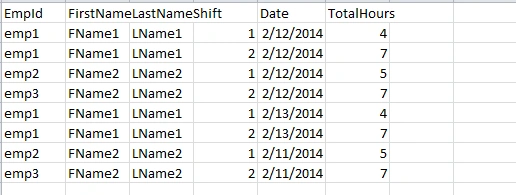
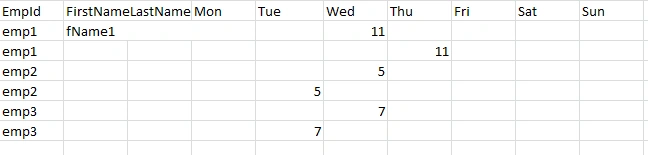
And I need to transfer it in this
using System;
using System.Collections.Generic;
using System.Linq;
using System.Text;
using System.Data;
namespace Test
{
class Program
{
static void Main(string[] args)
{
DataTable dt = new DataTable();
dt.Columns.Add("EmpID");
dt.Columns.Add("fName");
dt.Columns.Add("sName");
dt.Columns.Add("WorkDay", typeof(DateTime));
dt.Columns.Add("HoursWorked", typeof(decimal));
// mix them up a bit
dt.Rows.Add("Emp1", "First1", "Second1", "2014-02-06", 3.2);
dt.Rows.Add("Emp2", "First2", "Second2", "2014-02-06", 3.4);
dt.Rows.Add("Emp1", "First1", "Second1", "2014-02-07", 3.2);
dt.Rows.Add("Emp2", "First2", "Second2", "2014-02-04", 3.2);
dt.Rows.Add("Emp2", "First2", "Second2", "2014-02-03", 3.2);
dt.Rows.Add("Emp1", "First1", "Second1", "2014-01-06", 3.2);
DataTable dw = new DataTable();
dw.Columns.Add("EmpID");
dw.Columns.Add("Mon", typeof(decimal));
dw.Columns.Add("Tue", typeof(decimal));
dw.Columns.Add("Wed", typeof(decimal));
dw.Columns.Add("Thu", typeof(decimal));
dw.Columns.Add("Fri", typeof(decimal));
dw.Columns.Add("Sat", typeof(decimal));
dw.Columns.Add("Sun", typeof(decimal));
DateTime inputDate = Convert.ToDateTime("2014-02-06");
DateTime firstDayOfTheWeek = inputDate.AddDays(0 - (inputDate).DayOfWeek.GetHashCode());
}
}
}
VulpesPosted Feb 14, 2014, 9:30 AM
The array is just being populated for each output record - nothing is being stored or printed at this stage, apart from some test code:
VulpesPosted Feb 18, 2014, 4:16 PM
dow = ((int)fDate.DayOfWeek + 6) % 7;
will need to be changed to:
dow = (int)fDate.DayOfWeek;
That's because the DayOfWeek enum starts from Sunday ( = 0) and so we don't need to adjust it now.
Lio LiovPosted Feb 18, 2014, 3:59 PM
VulpesPosted Feb 17, 2014, 2:06 PM
However, I found this link:
http://help.infragistics.com/Help/Doc/WinForms/2012.1/CLR2.0/HTML/WinGrid_Add_Rows_to_WinGrid_Programmatically.html
which says you can do it using the AddRow method (it seems to be actually called AddNew) of the UltraGridBand class but performance is poor if you're adding several rows at a time.
I think you'll therefore have to go back to the DataTable approach if you're going to use this particular control.
Lio LiovPosted Feb 17, 2014, 11:48 AM
Thank you , instead of dataGrid in my case I have to add the data row to an ultraWinGrid.
Do you have an Idea how to do that?
VulpesPosted Feb 16, 2014, 5:59 PM
Lio LiovPosted Feb 16, 2014, 5:17 PM
If I had a teacher like you I wouldnt ask here for help
I achieve the coloring by the folowing code
Do you think that there is a way to eleminate the iter variable
using System;
using System.Collections.Generic;
using System.ComponentModel;
using System.Data;
using System.Drawing;
using System.Linq;
using System.Text;
using System.Windows.Forms;
namespace Test1234
{
public partial class Form1 : Form
{
public Form1()
{
InitializeComponent();
}
private void button1_Click(object sender, EventArgs e)
{
DateTime fDate = new DateTime(2014,02,04);
int dow = ((int)fDate.DayOfWeek + 6) % 7; // Monday = 0, Tuesday = 1 etc
DateTime wComm = fDate.AddDays(-dow);
DataTable tdInput = createData();
string id = "";
string fName = "";
string lName = "";
DateTime pDate = DateTime.MinValue;
DateTime tempWComm = DateTime.MinValue;
string temp = null;
string tempFName = null;
string tempLName = null;
decimal[] total = new decimal[7];
int[] shifts = new int[7];
int shift = 0;
object[] oa = null;
int iter = 0;
foreach (DataRow dr in tdInput.Rows)
{
temp = dr[0].ToString();
tempFName = dr[1].ToString();
tempLName = dr[2].ToString();
shift = (int)dr[3];
pDate = (DateTime)dr[4];
dow = ((int)pDate.DayOfWeek + 6) % 7; // Monday = 0, Tuesday = 1 etc
tempWComm = pDate.AddDays(-dow);
if (id == "")
{
id = temp;
fName = tempFName;
lName = tempLName;
}
else if (id != temp)
{
oa = new object[10];
oa[0] = id;
oa[1] = fName;
oa[2] = lName;
for (int i = 3; i < 10; i++)
{
oa[i] = total[i - 3];
}
dataGridView1.Rows.Add(oa);
for (int a = 0; a < 7; a++)
{
if ((int)shifts[a] == 9)
{
dataGridView1.Rows[iter].Cells[a+3].Style.BackColor = Color.Red;
}
else if ((int)shifts[a] == 1)
{
dataGridView1.Rows[iter].Cells[a + 3].Style.BackColor = Color.Blue;
}
if ((int)shifts[a] == 2)
{
dataGridView1.Rows[iter].Cells[a + 3].Style.BackColor = Color.Yellow;
}
if ((int)shifts[a] == 3)
{
dataGridView1.Rows[iter].Cells[a + 3].Style.BackColor = Color.Gray;
}
}
iter++;
id = temp;
fName = tempFName;
lName = tempLName;
Array.Clear(total, 0, 7);
Array.Clear(shifts, 0, 7);
}
if(wComm == tempWComm)
{
total[dow] += (decimal)dr[5];
if(shifts[dow] == 0)
{
shifts[dow] = shift;
}
else
{
shifts[dow] = 9;
}
}
}
// add the final row to the combined table
oa = new object[10];
oa[0] = id;
oa[1] = fName;
oa[2] = lName;
for (int i = 3; i < 10; i++)
{
oa[i] = total[i - 3];
}
dataGridView1.Rows.Add(oa);
for (int a = 0; a < 7; a++)
{
if ((int)shifts[a] == 9)
{
dataGridView1.Rows[iter].Cells[a + 3].Style.BackColor = Color.Red;
}
else if ((int)shifts[a] == 1)
{
dataGridView1.Rows[iter].Cells[a + 3].Style.BackColor = Color.Blue;
}
if ((int)shifts[a] == 2)
{
dataGridView1.Rows[iter].Cells[a + 3].Style.BackColor = Color.Yellow;
}
if ((int)shifts[a] == 3)
{
dataGridView1.Rows[iter].Cells[a + 3].Style.BackColor = Color.Gray;
}
}
}
private static DataTable createData()
{
DataTable rowData = new DataTable();
rowData.Columns.Add("EmpID", typeof(string));
rowData.Columns.Add("FirstName", typeof(string));
rowData.Columns.Add("LastName", typeof(string));
rowData.Columns.Add("Shift", typeof(int));
rowData.Columns.Add("PayDate", typeof(DateTime));
rowData.Columns.Add("WorkHours", typeof(decimal));
rowData.Rows.Add("Emp1", "First1", "Last1", 1, new DateTime(2014, 2, 3), 2.4);
rowData.Rows.Add("Emp2", "First2", "Last2", 2, new DateTime(2014, 2, 4), 5.4);
rowData.Rows.Add("Emp1", "First1", "Last1", 1, new DateTime(2014, 2, 5), 3.7);
rowData.Rows.Add("Emp2", "First2", "Last2", 3, new DateTime(2014, 2, 4), 2.4);
rowData.Rows.Add("Emp2", "First2", "Last2", 1, new DateTime(2014, 2, 6), 7.4);
rowData.Rows.Add("Emp1", "First1", "Last1", 2, new DateTime(2014, 2, 7), 2.1);
rowData.Rows.Add("Emp3", "First3", "Last3", 1, new DateTime(2014, 2, 3), 2.4);
rowData.Rows.Add("Emp3", "First3", "Last3", 2, new DateTime(2014, 2, 4), 5.4);
rowData.Rows.Add("Emp4", "First4", "Last4", 1, new DateTime(2014, 2, 5), 3.7);
rowData.Rows.Add("Emp5", "First5", "Last5", 3, new DateTime(2014, 2, 4), 2.4);
rowData.Rows.Add("Emp4", "First4", "Last4", 1, new DateTime(2014, 2, 6), 7.4);
rowData.Rows.Add("Emp5", "First5", "Last5", 2, new DateTime(2014, 2, 7), 2.1);
rowData.Rows.Add("Emp1", "First1", "Last1", 2, new DateTime(2014, 2,10), 4.0);
rowData.Rows.Add("Emp6", "First6", "Last6", 3, new DateTime(2014, 2,5), 2.5); //** new
DataView dv = rowData.DefaultView;
dv.Sort = "EmpID,PayDate,Shift";
DataTable rowData1 = dv.ToTable();
return rowData1;
}
}
}
VulpesPosted Feb 16, 2014, 3:34 PM
row = tdOutput.NewRow();
oa = new object[10];
oa[0] = id;
oa[1] = fName;
oa[2] = lName;
for (int i = 3; i < 10; i++)
{
oa[i] = total[i - 3];
}
row.ItemArray = oa;
tdOutput.Rows.Add(row);
would translate to:
oa = new object[10];
oa[0] = id;
oa[1] = fName;
oa[2] = lName;
for (int i = 3; i < 10; i++)
{
oa[i] = total[i - 3];
}
dataGridView1.Rows.Add(oa);
As regards relative speed, clearly the data is going to hit the grid sooner than it did before but the display might be a bit jumpy as the grid redraws after each row is added.
If it is, then you could set the grid's Visible property to false initially and then set it back to true after it's been fully populated.
Lio LiovPosted Feb 16, 2014, 12:21 PM
VulpesPosted Feb 16, 2014, 11:32 AM
The only drawback is that you'd no longer have a DataTable if you wanted to manipulate or do something else with it later.
Lio LiovPosted Feb 16, 2014, 6:42 AM
tdOtput after all calculations to add a row to the dataGrid , do the logic for
the background and shifts and display it .
VulpesPosted Feb 15, 2014, 3:56 PM
So, if you've coded it already and performance is acceptable, stick with it.
Lio LiovPosted Feb 15, 2014, 7:43 AM
I bound the data table with rows for employee and shifts directly
to the grid then I iterate through the grid, hide every second row and change
the background depending on the shift. Do you think that the suggested by you new
solution is going to perform faster.
VulpesPosted Feb 14, 2014, 4:08 PM
If you've put all this code in a method which returns a DataTable, then return a DataTable array instead:
return new DataTable[]{tdOutput, tdShifts};
VulpesPosted Feb 14, 2014, 3:18 PM
One idea that was going through my mind was to create two DataViews for the even and odd numbered rows. You could then bind the grid to the first of these DataViews.
However, you'd need to add another column to the datatable to store the row number so you could create a row filter expression and, all things considered, it's probably not worth the hassle.
Lio LiovPosted Feb 14, 2014, 2:43 PM
VulpesPosted Feb 14, 2014, 2:16 PM
The only problem I can see is that you're not going to be able to bind the datatable directly to the grid because of the 'additional rows'.
Lio LiovPosted Feb 14, 2014, 12:12 PM
I realy admire your skills.I need to access the data in end of the method including the shift array and put it in a grid with different background per grid cell depending of the shift.
The way I decided to handle the problem was I added a second row in the data table with each iteration and I saved the shift array in the second row. Is it a good approach?
Thanks
Lio LiovPosted Feb 14, 2014, 8:58 AM
I think int array should be fine.
1 for first,2-second,3-third, and 9 for multipleshifts
VulpesPosted Feb 14, 2014, 8:44 AM
So, it's possible that a given employee could have hours worked (and multiple shifts) on any one or more days of that week.
I think you'll therefore need to introduce a 'shifts' array with 7 elements, one for each day.
The question then is how to represent multiple shifts for any of those days.
You could use a string as I mentioned earlier, you could use an int (123 would represent shifts 1, 2 and 3) or you could use a List
Which of these would be most convenient for what you want to do?
Lio LiovPosted Feb 14, 2014, 7:28 AM
Thank you again
VulpesPosted Feb 14, 2014, 7:18 AM
However, are you wanting to write the shifts to the output datatable in some form?
If you're going to have stuff like '1, 3' then you'l either need to use an int array or a string.
Lio LiovPosted Feb 14, 2014, 6:05 AM
explanation,
I don't want to have different records for the same day and shift.
example
Monday , Shift 1,3, total hours 12
Tuesday, shift 1 total hours 8
I don't want to display the shift I just want to be able to access the shift as
I iterate the rows
And thank you again
VulpesPosted Feb 14, 2014, 5:48 AM
So for each record we need to decide on which day of the week PayDate falls and then convert this to the appropriate index. This is done with the following code:
pDate = (DateTime)dr[4];
dow = ((int)pDate.DayOfWeek + 6) % 7; // Monday = 0, Tuesday = 1 etc
tempWComm = pDate.AddDays(-dow);
pDate.DayOfWeek returns a value of the DayOfWeek enum. However, DayOfWeek.Sunday (rather than Monday) is equivalent to an integer value of 0 so we need to adjust it to give the correct index and then assign this to the variable 'dow'.
We can then obtain the first day of the pay week and assign it to the variable 'tempWComm' by subtracting 'dow' days from PayDate.
At the beginning of the Main() method we've already computed the first day of the week for the filter date and assigned it to the variable 'wComm'.
As we're only interested in calculating the totals for records which fall in the same week as the filter date, we need to qualify the code accordingly:
if(wComm == tempWComm) total[dow] += (decimal)dr[5];
Each time we move to a new EmpId we save the totals within a new record amd add it to the output datatable. We then have to clear the totals in readiness for the next record.
You could adjust the code to obtain the value of the 'Shift' column as follows:
object[] oa = null;
DataRow row = null;
int shift = 0;
foreach (DataRow dr in tdInput.Rows)
{
temp = dr[0].ToString();
tempFName = dr[1].ToString();
tempLName = dr[2].ToString();
shift = (int)dr[3];
pDate = (DateTime)dr[4];
dow = ((int)pDate.DayOfWeek + 6) % 7; // Monday = 0, Tuesday = 1 etc
tempWComm = pDate.AddDays(-dow);
// etc
You can now use it to adjust the calculations for each record as you want.
Lio LiovPosted Feb 13, 2014, 8:35 PM
Everithing works
I have one question.
Where is going to be the best place to set a flag returning the shift value. I need to use the shift later in my logic.
VulpesPosted Feb 13, 2014, 7:38 PM
The output this time is:
Lio LiovPosted Feb 13, 2014, 10:45 AM
If I input todays date I will display all the people with summarized hours per day for who ever work per this week, the rest are going to diaplay zerro.
I tryed to use your code but I dont realy get how are you summarizing the hours per day. Also my date is in dateTime format
VulpesPosted Feb 13, 2014, 9:26 AM
Note that I've also made some changes to the 2 data methods and marked the changes with //** comments:
The output is:
Lio LiovPosted Feb 13, 2014, 7:50 AM
Thank you for the help.
I should have one record for employee with days populated for certain week.I am going to pass the day of the week. I need the shift column in the input table because I am going to use it in my logic how to display the records.
VulpesPosted Feb 13, 2014, 6:50 AM
However, there are a lot of other errors besides.
Whilst I can correct these, I just need to be clear on your second point which may mean that some more drastic changes are needed.
As the PayDates for a given EmpId may be different, are you saying that the output datatable should now contain a separate record for each distinct EmpId and PayDate combination?
Lio LiovPosted Feb 12, 2014, 7:26 PM
When I run the code I am geting Format exception was unhandle on the date formating.
Also ,how can I add the workHours if the empId and the dates are the same, not taking in consideration the shift.
using System;
using System.Collections.Generic;
using System.Linq;
using System.Text;
using System.Data;
namespace Test
{
class Program
{
static void Main(string[] args)
{
DataTable tdInput = createData();
DataTable tdOutput = outputData();
string id = "";
string fName = "";
string lName = "";
string temp = null;
string tempFName = null;
string tempLName = null;
int dow = 0;
decimal[] total = new decimal[7];
object[] oa = null;
DataRow row = null;
foreach (DataRow dr in tdInput.Rows)
{
temp = dr[0].ToString();
tempFName = dr[1].ToString();
tempLName = dr[2].ToString();
DateTime workDay = DateTime.ParseExact(dr[3].ToString(), "yyyy-MM-dd", null);
dow = ((int)workDay.DayOfWeek + 6) % 7; // Monday = 0, Tuesday = 1 etc
if (id == "")
{
id = temp;
fName = tempFName;
lName = tempLName;
}
else if (id != temp)
{
row = tdInput.NewRow();
oa = new object[10];
oa[0] = id;
oa[1] = fName;
oa[2] = lName;
for (int i = 3; i < 10; i++)
{
oa[i] = total[i - 3];
}
row.ItemArray = oa;
tdInput.Rows.Add(row);
id = temp;
fName = tempFName;
lName = tempLName;
Array.Clear(total, 0, 7);
}
total[dow] += (decimal)dr[4];
}
// add the final row to the combined table
row = tdInput.NewRow();
oa = new object[10];
oa[0] = id;
oa[1] = fName;
oa[2] = lName;
for (int i = 3; i < 10; i++)
{
oa[i] = total[i - 3];
}
row.ItemArray = oa;
tdInput.Rows.Add(row);
// check it worked
foreach (DataRow dr in tdInput.Rows)
{
foreach (object o in dr.ItemArray)
{
Console.Write("{0,3} ", o);
}
Console.WriteLine();
}
Console.ReadKey();
}
private static DataTable createData()
{
DataTable rowData = new DataTable();
rowData.Columns.Add("EmpID", typeof(string));
rowData.Columns.Add("FirstName", typeof(string));
rowData.Columns.Add("LastName", typeof(string));
rowData.Columns.Add("Shift", typeof(int));
rowData.Columns.Add("PayDate", typeof(DateTime));
rowData.Columns.Add("WorkHours", typeof(decimal));
rowData.Rows.Add("Emp1", "First1", "Last1", 1, "2014-02-03", 2.4);
rowData.Rows.Add("Emp2", "First2", "Last2", 2, "2014-02-04", 5.4);
rowData.Rows.Add("Emp1", "First1", "Last1", 1, "2014-02-05", 3.7);
rowData.Rows.Add("Emp2", "First2", "Last2", 3, "2014-02-04", 2.4);
rowData.Rows.Add("Emp2", "First2", "Last2", 1, "2014-02-06", 7.4);
rowData.Rows.Add("Emp1", "First1", "Last1", 2, "2014-02-07", 2.1);
rowData.Rows.Add("Emp3", "First3", "Last3", 1, "2014-02-03", 2.4);
rowData.Rows.Add("Emp3", "First3", "Last3", 2, "2014-02-04", 5.4);
rowData.Rows.Add("Emp4", "First4", "Last4", 1, "2014-02-05", 3.7);
rowData.Rows.Add("Emp5", "First5", "Las5", 3, "2014-02-04", 2.4);
rowData.Rows.Add("Emp4", "First4", "Last4", 1, "2014-02-06", 7.4);
rowData.Rows.Add("Emp5", "First5", "Last5", 2, "2014-02-07", 2.1);
DataView dv = rowData.DefaultView;
dv.Sort = "EmpID";
DataTable rowData1 = dv.ToTable();
return rowData1;
}
private static DataTable outputData()
{
DataTable dt = new DataTable();
dt.Columns.Add("EmpID");
dt.Columns.Add("FirstName");
dt.Columns.Add("LastName");
dt.Columns.Add("PayDate");
dt.Columns.Add("Mon", typeof(int));
dt.Columns.Add("Tue", typeof(int));
dt.Columns.Add("Wed", typeof(int));
dt.Columns.Add("Thu", typeof(int));
dt.Columns.Add("Fri", typeof(int));
dt.Columns.Add("Sat", typeof(int));
dt.Columns.Add("Sun", typeof(int));
return dt;
}
}
}
VulpesPosted Feb 12, 2014, 1:50 PM
Try this:
The output is: