You can see the problem at my photo.
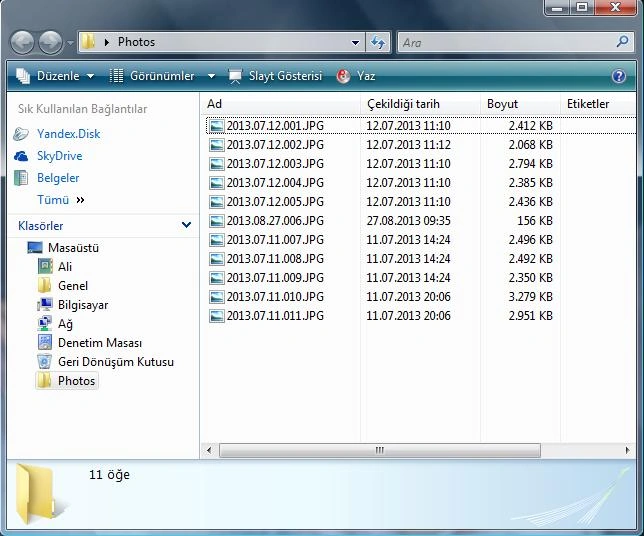
How can I edit the loop part of my code in order to get such rename:
2013.07.12.001.JPG
2013.07.12.002.JPG
2013.07.12.003.JPG
2013.07.12.004.JPG
2013.07.12.005.JPG
2013.08.27.001.JPG
2013.07.11.001.JPG
2013.07.11.002.JPG
2013.07.11.003.JPG
2013.07.11.004.JPG
2013.07.11.005.JPG
My codes are here:
============================================
using System;
using System.Collections.Generic;
using System.ComponentModel;
using System.Data;
using System.Drawing;
using System.Linq;
using System.Text;
using System.Windows.Forms;
using System.Drawing.Imaging; //YENI
using System.IO; //YENI
namespace PhotoRenamer2
{
public partial class Form1 : Form
{
public Form1()
{
InitializeComponent();
}
private void button1_Click(object sender, EventArgs e)
{
DialogResult result = folderBrowserDialog1.ShowDialog();
string pathname = @folderBrowserDialog1.SelectedPath;
label2.Text = pathname;
FileInfo[] files = new DirectoryInfo(pathname).GetFiles("*.JPG");
for (int i = 0; i < files.Length; i++)
{
string DateAndTimePictureTaken = string.Empty;
Image image = new Bitmap(@files[i].FullName);
PropertyItem[] propItems = image.PropertyItems;
foreach (PropertyItem propItem in propItems)
{
if (propItem.Id == 0x0132)
{
DateAndTimePictureTaken = (new System.Text.ASCIIEncoding()).GetString(propItem.Value);
image.Dispose();
string Year = DateAndTimePictureTaken.Substring(0, 4);
string Month = DateAndTimePictureTaken.Substring(5, 2);
string Day = DateAndTimePictureTaken.Substring(8, 2);
string PhotoNumber = (i+1).ToString().PadLeft(3, '0');
string newFile = String.Format("{0}.{1}.{2}.{3}.{4}", Year, Month, Day, PhotoNumber, "JPG");
string fullNewPath = files[i].DirectoryName;
string newFileWithPath = Path.Combine(fullNewPath, newFile);
label2.Text = files[i].FullName;
label3.Text = newFileWithPath;
File.Move(files[i].FullName, newFileWithPath);
break;
}
}
}
}
}
}
============================================
Sunny SharmaPosted Sep 29, 2013, 9:13 AM
Use the code below, It's more efficient and eligant:
------------------------------
Happy Coding :)
Ali GPosted Sep 30, 2013, 3:37 AM
Sunny SharmaPosted Sep 30, 2013, 12:26 AM
GetLastWriteTime(file) gives you the Date when the file was last modified. It would be same as Date Created if it's not modified after it's created.
So, in your case, GetLastWriteTime(file) will work fine assuming that photos not modified after it's created.
Hope you got the point :)
Ali GPosted Sep 29, 2013, 2:49 PM
filesData.Add(file, File.GetCreationTime(file));
to this line:
DateTime d=File.GetLastWriteTime(filepath);
Result is OK but i couldn't understand
Ali GPosted Sep 29, 2013, 2:21 PM
Çekildigi tarih: Date taken
Olusturma tarihi: Creation date
Sunny SharmaPosted Sep 29, 2013, 12:53 PM
I've written these codes for you itself. You don't need to change GetCreationTime(file) at all as it will get you the date photo Taken. I assume that you mean the File Creation Date by date photo Taken unless otherwise specified.
Ali GPosted Sep 29, 2013, 12:32 PM