
Hello everyone,
I am working on MVC5,
1) How can I show required validation when page is first loaded as here csharp corner showing like that?
2) How can move error * massage to textbox right side as below image shown?
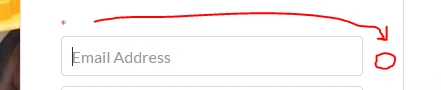
I have tried,
CSS.
- /* styles for validation helpers */
- .field-validation-error {
- color: red;
- font-size: 15px;
- }
- .field-validation-valid {
- display: none;
- }
- input.input-validation-error {
- border: 1px solid red;
- }
- select.input-validation-error {
- border: 1px solid red;
- }
- input[type="checkbox"].input-validation-error {
- border: 0 none;
- }
- .validation-summary-errors {
- color: red;
- }
- .validation-summary-valid {
- display: none;
- }
- /*End*/
- [Required]
- public string LoginName { get; set; }
- @using (Html.BeginForm("GetPremiumUserReg", "UserRegister", FormMethod.Post, new { id = "frmSubmitPremUserRegFirst" }))
- {
- <form role="form">
- <div class="row">
- <div class="col-xs-12 col-sm-12 col-md-12">
- <div class="form-group">
- @Html.ValidationMessageFor(m => m.listPartnerVM.LoginName, "*")
- @Html.TextBoxFor(model => model.listPartnerVM.LoginName, new { @id = "email", @class = "form-control input-sm", @placeholder = "Email Address" })
- div>
- div>
- div>
-
- form>
- }
Asma KhalidPosted Feb 27, 2017, 11:01 AM
Nilesh ShahPosted Feb 27, 2017, 9:42 AM