Hello Team,
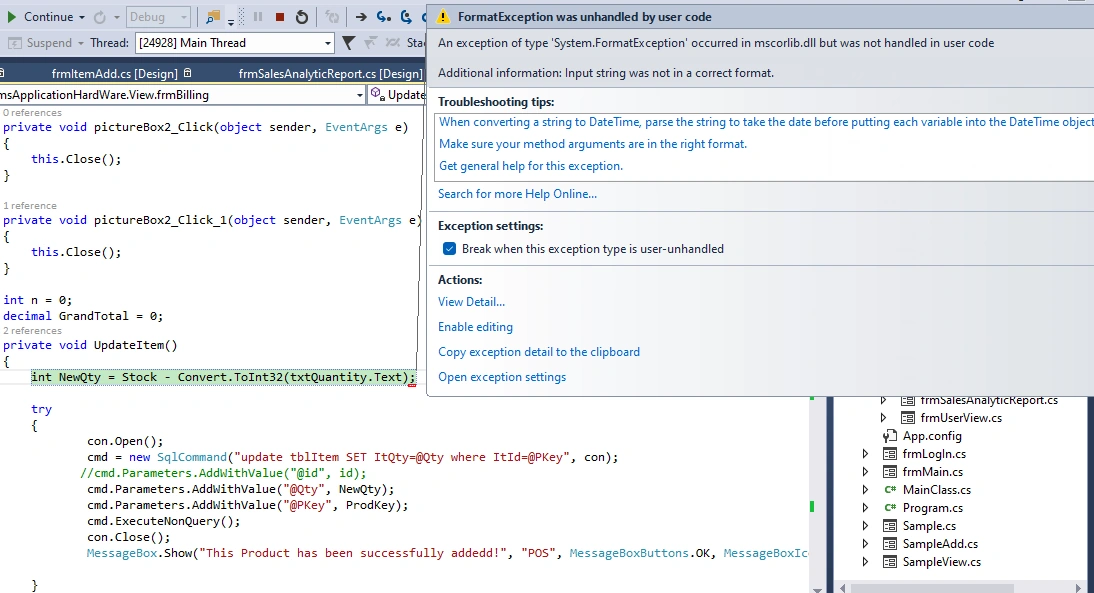
Am having this error in my code
private void UpdateItem()
{
    int NewQty = Stock - Convert.ToInt32(txtQuantity.Text);

    try
    {
            con.Open();
            cmd = new SqlCommand("update tblItem SET ItQty=@Qty where ItId=@PKey", con);
           //cmd.Parameters.AddWithValue("@id", id);
            cmd.Parameters.AddWithValue("@Qty", NewQty);
            cmd.Parameters.AddWithValue("@PKey", ProdKey);
            cmd.ExecuteNonQuery();
            con.Close();
            MessageBox.Show("This Product has been successfully addedd!", "POS", MessageBoxButtons.OK, MessageBoxIcon.Information);

    }
    catch (Exception ex)
    {
        con.Open();
        MessageBox.Show(ex.Message);
    }
}

int ProdKey = 0;
int Stock = 0;
private void dataGridView1_CellContentClick(object sender, DataGridViewCellEventArgs e)
{
         txtProductName.Text = Convert.ToString(dataGridView1.CurrentRow.Cells["dgvName"].Value);
        Stock = Convert.ToInt32(dataGridView1.SelectedRows[0].Cells[3].Value.ToString());
        txtSellingPrice.Text = Convert.ToDecimal(dataGridView1.CurrentRow.Cells["dgvSellingPrice"].Value).ToString("#0.00");

    if(txtProductName.Text =="")
    {
        ProdKey = 0;
    }
    else
    {
        ProdKey = Convert.ToInt32(dataGridView1.SelectedRows[0].Cells[0].Value.ToString());
    }
}
Amit MohantyPosted Nov 23, 2023, 6:05 AM
Hey Emmmanuel, I think you have called the "UpdateItem()" method in wrong palce. That's why you are getting error before the product dataGridView data load.
Anandu G NathPosted Dec 30, 2023, 1:29 PM
Hai @Emmmanuel FIADUFE
Check the textbox value is null or not.
if(txtQuantity.Text!=null
{
int NewQty = Stock - Convert.ToInt32(txtQuantity.Text);
}
Emmmanuel FIADUFEPosted Nov 23, 2023, 1:33 PM
Thank Amit, I just notice that
Prasad RaveendranPosted Nov 23, 2023, 3:25 AM
Please do confirm whether the control txtQuantity.Text is a required field in UI.
In your code, there are several places where you are performing conversions from string to other data types (
Convert.ToInt32,Convert.ToDecimal). If the string is not a valid representation of an integer or decimal number, this error will occur.One potential issue in your code could be in the
dataGridView1_CellContentClickmethod. The error might occur ifdataGridView1.CurrentRow.Cells[0].Valueis not a valid integer string.here is the modified code for dataGridView1_CellContentClick
By using
int.TryParseanddecimal.TryParsemethods, the code attempts to convert strings to integers or decimals safely without throwing exceptions if the conversion fails. This helps in preventing the "input string was not in a correct format" error.Emmmanuel FIADUFEPosted Nov 22, 2023, 3:56 PM
Hello Amit, Please when I used your format as you said it is not working because I load the data from product dataGridView into the textboxes and then to the Billing dataGridView.
This code seems to be working alright because when I click the error popup ok buttong and it goes away, the ("update tblItem set ItQty = ItQty - " + Int32.Parse(txtQuantity.Text) + function work fine but when I run the project before the product dataGridView Load the first message that popup is the input string is not in the correct format.
public void UpdateItem()
{
try
{
con.Open();
cmd = new SqlCommand("update tblItem set ItQty = ItQty - " + Int32.Parse(txtQuantity.Text) + "where ItId like '" + Int32.Parse(dataGridView1.SelectedRows[0].Cells[1].Value.ToString()) + "%'", con);
cmd.Parameters.AddWithValue("@ItQty", Int32.Parse(dataGridView1.CurrentRow.Cells["dgvQty"].Value.ToString()));
cmd.ExecuteNonQuery();
con.Close();
MessageBox.Show("This Product has been successfully addedd!", "POS", MessageBoxButtons.OK);
LoadProducts();
}
catch (Exception ex)
{
con.Close();
MessageBox.Show(ex.Message);
}
}
Amit MohantyPosted Nov 21, 2023, 6:00 AM
To resolve this issue, consider implementing the following modifications in your code.
int.TryParseto check if the conversion is valid before performing the subtraction operation.Rajanikant HawaldarPosted Nov 20, 2023, 6:07 PM
It's saying why it is saying?Google how to use and purpose of int32.TryParse(), learn to mouse over on value and see what value it contains, check value has any white space etc while debugging code.
Emmmanuel FIADUFEPosted Nov 19, 2023, 6:17 PM
Thank you Sam and Rajanikant
I have remodify the code this way but it says input string was not in a correct format
public void UpdateItem()
{
try
{
con.Open();
cmd = new SqlCommand("update tblItem set ItQty = ItQty - " + int.Parse(txtQuantity.Text) + "where ItId like '" + Convert.ToInt32(dataGridView1.SelectedRows[0].Cells[0].Value.ToString()) + "'", con);
cmd.Parameters.AddWithValue("@ItId", Convert.ToInt32(dataGridView1.CurrentRow.Cells["dgvID"].Value.ToString()));
cmd.ExecuteNonQuery();
con.Close();
MessageBox.Show("This Product has been successfully addedd!", "POS", MessageBoxButtons.OK, MessageBoxIcon.Information);
}
catch (Exception ex)
{
con.Close();
MessageBox.Show(ex.Message);
}
}
Sam HobbsPosted Nov 19, 2023, 5:12 PM
You can use the debugger to see what the data actually is that is not valid. In the image you posted, when you have that error, you can just hover over txtQuantity.Text to see what is there. Or you can select it and press Shift-F9.
It is better to use Int32.TryParse instead of Convert.ToInt32 and then if the conversion fails you can issue an error for the user.
Rajanikant HawaldarPosted Nov 19, 2023, 3:53 PM
Your reading from data reader which is already closed.
Emmmanuel FIADUFEPosted Nov 18, 2023, 3:12 PM
In the diagram below, I have two dataGridView the product dataGridView and ClientBilling dataGridView, so when I select product from the product dataGridView to the client dataGridView the quantity on the product dataGridView should be updated, that is what am trying to do and am getting this error
I use a different approach here but still,