Hello Team,
There are 2 different forest (say Forest - A and Forest - B).
Each forest has a different domain.
My requirement is -
1. I need to transfer all - Users, Policies, Groups, etc. from one domain to another.
2. Whenever the system needs a restart, it should give user a warning that "Your system needs a restart" or something like this.
3. I need to make it in Windows Application.
4. Here, the user is using ADMT Tool (Active Directory Migration Tool).
5. Whenever this ADMT Tool asks for restart, we need a windows tool to give users a popup message.
Please help me out.
Naimish MakwanaPosted May 28, 2024, 4:42 AM
Transferring Users, Policies, Groups, etc. from one domain to another using ADMT Tool:
Creating a Windows Application to give users a popup message when the system needs a restart:
Creating a popup message when ADMT Tool asks for a restart:
Please note that these are high-level steps and you might need to adjust them according to your specific setup and requirements. Always remember to test everything in a controlled environment before applying it to your production systems. I
Thanks
Riddhi ValechaPosted Jun 11, 2024, 11:03 AM
Hello Team,
I am sharing my code. I have made the schedular.
The Flow is -
1. When the form loads, it shows the countdown duration of 4hours.
2. When user selectes the radio button "Restart Later" and selects value from dropdownlist (say 2 hours), then the timer should show the countdown of 2 hours.
3. Get the Event ID of Event Viewer. Check if it is 107. Check if it is generated from any particular process.
4. Then supress that process and initiate the exe of the form from bin folder.
Please guide - How do I do this ?
I have used 2 timers, but is this possible with 1 timer also?
jamesjackPosted Jun 5, 2024, 9:23 AM
Based on your requirements, here's a suggested approach to address each point:
Transferring Users, Policies, Groups, etc. from one domain to another: You can use the Active Directory Migration Tool (ADMT) to perform the domain migration. The ADMT allows you to migrate objects such as users, groups, and policies between domains. You can follow the ADMT documentation and guidelines to plan and execute the migration process.
Providing a warning message for system restart: To give users a warning message when a system restart is required, you can develop a Windows application that runs in the background and periodically checks for system restart requirements. This application can use the Windows API to detect when a restart is needed and display a popup message to the user accordingly.
Developing a Windows application: You can develop a Windows application using a programming language like C# or VB.NET. These languages have built-in support for Windows Forms or WPF, which are frameworks for creating Windows applications. You can use these frameworks to create the user interface and implement the required functionality.
Using the ADMT Tool: If the user is already using the ADMT Tool for domain migration, you can integrate the Windows application with the ADMT Tool. This integration can be done by executing the ADMT Tool commands from within the Windows application. You can use the Process class in C# or similar mechanisms in other programming languages to execute command-line tools like the ADMT Tool.
Displaying a popup message when ADMT asks for restart: To display a popup message when the ADMT Tool asks for a restart, you can listen for specific events or monitor the output of the ADMT Tool process in your Windows application. When the application detects the restart request, it can display a popup message to the user using the Windows API or a library like MessageBox in C#.
Keep in mind that this is a high-level approach, and you may need to further research and tailor it to your specific requirements.
Riddhi ValechaPosted Jun 4, 2024, 7:27 AM
Hello Team,
I need to make a Windows Form as below -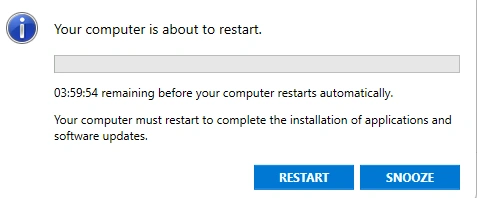
Please help me in this.
How to show time in descending order - 4hrs.
Riddhi ValechaPosted May 30, 2024, 11:07 AM
Hello Sir,
On system, we have Task Schedular and Event Viewer.
We have EventID - and based on this EventID, I have to show the alert message.
Alert Message should show - Your system is about to restart. Please click on Restart or Snooze.
If user clicks "Snooze, then restart should postpone for 15mins. Else System should restart.
Please guide.
Screenshots -
We will create a new task for my Windows Application Program -
Then we will create an event for it -
There is a cmd command - "shutdown \a" and it gives the following output -
C:\Users\dell>shutdown \a
Usage: shutdown [/i | /l | /s | /sg | /r | /g | /a | /p | /h | /e | /o] [/hybrid] [/soft] [/fw] [/f]
[/m \\computer][/t xxx][/d [p|u:]xx:yy [/c "comment"]]
No args Display help. This is the same as typing /?.
/? Display help. This is the same as not typing any options.
/i Display the graphical user interface (GUI).
This must be the first option.
/l Log off. This cannot be used with /m or /d options.
/s Shutdown the computer.
/sg Shutdown the computer. On the next boot, if Automatic Restart Sign-On
is enabled, automatically sign in and lock last interactive user.
After sign in, restart any registered applications.
/r Full shutdown and restart the computer.
/g Full shutdown and restart the computer. After the system is rebooted,
if Automatic Restart Sign-On is enabled, automatically sign in and
lock last interactive user.
After sign in, restart any registered applications.
/a Abort a system shutdown.
This can only be used during the time-out period.
Combine with /fw to clear any pending boots to firmware.
Now, in the backend, whenever the system is about to restart or shutdown, then the alert message should appear that -
"Your System is about to restart/shutdown. Do you want to postpone"?
There are 2 buttons - "Restart/Shutdown" and "Snooze".
If user clicks "Restart/Shutdown" - Then system should restart.
If user clicks "Snooze", then the activity should get postpone for sometime.
Please guide me in this.