Hello Ashutosh Singh
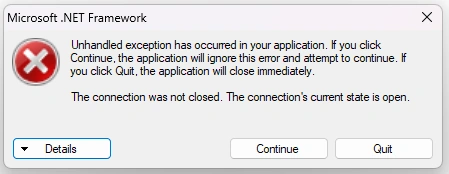
After modifying the code as you said, another error popup saying the connection was not close but when I check it closely all connection was close, and also can you help me with any form of validation if the user select a data range which doesn't exist it should alert the user of selecting wrong date range.
public DataTable LoadFirstTimersReportByDate()
{
DataTable dataTable = new DataTable();
int i = 0;
dataGridView5.Rows.Clear();
cn.Open();
cm = new SqlCommand("Select * FROM tblFirstTimers WHERE FDate BETWEEN @StartDate AND @EndDate", cn);
cm.Parameters.AddWithValue("@StartDate", FirstTimersDt1.Value.Date);
cm.Parameters.AddWithValue("@EndDate", FirstTimersDt2.Value.Date);
SqlDataAdapter da = new SqlDataAdapter(cm);
da.Fill(dataTable);
dr = cm.ExecuteReader();
while (dr.Read())
{
i++;
dataGridView5.Rows.Add(i, dr["id"].ToString(), dr["FDate"].ToString(), dr["FName"].ToString(), dr["LName"].ToString(), dr["FGender"].ToString(), dr["FDOB"].ToString(), dr["FLocation"].ToString(), dr["FPhoneNo"].ToString(), dr["FInvitedBy"].ToString(), dr["FPrayerRequest"].ToString());
}
dr.Close();
cn.Close();
return dataTable;
}
public void LoadFirstTimers()
{
ReportDataSource rptDataSource;
this.reportViewer1.LocalReport.ReportPath = Application.StartupPath + @"\Reports\rptFirstTimers.rdlc";
this.reportViewer1.LocalReport.DataSources.Clear();
cn.Open();
DataTable filteredData =fmlist.LoadFirstTimersReportByDate();
rptDataSource = new ReportDataSource("DataSet1", filteredData);
reportViewer1.LocalReport.DataSources.Add(rptDataSource);
reportViewer1.SetDisplayMode(Microsoft.Reporting.WinForms.DisplayMode.PrintLayout);
reportViewer1.ZoomMode = ZoomMode.Percent;
reportViewer1.ZoomPercent = 100;
cn.Close();
}
Jignesh KumarPosted Apr 23, 2024, 3:43 AM
Hello Emmanuel,
You can use using block to handle or try catch and finally block for good coding practices,
Here I have given an example for one method you can follow for all so you can avoid this kind off errors
Emmmanuel FIADUFEPosted Apr 23, 2024, 10:04 AM
Thank you team,
It is working now
Jaimin ShethiyaPosted Apr 23, 2024, 3:47 AM
@Jignesh,
In this method LoadFirstTimersReportByDate also connection will open so ideally it gives and error because already they have open connection again they need to open connection.
So I have correct and posted method, if that method use then it will works.
Thanks
Jaimin ShethiyaPosted Apr 23, 2024, 3:36 AM
Hello,
Try below code, as you have open connection multiple times.
Just replace only LoadFirstTimers() method code.
Thanks
Aravind GovindarajPosted Apr 22, 2024, 5:05 PM
you could probably use something like using keyword...
using (sqlconn conn = new SqlConnection()
{
//you actual code will be here.
}
//once code come out from this using block, the connection suppose to be closed.