
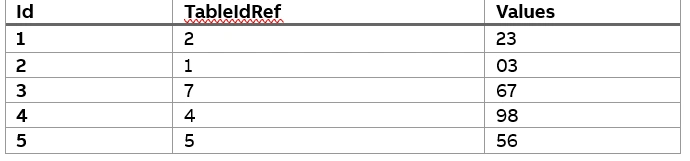
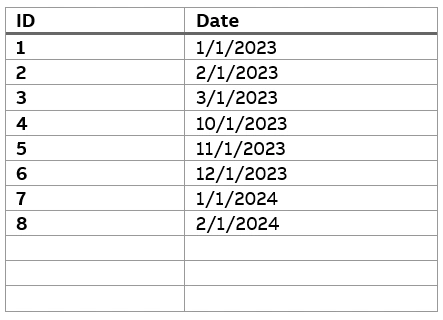
The Values In 1st Table can be filterd by Annual, Quater and Month.
In 1st table having a relationship with second Table By "Tableidref". And Those values should be categorized into Monthly, Quaterly and Yearly.

In Slicer categorized into Annual, quater and Month, If select Year only yealy data bars need to show like that,
Note:Month should Be added like 2023 Jan like and show as it is above the stacked column chart
If Any one knows pls help me with proper guidence
Loading
Mithilesh TataPosted Mar 1, 2024, 7:05 AM
In Power BI, if you want to create a filter for values such as "Annually," "Quarterly," and "Monthly," you can achieve this using a custom column or a calculated column in Power Query Editor. Here's how you can do it:
Open Power Query Editor:
Create a Custom Column:
if Date.Month([DateColumn]) = 1 then "Annually" else nullif Date.Month([DateColumn]) = 1 or Date.Month([DateColumn]) = 4 or Date.Month([DateColumn]) = 7 or Date.Month([DateColumn]) = 10 then "Quarterly" else nullText.Combine({Text.Start(Date.ToText([DateColumn]), 7), " Monthly"}, " ")Close and Apply:
Use the Filter:
By following these steps, you can create a filter for values such as "Annually," "Quarterly," and "Monthly" in Power BI based on your data's date column. Adjust the formulas and column names as needed to fit your specific dataset and requirements.
Amira BedhiafiPosted Apr 2, 2024, 4:03 PM
First, you need to merge both tables as below :
Your TableA should like below, you can of course Hide The TableIdRef if you want as it is considered as the join column between TableA and TableB :
Create a calendar table: DimDate = CALENDARAUTO()
And link it to your TableA like below :
Then create a table for the values of the slicers :
Time Frame Selection = DATATABLE(
"Time Frame", STRING,
{
{"Monthly"},
{"Quarterly"},
{"Annually"}
}
)
And then your dynamic measure :
Dynamic Value Measure =
VAR SelectedTimeFrame = SELECTEDVALUE('Time Frame Selection'[Time Frame], "Annually")
RETURN
SWITCH(
SelectedTimeFrame,
"Monthly", CALCULATE(SUM(TableA[Values]), ALLSELECTED('DimDate'[Date].[Month])),
"Quarterly", CALCULATE(SUM(TableA[Values]), ALLSELECTED('DimDate'[Date].[Quarter])),
"Annually", CALCULATE(SUM(TableA[Values]), ALLSELECTED('DimDate'[Date].[Year])),
BLANK()
)
Chinna KanchireddyPosted Mar 4, 2024, 1:04 PM
I tried below the formula but showing error. pls help me out