I have Code To Create Dynamically create and add/Remove rows with TextBox and DropDownList Dynamically Code is Below.
html Code..........
<html xmlns="http://www.w3.org/1999/xhtml"><head runat="server"> <title>title>head><body> <form id="form1" runat="server"> <div> <script type="text/javascript" src="http://ajax.googleapis.com/ajax/libs/jquery/1.8.3/jquery.min.js">script> <script type="text/javascript"> $(function () { $("#btnAdd").bind("click", function () { var div = $("<div />"); div.html(AddDDL()); div.html(GetDynamicTextBox('')); $("#TextBoxContainer").append(div); }); $("#btnGet").bind("click", function () { var values = ""; $("input[name=DynamicTextBox]").each(function () { values += $(this).val() + "\n"; }); alert(values); }); $("body").on("click", ".remove", function () { var index = $(this).closest("div").index(); index = parseInt(index / 2) + 1; $(this).closest("div").remove(); var ddlId = index; $('[id$=ddl' + parseInt(ddlId) + ']').remove(); var i = 1; var Ids = []; $('[id*=ddl]').each(function () { $(this).attr("id", "ddl" + i); Ids.push(i); i++; }); $('[id*=hfDDLId]').val(parseInt($('[id*=hfDDLId]').val()) - 1); var resultIds = Ids.join(','); $('[id*=hfDropDownIds]').val(resultIds); }); }); function AddDDL() { var Id = parseInt($('[id*=hfDDLId]').val()) + 1; var ddlId = "ddl" + (Id); //var optionList = [1, 2, 3, 4, 5]; //$('[id*=div1]').append(getDropDownList(ddlId, ddlId, optionList)); $("#TextBoxContainer").append(getDropDownList(ddlId, ddlId)); $('[id*=hfDDLId]').val(Id); var previousDropDownId = $('[id*=hfDropDownIds]').val(); if (previousDropDownId != '') { $('[id*=hfDropDownIds]').val(previousDropDownId + ',' + Id); } else { $('[id*=hfDropDownIds]').val(Id); } return false; } function getDropDownList(name, id) { var combo = $("<select>select>").attr("id", id).attr("name", name).attr("runat", "server").attr("class", "class").attr("required", "required"); //$.each(optionList, function (i, el) { combo.append("<option value=" + "" + ">" + "Select Category" + "option>"); combo.append("<option value=" + "1" + ">" + "1" + "option>"); combo.append("<option value=" + "2" + ">" + "2" + "option>"); combo.append("<option value=" + "3" + ">" + "3" + "option>"); //}); return combo; } function GetDynamicTextBox(value) { return '<input name = "DynamicTextBox" type="text" value = "' + value + '" required/> ' + '<input name = "DynamicTextBox" type="text" value="' + value + '" required/> ' + '<input type="button" value="Remove" class="remove" />' } script> <input id="btnAdd" type="button" value="Add" /> <br /> <br /> <div id="TextBoxContainer"> div> <br /> <input type="hidden" id="hfSelectedValue" runat="server" /> <input type="hidden" id="hfDropDownIds" value="" runat="server" /> <input id="btnGet" type="button" value="Get Values" /> <input type="hidden" id="hfDDLId" value="0" /> div> form>body>html>html Code ends
Below is UI Inputs Forms
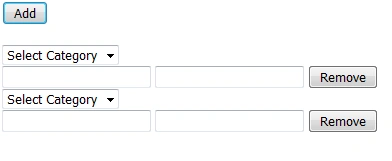
I Wants displays As its in Update Mode in asp.net c#
Thanxs
Vincent Maverick DuranoPosted May 31, 2016, 8:09 AM
Vincent Maverick DuranoPosted Jun 2, 2016, 11:29 AM
munaf khanPosted Jun 2, 2016, 3:11 AM