Using Angualar 5 how to create a UI with drop down list with hardcoded values (Copy,Move,Delete)
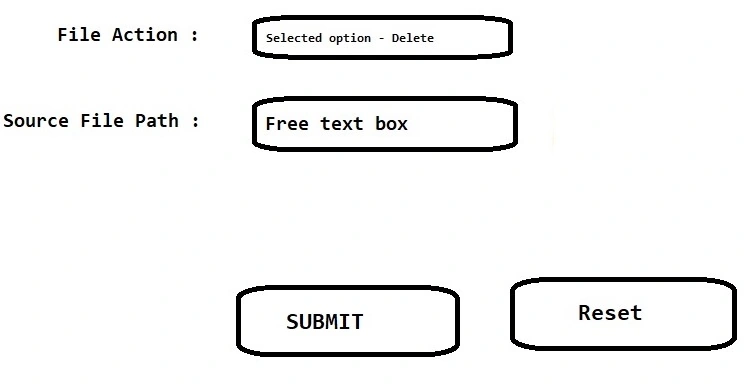
If I select ‘Delete’ in the dropdown list, then only one text box should be displayed below to the dropdown list – this textbox to enter the Delete File name along with Path (example : C:\aa.txt)
If I select ‘Copy Or Move’ in the dropdown list, then two text box should be displayed below to the dropdown list – one text box for Source File name along with Path (example : C:\aa.txt) and other text box for Destination File name along with Path
How to do this using Angualar 5, Can you please guide me. I am new to angular
Image 1????

Image 2:
Jayraj ChhayaPosted Nov 17, 2023, 1:40 PM
Hello Kumar AU
you can use the
element along with the*ngFordirective to iterate over the hardcoded values and generate the options dynamically. Here's an example:In your component, you would define the
optionsarray with the hardcoded values:To display the text boxes based on the selected option, you can use the
*ngIfdirective.In your component, you would define the corresponding variables (
deleteFileName,sourceFileName,destinationFileName) to bind the input values.This way, when the user selects 'Delete' in the dropdown list, only the 'Delete File Name' textbox will be displayed. If the user selects 'Copy' or 'Move', both the 'Source File Name' and 'Destination File Name' textboxes will be displayed.
Kumar AUPosted Nov 24, 2023, 9:05 PM
Thank you so much - Jayraj Chhaya